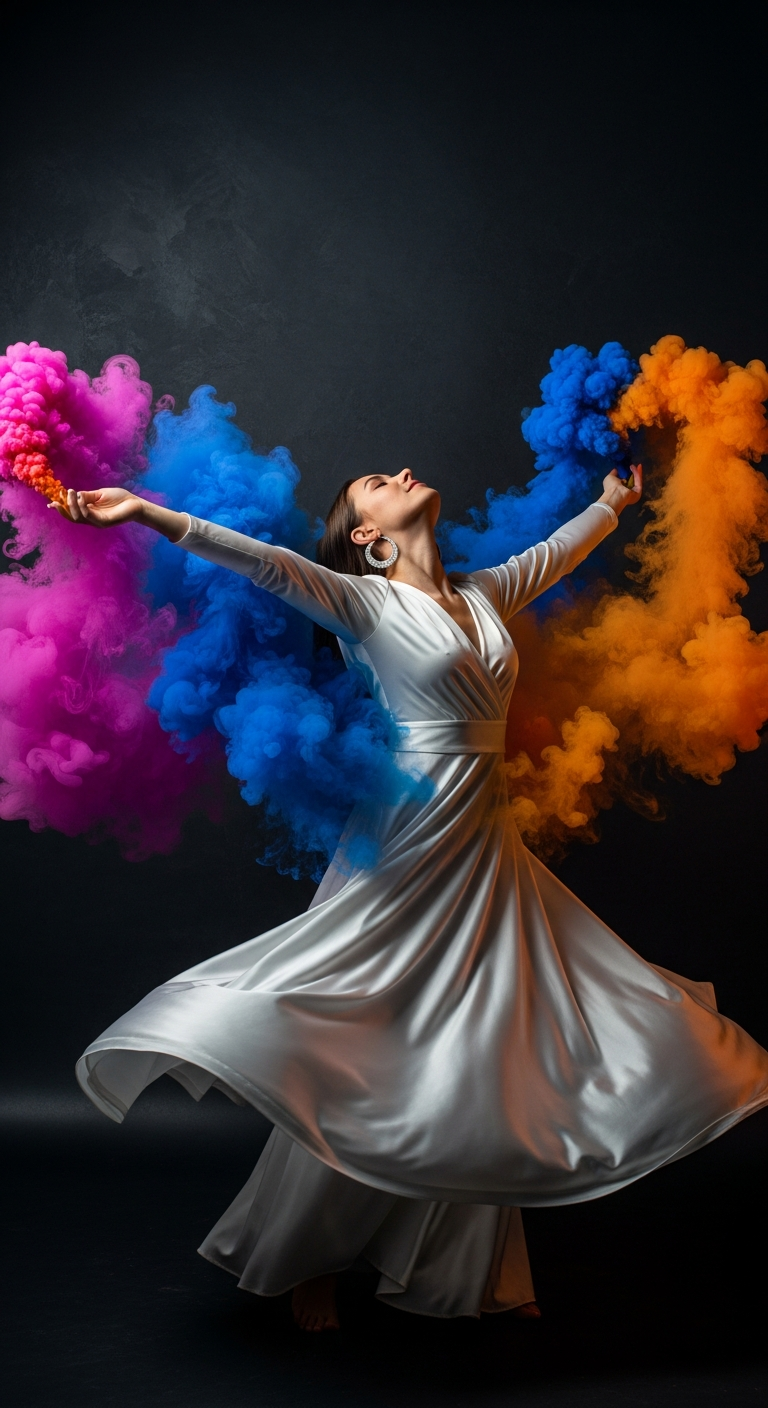
Ecstatic Smoke Bloom Dance is a cinematic portrait photography style where explosive clouds of vivid colored smoke — magenta, cobalt, and saffron — erupt around a subject in motion, creating high-energy editorial images that feel like album covers. It combines movement, color psychology, and raw expression for visually stunning AI-generated portraits.
Imagine an album cover that stops you mid-scroll. A dancer frozen at the peak of a spin, silk billowing, arms wide open, and volcanic clouds of electric color erupting from every direction. That image you just pictured? You can generate it in seconds — and right now, it's one of the most shared AI portrait styles on the internet. Welcome to the Ecstatic Smoke Bloom Dance trend, and it's about to change the way you think about cinematic portrait photography.
What is Ecstatic Smoke Bloom Dance?
At its core, Ecstatic Smoke Bloom Dance is a style of cinematic portrait photography that fuses physical movement, raw emotion, and dramatic color theory into a single explosive frame. Think of it as the visual equivalent of a climactic musical drop — everything is happening at once, and somehow it all works perfectly together.
The defining elements are three vivid smoke colors — electric magenta, cobalt blue, and saffron orange — that billow and swirl around a subject who is fully mid-motion. The smoke isn't a subtle accent; it's a co-star. It curls around fingertips, bleeds into flowing fabric, and lights the subject's skin with saturated reflected color.
The style sits at the intersection of editorial fashion photography, concert photography, and fine art portraiture. It borrows the high-contrast drama of studio lighting, the kinetic energy of dance photography, and the surreal color palette of experimental art direction. The result is an image that feels simultaneously real and otherworldly — exactly the kind of tension that makes a photo go viral.
Musicians use it for single artwork. Athletes use it for brand campaigns. Creative directors use it for mood boards. And AI artists are using it to build massive audiences online. The style translates beautifully across industries because emotion and energy are universally compelling.
The Viral Prompt
Prompt
A cinematic ultra-realistic portrait of a stylish young woman mid-spin with arms outstretched, set against a sleek, dark charcoal-textured studio wall that absorbs light, making the vibrant colors pop dramatically. She is wearing an elegant, flowing white silk gown that billows and catches the light, adorned with delicate silver hoop earrings. Her face is tilted upward, eyes closed, with an expression of pure euphoria and ecstasy, bathed in the colored light. Around her, explosive billowing clouds of electric magenta, cobalt blue, and saffron orange smoke swirl dramatically and violently, forming dynamic tendrils that curl near her fingertips and blend seamlessly with the fabric of her dress. The scene is illuminated by dramatic, high-contrast studio lighting that accentuates the smoke and her form, creating a powerful sense of movement. Motion blur subtly blurs the edges of her dress, emphasizing the energetic spin. Shallow depth of field, intense mood, dynamic energy, realistic skin texture, high detail, cinematic color grading, professional photography, DSLR quality, 85mm lens, ultra detailed, 8K
How to Use This Prompt Step by Step
Getting the most out of this cinematic portrait photography prompt is straightforward once you understand its anatomy. Here's exactly how to run with it.
Step 1 — Choose your AI platform. This prompt performs exceptionally well on Midjourney v6, Adobe Firefly, and DALL-E 3. For the most photorealistic results with accurate smoke behavior and fabric physics, Midjourney with the --style raw parameter is currently the top pick.
Step 2 — Paste the prompt as-is first. Before you start tweaking, generate at least four variations using the base prompt. You want a solid baseline to compare against as you customize. The prompt is highly engineered and will deliver strong results right out of the box.
Step 3 — Customize the subject. Swap "stylish young woman" for any subject that fits your project — a male musician, a non-binary dancer, a senior athlete. The rest of the scene scales beautifully around different subjects without needing major rewrites.
Step 4 — Adjust the smoke colors. The magenta-cobalt-saffron palette is the default, but you can shift the color story entirely. Try deep violet, emerald green, and coral for a darker mood. Or go monochromatic with varying shades of a single color for a more refined editorial look.
Step 5 — Iterate on the motion. "Mid-spin" is just one motion option. Try "mid-leap," "hair whipping forward," or "falling backward" to shift the energy while keeping all the other cinematic portrait photography elements intact.
Step 6 — Upscale and refine. Once you have a winner, upscale to maximum resolution. In Midjourney, use the Upscale (Subtle) option to preserve the painterly smoke textures rather than over-sharpening them.
Tips to Get the Best Results
Keep the background dark and simple. The charcoal studio wall in this prompt isn't decorative — it's strategic. A dark, light-absorbing background is what makes those vivid smoke colors absolutely detonate visually. If you swap in a lighter background, the whole color impact deflates. Trust the darkness.
Don't over-describe the smoke. It sounds counterintuitive, but if you add too many adjectives to the smoke description, AI models start to get confused and produce muddy, overworked results. The prompt already hits the sweet spot — "explosive billowing clouds" plus directional verbs like "swirl dramatically" is all you need.
White clothing is your best friend. The white silk gown works as a reflective canvas that picks up all three smoke colors simultaneously. If you change the outfit, choose light neutrals — cream, ivory, soft grey — to maintain that multicolor light-bleed effect on the fabric.
Use aspect ratios intentionally. For social media and album covers, use a square (1:1) or portrait (2:3) ratio. For editorial spreads and wallpapers, go widescreen (16:9) to give the smoke room to bloom dramatically across the frame.
Add a real lens specification. The "85mm lens" callout in the prompt does meaningful work. It signals to the model that this should have portrait compression, creamy background blur, and flattering subject perspective. If you switch to "24mm," you'll get a wider, more dramatic distortion that suits action shots.
Batch generate for color variety. Because smoke behavior is semi-random in AI generation, running the same prompt multiple times gives you wildly different compositions. Some will have smoke mostly behind the subject, some wrapping around the front. Generate ten and pick the strongest two or three.
Why This Style Is Trending
Cinematic portrait photography has always been about making the subject feel larger than life. But in the age of scroll culture, that's no longer enough — an image needs to communicate emotion in under a second. The Smoke & Soul Color Explosion trend solves this perfectly.
Color psychology plays a massive role here. Magenta signals passion and intensity. Cobalt blue reads as cool, confident, and powerful. Saffron orange evokes energy and warmth. Together, they create a subconscious emotional cocktail that hits viewers immediately and viscerally — before they've even consciously registered what they're looking at.
There's also a cultural moment happening. After years of clean minimalist aesthetics dominating design, audiences are hungry for maximalist visual energy. Musicians like Beyoncé and Kendrick Lamar have been leaning into explosive visual production for years — this AI style democratizes that high-budget editorial look for independent creators and small brands.
Finally, the style works across formats. It looks incredible as a phone wallpaper, a social media post, a print, a streaming thumbnail, or a brand campaign asset. Versatility is one of the biggest drivers of viral AI art trends, and this one checks that box definitively.
What AI tools work best for the Ecstatic Smoke Bloom Dance prompt?
Midjourney v6 consistently produces the most photorealistic smoke behavior and fabric physics. Adobe Firefly is a strong second for users who need commercial licensing. DALL-E 3 handles the emotional expression and skin realism very well but can sometimes flatten the smoke dynamics slightly.
Can I use this prompt for male subjects or non-binary subjects?
Absolutely. Simply replace "stylish young woman" and "white silk gown" with appropriate descriptors for your subject. The smoke, lighting, and motion elements of the prompt work equally well across all subjects and body types.
How do I make the smoke look more realistic?
Add the phrase "volumetric smoke, physically accurate light scattering" to the end of your prompt. Also, generating at higher resolution (request 8K or use maximum upscaling) naturally forces the model to render more convincing smoke particle behavior.
Is this style appropriate for commercial branding projects?
Yes — musicians, athletes, and creative directors are actively using this style for official branding content. Just verify the commercial licensing terms of whichever AI platform you use before publishing. Midjourney Pro and Adobe Firefly both offer commercially safe generation options.
Can I change the smoke colors to match my brand palette?
Definitely. Replace "electric magenta, cobalt blue, and saffron orange" with any three colors that align with your brand. For best results, choose one warm tone, one cool tone, and one high-contrast accent. This three-color tension is what gives the composition its dynamic energy.
Why does the prompt specify an 85mm lens?
The 85mm focal length is the classic portrait lens in traditional photography. Specifying it in an AI prompt signals portrait compression, which means a flattering perspective on the subject and a naturally blurred background. It also tells the model to prioritize subject sharpness while allowing the smoke edges to breathe softly out of focus.
How do I get more dramatic results from this prompt?
Add phrases like "explosive force, smoke erupting violently outward, chromatic light spill across skin" to intensify the drama. You can also increase the emotional stakes by pushing the subject description — "expression of absolute euphoria, face tilted skyward" signals to the model to prioritize peak emotional intensity.
What aspect ratio should I use for the best composition?
For social media and album artwork, use 1:1 square or 4:5 portrait. For editorial spreads or desktop wallpapers, use 16:9 landscape so the smoke has room to expand across the full frame. For a classic print portrait feel, 2:3 vertical is the most cinematic option.
Now that you have the full toolkit, go generate your most explosive cinematic portrait yet — and when it inevitably goes viral, you'll know exactly where the magic came from.