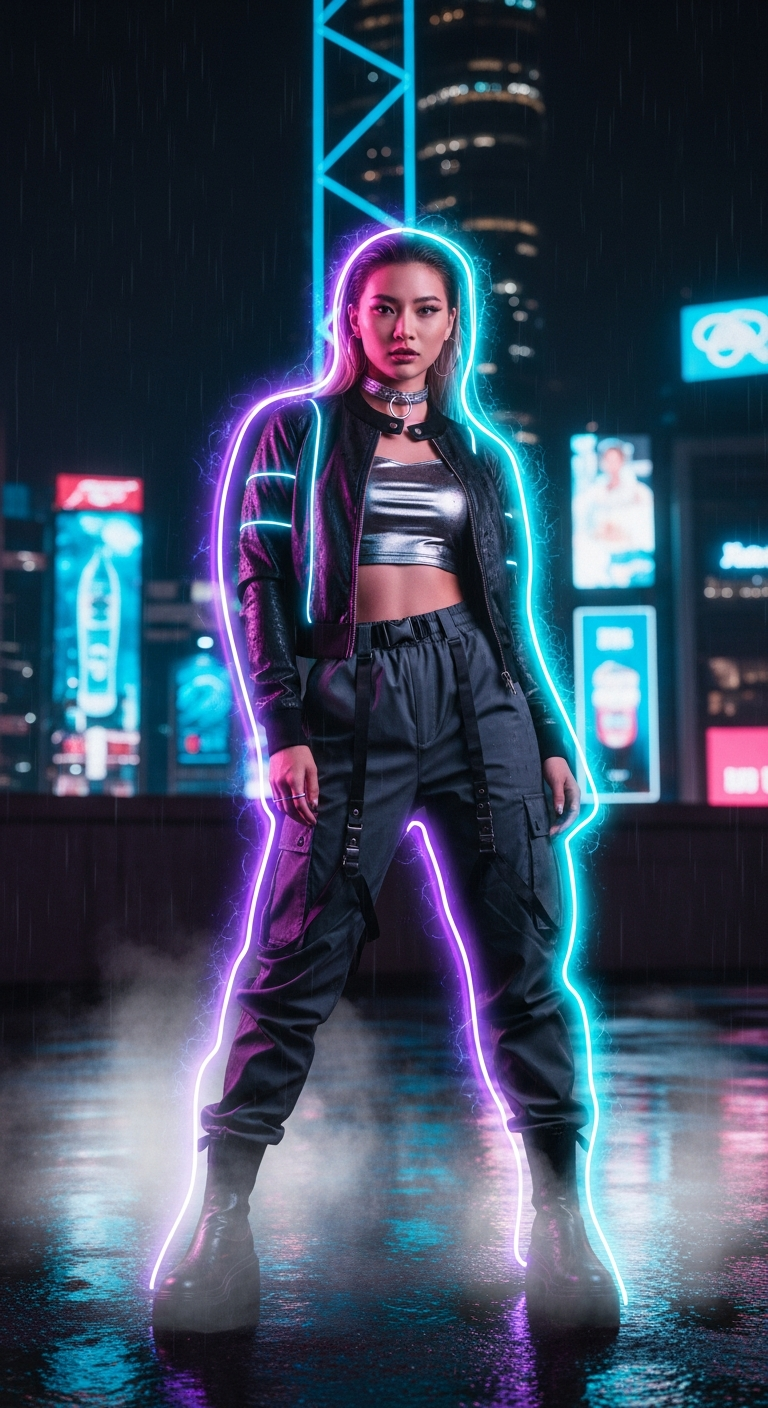
Cyberpunk Neon Aura Rain Portrait is a cinematic portrait photography style that wraps subjects in vibrant, glowing neon light against rain-soaked urban backdrops. Using AI tools, you can generate ultra-realistic portraits with electric blues, magentas, and dynamic aura effects that look like stills pulled straight from a big-budget sci-fi film.
Cyberpunk Neon Aura Rain Portrait: The Cinematic Portrait Photography Style Taking AI Art by Storm
Imagine standing on a rain-slicked rooftop, neon light bleeding into every raindrop, your silhouette glowing like something out of Blade Runner 2049. That's exactly the energy the Cyberpunk Neon Aura Rain Portrait style delivers — and right now, it's absolutely everywhere. From viral profile pictures to jaw-dropping AI art showcases, this look is dominating feeds and for very good reason.
What Is the Cyberpunk Neon Aura Rain Portrait Style?
At its core, this is cinematic portrait photography reimagined through an AI lens — literally. The style fuses several visually powerful elements into a single, cohesive aesthetic that feels both hyper-real and fantastical at the same time.
Think rain-slicked surfaces reflecting neon signs, holographic advertisements blazing through foggy night air, and a subject whose silhouette is dramatically outlined by an ethereal, glowing aura. The color palette leans hard into electric blues, hot magentas, and punchy yellows — a combination that hits the human eye like a perfectly tuned chord.
What separates this from generic cyberpunk art is the portrait-first approach. The subject isn't lost in the scenery — they own it. Sharp facial detail, realistic skin texture, and an intense, cinematic gaze keep the human element front and center, while the world around them crackles with futuristic energy.
It's the kind of image that makes someone stop mid-scroll. That's not an accident — it's craft, packed into a single prompt.
The Viral Prompt
This is the prompt that's been generating some of the most stunning results across platforms like Midjourney, DALL·E 3, and Stable Diffusion. Copy it exactly for the best starting point, then tweak from there.
Cyberpunk Neon Aura Rain Portrait — Full Prompt
A cinematic ultra-realistic portrait of a stylish young Asian woman standing on a rain-slicked rooftop overlooking a bustling cyberpunk metropolis at night, with towering skyscrapers and intricate holographic advertisements illuminating the dark sky. She is wearing a form-fitting black faux leather jacket with subtle integrated LED strips, a shimmering silver metallic crop top, high-waisted dark grey tech-wear cargo pants, and sleek black ankle boots, accessorized with a minimalist silver choker and geometric hoop earrings. She stands confidently, one hand casually tucked into her pocket, looking directly into the camera with an intense, captivating gaze, a subtle smirk playing on her lips. A vibrant, ethereal neon aura in electric blues, magentas, and hints of yellow dramatically outlines her silhouette, casting dynamic reflections onto her jacket and face. Wisps of luminous mist and steam rise from the wet ground, interacting with the neon light. The scene is dimly lit by the scattered neon glow and distant city lights, creating dramatic shadows and sharp highlights across her features and the wet environment. Deep bokeh of blurred city lights in the background, visible rain streaks, atmospheric mist, shallow depth of field, high contrast, intense cyberpunk mood. realistic skin texture, high detail, cinematic color grading, professional photography, DSLR quality, 85mm lens, ultra detailed, 8K.
How to Use This Prompt Step by Step
Getting the most out of this prompt isn't just about pasting it and hoping for magic. Here's how to approach it strategically depending on your platform of choice.
Step 1 — Choose Your AI Tool. This prompt is built for high-detail generators. Midjourney V6 and DALL·E 3 handle the neon lighting and skin texture particularly well. Stable Diffusion with a photorealistic checkpoint like RealVisXL will also deliver excellent results.
Step 2 — Paste the Full Prompt As-Is First. Before you customize anything, run the original prompt once. This gives you a benchmark image to compare against your edits. You'll quickly see which elements your chosen tool handles best.
Step 3 — Adjust the Subject Description. Want to change the subject's appearance? Swap out details like hair color, skin tone, outfit colors, or accessories. Keep the structural phrases like "intense, captivating gaze" and "subtle smirk" — these are doing heavy lifting for the facial expression.
Step 4 — Dial In the Aura Colors. The default palette is electric blue, magenta, and yellow. Try swapping to emerald green and gold for a different cyberpunk vibe, or deep violet and cyan for a cooler, more ethereal look. Just update the aura color description directly in the prompt.
Step 5 — Use Aspect Ratio Smartly. For profile pictures, go square (1:1). For wallpapers or digital art showcases, try 2:3 portrait orientation. In Midjourney, add --ar 2:3 at the end of your prompt.
Step 6 — Upscale Your Favorite Result. Once you have a generation you love, upscale it. Midjourney's upscaler, Magnific AI, or Topaz Photo AI will pull out incredible skin and rain detail that elevates the image from great to genuinely cinematic.
Tips to Get the Best Results
Don't trim the technical tail. The final section of the prompt — "85mm lens, ultra detailed, 8K, DSLR quality" — signals to the AI that you want photographic realism, not illustration. Removing it shifts the output toward a more artistic, less hyper-real style. Keep it unless that's intentionally what you want.
Add negative prompts when using Stable Diffusion. Use negatives like "cartoon, anime, flat lighting, oversaturated, blurry face, low quality" to steer the output away from common failure modes. This single step dramatically improves consistency.
Run multiple generations in batches. Neon lighting in AI art can be unpredictable — sometimes it blooms beautifully, sometimes it muddles the face. Run at least four variations per attempt and cherry-pick the winner. Treat it like a real photoshoot with multiple shots.
Seed your favorites. In Midjourney, use the seed number from a generation you love to create variations that maintain the same base composition and lighting. This is a game-changer for iterating on a near-perfect result.
Layer real photo editing on top. Take your AI output into Lightroom or Photoshop and push the neon glow, deepen the shadows, and boost the clarity on facial features. AI gives you the base — your editing eye makes it extraordinary.
Why This Style Is Trending
Cinematic portrait photography has always been aspirational. People want to look like they belong in a movie. The cyberpunk aesthetic supercharges that desire by placing the subject in a world that feels urgent, electric, and alive with possibility.
The rain element is doing something psychologically clever, too. Wet surfaces multiply reflections, which means every light source in the scene appears twice — once from above and once from the ground. That doubles the visual complexity and richness without doubling the chaos, because water acts as a natural diffuser.
The neon aura specifically has exploded as a trend because it solves a classic portrait problem: how do you make a person look extraordinary without making the image feel fake? The aura grounds the subject in a fantastical light source that the eye accepts as cinematic rather than artificial. It's the same reason practical lighting effects in film always look more convincing than pure CGI.
And practically speaking, this style absolutely crushes as a profile picture. It's bold enough to stand out at thumbnail size, detailed enough to reward a closer look, and personal enough that it feels like a genuine representation of someone with taste and edge. That trifecta is rare, and people know it when they see it.
What AI tools work best for the Cyberpunk Neon Aura Rain Portrait style?
Midjourney V6 is currently the top choice for hyper-realistic skin texture and neon lighting. DALL·E 3 is excellent for following complex prompt instructions accurately. Stable Diffusion with RealVisXL or Juggernaut XL checkpoints gives you the most control if you want to fine-tune every detail.
Can I use this prompt to generate a portrait of myself?
Yes — with tools like Midjourney's personalization feature, InsightFaceSwap, or dedicated portrait generators like Astria or PhotoAI, you can apply this style to your own likeness. The style transfer works best when you start with a clear, front-facing reference photo with good lighting.
How do I change the subject's ethnicity or appearance in the prompt?
Simply replace the descriptive phrase for the subject. For example, swap "stylish young Asian woman" with "stylish young Black woman with natural hair" or any description that fits. The rest of the prompt's environmental and lighting details will still apply perfectly.
Why does my output look blurry or over-saturated?
Over-saturation usually means your AI tool is boosting neon colors beyond realistic limits. Try adding "natural skin tones, controlled neon saturation" to your prompt. Blurry results in Stable Diffusion often come from a low step count — aim for at least 30–40 sampling steps for this level of detail.
What aspect ratio should I use for a profile picture?
For circular profile pictures on platforms like Instagram, Twitter/X, or LinkedIn, generate at 1:1 (square) and position the subject centrally. For a rectangular profile like LinkedIn's banner or a phone wallpaper, use 9:16 portrait orientation for full impact.
Is this style only for female subjects?
Not at all. The cyberpunk neon aura aesthetic is completely gender-flexible. Just update the subject description to match your vision — a male subject in a high-collar tech-wear coat with the same neon aura treatment looks equally striking. The environmental and lighting elements of the prompt work universally.
Can I sell or use AI images generated with this prompt commercially?
This depends on the terms of service of the specific AI platform you use. Midjourney Pro and higher plans generally allow commercial use. DALL·E 3 via ChatGPT Plus also grants usage rights to outputs. Always check the current terms of your platform before using AI-generated images commercially.
How do I make the neon aura more intense or more subtle?
To intensify the aura, add phrases like "extreme neon glow, intense bioluminescent aura, vibrant light bloom" to your prompt. To pull it back for a more grounded, moody result, add "subtle neon rim light, soft glow, understated aura" — this gives you a cinematic quality without the full sci-fi spectacle.
Now that you have everything you need — the prompt, the technique, and the insider tips — it's time to stop reading and start generating the most cinematic portrait photo of your life.