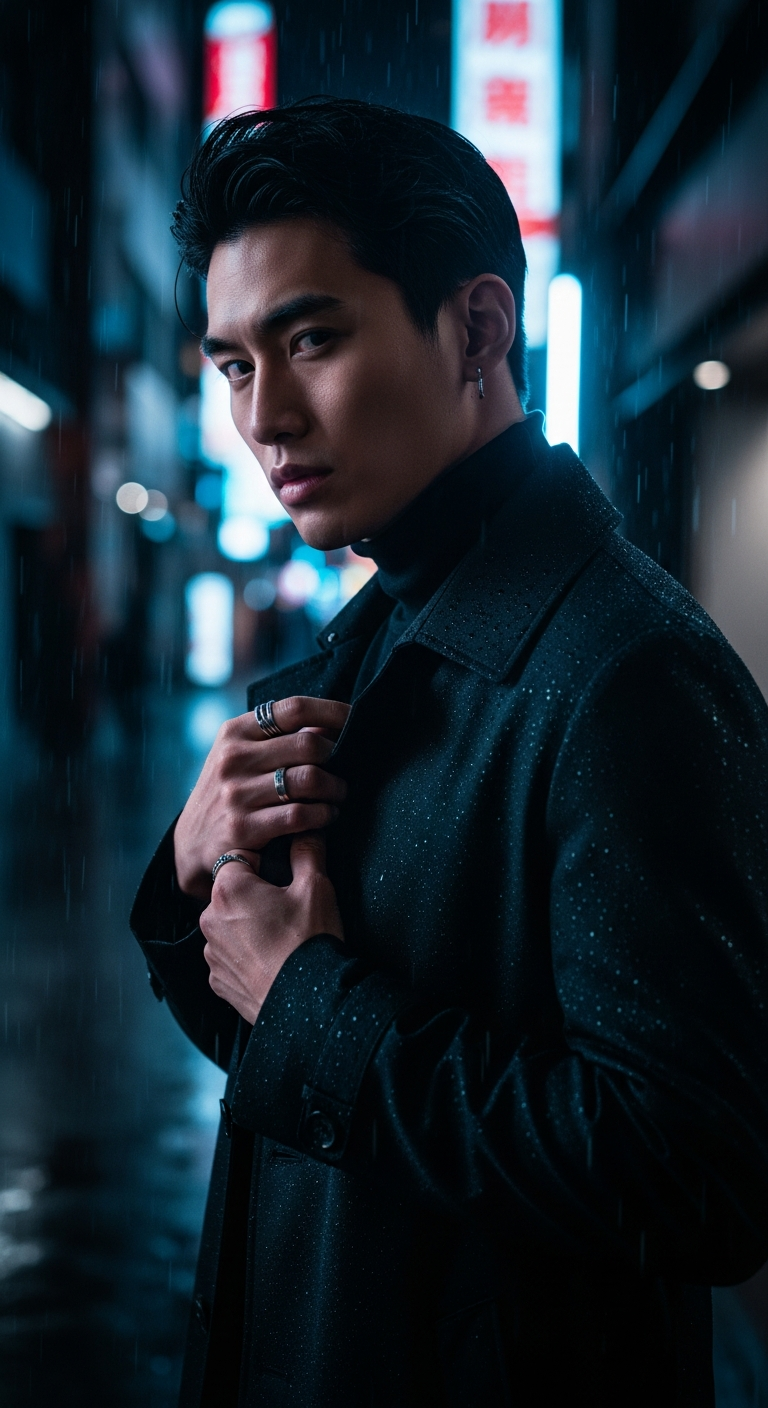
Neon Noir cinematic portrait photography combines deep dramatic shadows, vivid colored LED backlighting, and moody rain-slicked urban environments to create striking, film-quality portraits. This AI editing style uses cool color grading, shallow depth of field, and subtle film grain to achieve a professional cinematic look that mimics high-end DSLR photography with an 85mm lens.
There's a moment in every great noir film where the protagonist steps into a rain-soaked alley, neon light cutting through the darkness like a blade — and suddenly, everything feels cinematic. Now, thanks to AI image generation, you can recreate that exact feeling in a portrait. The Neon Noir Alley | Rain Glimmer prompt is taking Midjourney feeds by storm, and once you see the results, you'll understand exactly why it's going viral.
What Is Neon Noir Cinematic Portrait Photography?
Neon noir is a visual style that fuses classic film noir aesthetics — dramatic shadows, morally ambiguous protagonists, rain-drenched streets — with the electric, saturated color palette of modern neon-lit cityscapes. Think Blade Runner meets a high-fashion editorial shoot.
In cinematic portrait photography, this translates to a very specific set of visual cues: a single dominant colored light source (often electric blue, magenta, or amber), deep shadow coverage across most of the frame, shallow depth of field that blurs background neon signs into dreamy bokeh, and a film grain overlay that gives the image that tactile, analog feel.
What makes this style so powerful in AI generation is that every single one of these elements can be controlled through prompt language. You're essentially writing a lighting diagram, a wardrobe note, and a post-production color grade all in one sentence — and Midjourney executes it beautifully.
The Viral Prompt
Neon Noir Alley | Rain Glimmer — Full Prompt
Prompt: A cinematic ultra-realistic portrait of a stylish young Asian man standing in a rain-slicked city alleyway at night, surrounded by blurred neon signs and reflections. He is wearing a sleek black trench coat over a dark turtleneck, with silver minimalist rings on his fingers, looking intensely at the camera with a confident, slightly enigmatic expression. Dramatic deep shadows envelop his figure, with a single, vivid electric blue LED backlight intensely illuminating the edges of his profile and coat, creating a striking neon noir effect. Rain droplets glisten on his coat and face, reflecting the moody city lights. Dark, moody atmosphere, shallow depth of field, subtle film grain, cinematic color grading with cool tones, realistic skin texture, high detail, professional photography, DSLR quality, 85mm lens, ultra detailed, 8K
Negative Prompt: blurry, low quality, distorted face, extra limbs, ugly, deformed, watermark, text, cartoon, anime
Best For: Midjourney | Aspect Ratio: 9:16
How to Use This Prompt Step by Step
Getting the best results from the Neon Noir Alley prompt is straightforward, but a few key steps will take your output from good to genuinely stunning. Here's exactly how to do it.
Step 1 — Open Midjourney and go to your preferred Discord server or the Midjourney web app. This prompt is optimized for Midjourney due to its superior handling of cinematic lighting, skin texture, and shallow depth of field rendering.
Step 2 — Copy the full prompt exactly as written. Every phrase is doing heavy lifting. Removing "single, vivid electric blue LED backlight" or "subtle film grain," for example, will noticeably flatten the image. Specificity is the secret sauce here.
Step 3 — Add the aspect ratio parameter. At the end of your prompt, type --ar 9:16 to get that tall, portrait-oriented frame that makes this style pop on social media. It also naturally emphasizes the vertical drama of a figure in an alleyway.
Step 4 — Set your version and stylize value. Use --v 6 (Midjourney's latest model) and consider adding --stylize 750 to push the cinematic quality further without losing realism. Higher stylize values amplify the mood dramatically.
Step 5 — Run the prompt and upscale your favorite variation. Use the U1–U4 buttons to upscale your chosen image, then use "Upscale (Creative)" for the most detailed, high-resolution final result.
Tips to Get the Best Results
Lock in your light source color early. The electric blue backlight is the hero of this prompt. If you want to experiment, try swapping it for "vivid magenta," "warm amber," or "toxic green" — each creates a completely different mood while keeping the neon noir structure intact.
Describe the rain with precision. "Rain droplets glisten on his coat and face" is doing a lot of visual work. You can amplify this by adding "heavy rain streaks catching the neon light in the background" to get more weather drama in the environment.
Use the negative prompt every time. The negative prompt list — especially "distorted face" and "extra limbs" — is non-negotiable for portrait work. Midjourney sometimes struggles with hands and face proportions in complex lighting, so having these guardrails saves you regeneration time.
Experiment with the trench coat color. The black trench coat works because it absorbs shadow beautifully, but swapping it to "deep navy" or "dark charcoal with subtle sheen" gives the backlight more surface to play on, intensifying the rim-light effect.
Seed lock for consistency. If you find a variation you love and want to generate more portraits in the same lighting environment, use the --seed [number] parameter with the seed from your favorite output. This keeps the background and lighting remarkably consistent across multiple shots.
Why This Style Is Trending
Neon noir cinematic portrait photography is everywhere right now, and it's not a coincidence. Several cultural forces are converging to make this aesthetic the moment's dominant visual language.
First, there's the K-drama and East Asian cinema influence. Shows like Squid Game, Vincenzo, and films from directors like Wong Kar-wai have built a massive global appetite for exactly this kind of moody, neon-lit urban storytelling. The aesthetic feels cinematic because it literally IS cinematic — it's drawn from real film grammar.
Second, this style photographs beautifully on mobile screens. The 9:16 aspect ratio, high contrast, and single dominant color make it instantly eye-catching in an Instagram or TikTok scroll. Dark backgrounds with a single vivid light source are algorithmically favored because they create instant visual stop-power.
Third, it flatters. The combination of deep shadows, edge lighting, and shallow depth of field is essentially what every professional portrait photographer is trying to achieve on set. AI is democratizing a look that previously required a full production crew, rain machines, and a $10,000 lighting rig.
Finally, there's the nostalgia angle. Film grain, analog color grading, and the rain-soaked noir palette tap directly into a cultural longing for tactile, physical imagery in an increasingly digital world. It feels real, even when it isn't.
What AI tool works best for the Neon Noir Alley prompt?
Midjourney is the top recommendation for this specific prompt due to its exceptional handling of cinematic lighting, realistic skin texture, and atmospheric depth of field. DALL-E 3 and Stable Diffusion can also produce good results, but may require additional prompt tweaking to match the same level of detail and mood.
Can I change the subject from a man to a woman or other person?
Absolutely. Simply swap "stylish young Asian man" for any subject description you like — "stylish young woman," "middle-aged man with a beard," or any description that fits your creative vision. The lighting and environmental prompts work equally well across all subjects.
What does the 85mm lens reference do in an AI prompt?
Referencing an 85mm lens tells the AI to simulate the compression, shallow depth of field, and flattering focal length that portrait photographers traditionally use. It subtly influences how the subject is rendered relative to the background, creating a more professional, photographic look rather than a wide-angle distorted feel.
How do I get more rain detail in the generated image?
Add phrases like "heavy rain streaks visible in midground," "rain splashing on wet pavement," or "rain-blurred street lights in background" to your prompt. You can also try adding "slow shutter speed rain blur effect" to simulate the look of rain photographed at longer exposures.
Why is the negative prompt important for cinematic portrait photography?
Negative prompts prevent common AI generation artifacts that are particularly disruptive in portrait work — distorted faces, extra fingers, or merged limbs. In complex dramatic lighting scenarios, these errors are more likely to occur, so a strong negative prompt acts as a quality filter before you even see the results.
Can I use this style for commercial projects?
Midjourney's commercial usage rights depend on your subscription tier — Pro and Mega plan subscribers get full commercial usage rights. Always review the current Midjourney terms of service before using AI-generated images for paid commercial work, branding, or advertising campaigns.
What color variations work best for the LED backlight?
Electric blue creates a cold, mysterious atmosphere. Vivid magenta or hot pink leans more cyberpunk. Warm amber gives a retro, classic noir feel. Toxic green creates an unsettling, thriller vibe. Each color completely changes the emotional register of the image while keeping the same dramatic structure.
How can I make the film grain effect stronger in the output?
Replace "subtle film grain" with "heavy analog film grain" or "strong 35mm film grain texture" in the prompt. You can also add "shot on Kodak Portra 800" or "shot on Fujifilm Superia 1600" to reference specific film stocks known for visible grain, which Midjourney recognizes and replicates with impressive accuracy.
Now that you have the full blueprint for neon noir cinematic portrait photography, the only thing left to do is fire up Midjourney, paste that prompt, and see just how cinematic a single text box can get — your feed will never look the same again.