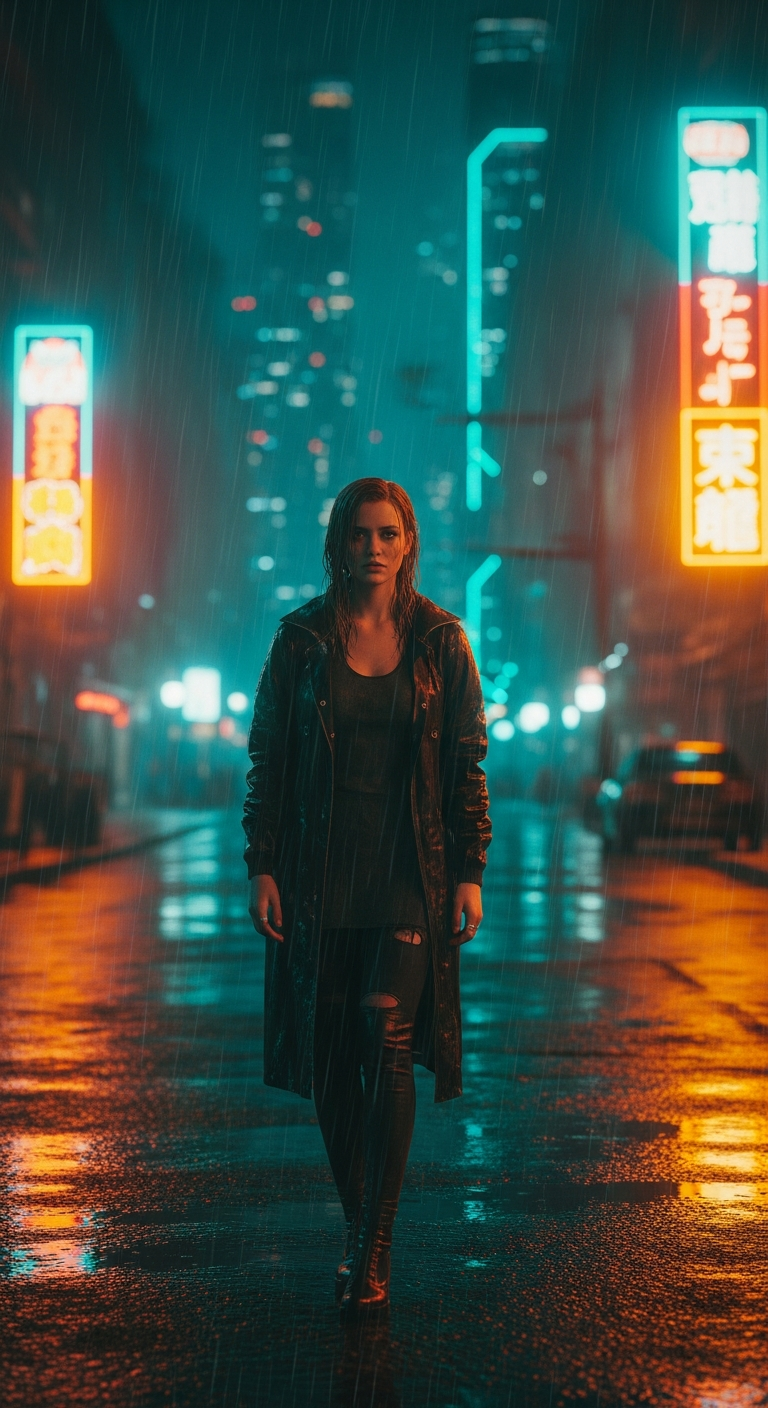
Neon Rain Gaze is a cinematic portrait photography style inspired by Blade Runner 2049, combining dramatic neon lighting, an orange-teal color grade, and rain-slicked futuristic cityscapes to create emotionally intense, film-quality AI portraits. It's one of the most visually striking trends in AI image generation right now, and it's surprisingly easy to recreate.
If you've ever scrolled through Instagram and stopped dead on a portrait that felt like a movie still — moody, rain-soaked, drenched in neon orange and teal — you've already felt the pull of future noir. This isn't just a filter or a preset. It's a full visual language borrowed from some of the most visually stunning films ever made, and now AI can generate it on demand. Welcome to the Neon Rain Gaze.
What is the Neon Rain Gaze Style?
The Neon Rain Gaze style sits at the intersection of cinematic portrait photography and cyberpunk aesthetics. Think Roger Deakins' legendary cinematography in Blade Runner 2049 — that perfect tension between warmth and cold, between orange fire tones and icy teal shadows. It's a visual style built on contrast, both emotional and chromatic.
At its core, this style features a single subject — usually a person with an intense, introspective expression — placed against a rain-soaked urban nightscape. Neon signs bleed color across reflective wet surfaces. Misty skyscrapers loom in the background. The color grade is unmistakably orange and teal, creating a cinematic depth that immediately signals "big budget film" to your brain.
What makes this style so powerful for AI portrait photography is how it combines technical elements — high contrast lighting, photorealistic DSLR quality, specific aspect ratios — with pure emotional storytelling. The subject doesn't smile. They gaze. They feel something heavy and complicated. That melancholy is baked right into the prompt, and it elevates a simple portrait into something genuinely cinematic.
The Viral Prompt
Neon Rain Gaze: Future Noir Portrait
Prompt: A stylish young woman with an intense, melancholic gaze, her expression thoughtful and emotionally resonant. She is framed in a vertical 4:5 cinematic portrait, standing on a perpetually rain-slicked street of a futuristic city at night, reminiscent of Blade Runner 2049. Dramatic, high-contrast lighting from vibrant neon signs bathes her in an orange and teal color grade, casting long, deep shadows. The detailed background features rain streaks, reflective wet surfaces, and distant towering, misty cyberpunk skyscrapers. The image possesses DSLR photo-realistic quality with a trendy, slightly gritty Instagram photo editing style.
Negative Prompt: Blurry, bad anatomy, cartoon, drawing, painting, ugly, mutated, disfigured, text, watermark, low quality, multiple subjects, smiling, happy, unrealistic.
Best For: Midjourney | Aspect Ratio: 4:5
How to Use This Prompt Step by Step
Getting this prompt to work beautifully in Midjourney takes just a few minutes if you follow these steps carefully. Here's exactly how to do it.
Step 1 — Open Midjourney. Head to your Midjourney Discord server or the Midjourney web app. Make sure you're running version 6 or later, as the photorealism and lighting nuances in this prompt really shine on newer model versions.
Step 2 — Enter the /imagine command. Type /imagine in any bot channel and paste the full prompt text into the field. Don't trim anything — every descriptor in this prompt is doing specific work.
Step 3 — Set the aspect ratio. After your prompt text, add --ar 4:5 to lock in that vertical cinematic portrait format. This ratio is perfect for Instagram and gives the composition that tall, intimate feeling of a film poster.
Step 4 — Add stylize and quality parameters. Consider appending --stylize 750 and --q 2 to push Midjourney toward more artistic, high-quality output. This style rewards a higher stylize value.
Step 5 — Generate and upscale. Run the prompt and review your four initial outputs. Look for the image with the strongest contrast, the most convincing neon color bleed, and the most emotionally compelling expression. Hit U to upscale your favorite.
Step 6 — Optional post-processing. Take your upscaled image into Lightroom or a mobile app like VSCO or Lightroom Mobile. Boost the orange and teal split tone slightly, add a touch of grain for that gritty Instagram finish, and pull down the highlights to deepen those neon shadows. You'll barely need to touch it.
Tips to Get the Best Results
Lean into the negative prompt. The negative prompt here is doing heavy lifting. "Smiling" and "happy" are specifically excluded because positive expressions completely break the noir atmosphere. If you remove those exclusions, you'll get pleasant portraits — but not this style.
Experiment with lighting color bias. The orange-teal grade is the defining visual signature here, but you can push it further. Try adding "predominantly orange neon backlight with deep teal fill shadows" to your prompt for even more dramatic color separation.
Change the subject for variety. Swap "stylish young woman" for "weathered detective," "mysterious masked figure," or "cyberpunk street vendor" and the same prompt framework delivers completely fresh results. The environmental and lighting instructions are universal.
Vary the neon color sources. Add specific neon sign descriptions like "glowing red kanji signage," "flickering blue pharmacy cross," or "orange ramen shop lanterns" to give your background more authentic cyberpunk detail.
Use Vary (Subtle) to refine expressions. If you get a great composition but the expression isn't quite melancholic enough, use Midjourney's Vary Subtle option to iterate on the face without losing your lighting setup.
Why This Style Is Trending
Cinematic portrait photography has always been aspirational — the kind of imagery that used to require a full film crew, location permits, and a cinematographer with decades of experience. AI has democratized that completely, and the Blade Runner aesthetic is the single most recognizable shorthand for "cinematic excellence" in popular culture right now.
Blade Runner 2049 won the Academy Award for Best Cinematography. Its visual language — that specific orange warmth against cold teal darkness, rain as a constant metaphor, solitary figures in vast urban environments — has become the gold standard for what "cinematic" looks like to an entire generation raised on streaming.
On social media, this style performs exceptionally well because it triggers an immediate emotional response. The melancholy, the isolation, the beauty of it — viewers stop scrolling. Content creators, photographers building AI portfolios, and brands going for a luxury or editorial aesthetic are all gravitating toward it.
There's also a technical reason it's trending in AI specifically: modern models like Midjourney v6 have become genuinely exceptional at handling complex lighting scenarios. Neon color bleed, wet surface reflections, atmospheric haze — these are exactly the kinds of physically complex lighting situations that earlier AI models struggled with. Now they're strengths. The timing is perfect.
What AI tool works best for this cinematic portrait photography style?
Midjourney version 6 or later is the strongest choice for this prompt. Its photorealism, handling of complex neon lighting, and ability to render emotionally expressive faces make it ideal. Stable Diffusion with a cinematic LoRA can also produce strong results, but requires more setup.
Can I use this prompt in ChatGPT's DALL-E image generator?
Yes, you can adapt this prompt for DALL-E 3. Remove the negative prompt (DALL-E handles exclusions differently) and simplify slightly. Results will be less photorealistic than Midjourney but can still capture the color grade and mood effectively.
Why is the orange-teal color grade so associated with cinematic films?
Orange and teal are complementary colors that create maximum contrast when placed together. Human skin tones are naturally orange-warm, so teal shadows make subjects pop dramatically against their environment. Hollywood colorists have used this technique for decades, and Blade Runner 2049 took it to its artistic peak.
How do I make the portrait look more realistic and less AI-generated?
The phrase "DSLR photo-realistic quality" in the prompt already pushes toward realism. For extra authenticity, add specifics like "shot on Sony A7R IV, 85mm f/1.4 lens, shallow depth of field" and upscale to the highest resolution available. Post-processing with real film grain also helps significantly.
Can I generate male subjects with this same prompt?
Absolutely. Replace "stylish young woman" with any subject description — a man, a non-binary person, an older figure. The lighting, environment, and color grade instructions are completely subject-agnostic and will work beautifully with any human subject.
What aspect ratio is best for this cinematic portrait style?
The 4:5 ratio specified in this prompt is ideal for Instagram portrait posts and creates a strong vertical cinematic feel. For wallpaper or editorial use, try 2:3. For a true widescreen cinematic feel inspired by the film itself, experiment with 16:9 or the classic 2.39:1 anamorphic ratio.
Is this style appropriate for commercial or brand photography projects?
This aesthetic works exceptionally well for luxury brands, fashion editorials, music artist promotion, gaming campaigns, and any brand wanting a high-end, emotionally intense visual identity. The noir mood signals sophistication and depth — use it for brands with a bold, premium positioning.
How do I add more unique details to avoid generic-looking results?
The key is specificity. Add details like unique clothing ("wearing a reflective chrome trench coat"), specific neon colors ("bathed in magenta and amber light from a holographic advertisement"), or environmental details ("steam rising from a street grate"). The more specific your additions, the more distinctive your output.
Now go generate something that looks like it belongs on a cinema screen — your neon-soaked, rain-drenched masterpiece is one prompt away, and we genuinely can't wait to see what you create with it.