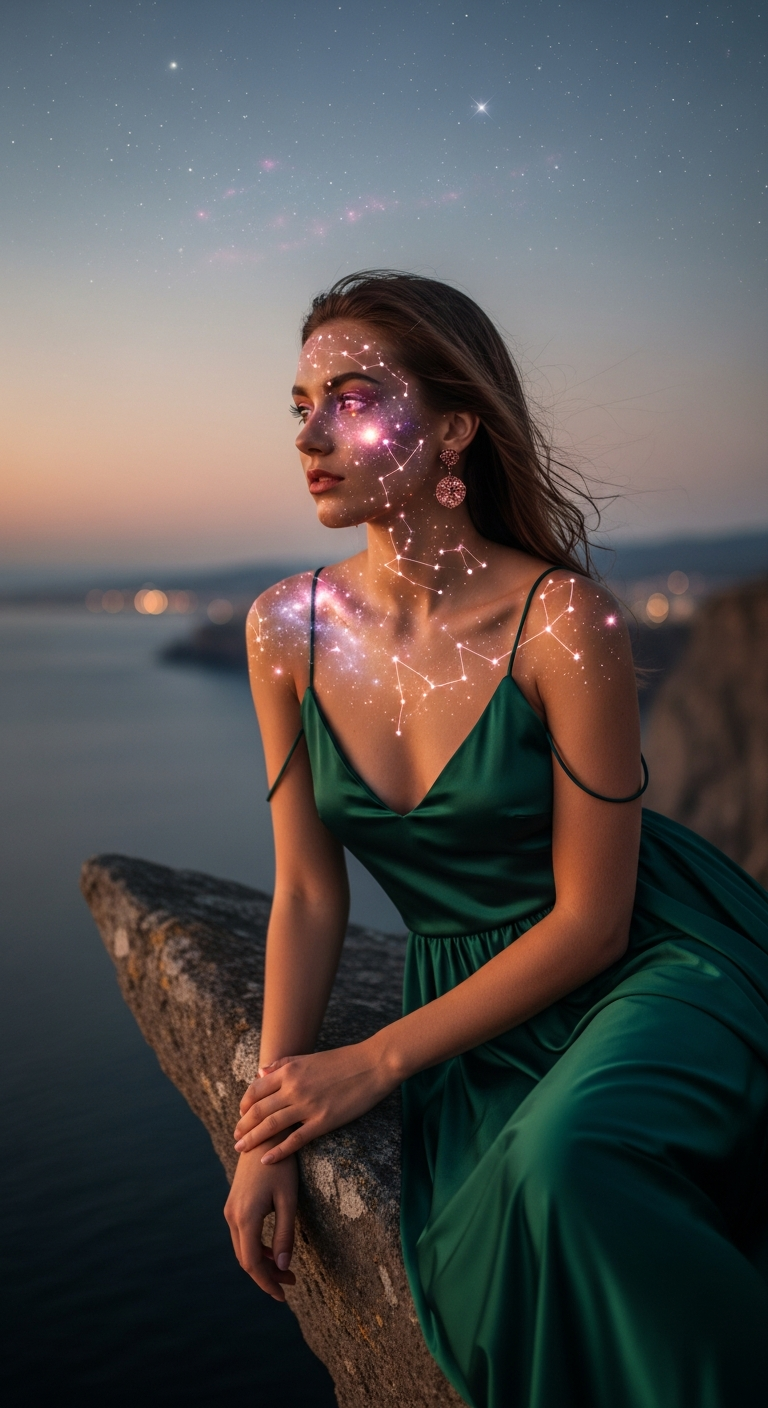
Celestial Skin Artistry in cinematic portrait photography combines hyper-realistic skin textures with glowing star map overlays, nebula eye reflections, and rose gold cosmic light grading. This trending AI style creates otherworldly portraits that blend high-fashion photography with deep-space visuals, producing images that feel simultaneously earthly and extraterrestrial — perfect for social media, digital art portfolios, and editorial content.
Imagine a portrait so stunning it looks like a fashion shoot staged inside a galaxy. That's exactly what the Rose Gold Celestial Portrait trend is delivering right now — and AI image generators are absolutely eating it up. If you've been scrolling through AI art communities and wondering how creators are producing those jaw-dropping portraits with glowing constellations etched into skin and swirling nebulae living inside someone's eyes, you've found your guide. Let's break down everything you need to know to recreate this style yourself.
What Is Celestial Skin Artistry, Rose Gold Dream?
Celestial Skin Artistry is a cinematic portrait photography style where the human subject becomes a living canvas for cosmic imagery. Think glowing constellations mapped across cheekbones, nebula clouds swirling inside irises, and a color palette pulled straight from a twilight sky — all rendered with photorealistic skin texture and professional-grade lighting.
The "Rose Gold Dream" variation specifically anchors everything in warm rose gold tones. This metallic blush hue threads through the star map overlay, the atmospheric color grading, and even the jewelry and wardrobe choices within the image. It creates a cohesive visual identity that feels luxurious, mystical, and deeply editorial all at once.
What separates this from generic fantasy portraiture is the insistence on realism. The goal isn't to make the subject look painted or illustrated — it's to make the cosmic elements feel genuinely embedded in real, textured, photorealistic skin. That tension between the hyper-real and the cosmic is exactly what makes this style so visually arresting and so shareable.
Technically, this style draws on several cinematic portrait photography pillars: shallow depth of field, an 85mm lens perspective, soft diffuse lighting, and high-detail 8K rendering. Layer in the celestial elements and you get something that looks like a collaboration between a top-tier fashion photographer and NASA's Hubble imaging team.
The Viral Prompt
Prompt
A cinematic ultra-realistic portrait of a stylish young woman standing on a dramatic, jagged cliff edge overlooking a vast ocean at twilight. She is wearing a flowing, deep emerald green silk gown with delicate spaghetti straps, revealing her shoulders and arms, with subtle rose gold stud earrings. She stands gracefully, looking pensively towards the distant horizon, her hair softly swept by a gentle breeze. Her skin is adorned with an intricate, glowing rose gold star map overlay, subtly embedded across her face, neck, and shoulders, appearing as living constellations. Her eyes reflect a breathtaking, swirling nebula of rose gold, soft purple, and deep blue hues, shimmering with cosmic light. The sky above transitions from fading rose gold to deep twilight blues, with the first twinkling stars appearing. Soft, diffuse ambient light, dramatic atmosphere, shallow depth of field, subtle bokeh from distant city lights, ethereal glow, realistic skin texture, high detail, cinematic color grading, professional photography, DSLR quality, 85mm lens, ultra detailed, 8K.
How to Use This Prompt Step by Step
Getting the most out of this prompt is straightforward once you know the right tools and sequence. Here's how to go from prompt to gallery-worthy image.
Step 1 — Choose your AI image generator. This prompt performs exceptionally well on Midjourney (v6 or later), Adobe Firefly, and DALL-E 3. Midjourney tends to handle the star map skin overlay and nebula eye detail with the most nuance, so start there if you have access.
Step 2 — Paste the full prompt without modification first. Before you start customizing, run the base prompt exactly as written. This gives you a reference image to compare against when you start tweaking variables. You'll likely get something stunning right out of the gate.
Step 3 — Upscale your favorite result. In Midjourney, use the U buttons to upscale your preferred output. The 8K and ultra-detailed tags in the prompt push the generator toward high-resolution detail, but upscaling locks that in and gives you a file worthy of printing or portfolio use.
Step 4 — Vary the cosmic elements. Use the variation feature or edit the prompt to swap out specific details. Try changing the nebula colors from rose gold and purple to emerald and gold, or shift the star map pattern from scattered constellations to a specific zodiac layout. Each variation produces a dramatically different mood while keeping the core style intact.
Step 5 — Adjust the environment for fresh compositions. The cliff edge and ocean are powerful, but try replacing the setting with a rooftop at night, a rain-soaked cobblestone street, or an ancient stone archway. The celestial skin elements remain the hero — the environment just changes the emotional register.
Tips to Get the Best Results
Lead with the skin detail description. The star map overlay is the defining feature of this style. Keep that description early and specific in your prompt. Phrases like "living constellations," "subtly embedded," and "glowing rose gold" signal to the AI exactly the level of integration you want — not a graphic slapped on top, but something that feels organically part of the skin.
Use contrast in your color palette. The reason this prompt works so well visually is the interplay between the deep emerald gown, the rose gold cosmics, and the twilight blue sky. Whenever you customize, maintain that tension between warm and cool tones. It's what gives the image depth and cinematic quality.
Don't skip the technical photography tags. Terms like "85mm lens," "shallow depth of field," "DSLR quality," and "cinematic color grading" aren't decoration — they actively steer AI generators toward photorealistic rendering modes. Remove them and you'll often get something that looks more illustrated than photographic.
Reference the eye reflection specifically. Nebula reflections in eyes are notoriously tricky for AI generators to nail. Be explicit: name the colors, mention "shimmering," and use "swirling" to suggest movement. If the eyes come out flat, try adding "catchlight" and "iris detail" to a revised prompt.
Batch generate for variety. Run the same prompt four or five times before committing to edits. Cinematic portrait photography prompts like this one produce quite different compositions across runs — different crop, different expression, different atmospheric intensity. Your best output might be on run three.
Why This Style Is Trending
The short answer: it hits multiple viral triggers simultaneously. Celestial imagery has been a consistent aesthetic trend across Pinterest, Instagram, and TikTok for years — star maps, zodiac content, and space photography all perform exceptionally well. This prompt essentially fuses that existing viral energy with high-fashion portraiture and the prestige signaling of cinematic photography.
Rose gold specifically is having a renaissance as a luxury color signal. After peaking around 2017, it quietly matured into an aspirational tone associated with editorial beauty campaigns and high-end product photography. Using it as the primary color thread in a celestial portrait instantly elevates the mood from "cool digital art" to "fashion-forward editorial."
There's also a deeply personal resonance to the concept of a star map embedded in skin. Astrology content consistently drives massive engagement, and a portrait that literally makes someone look like they're made of constellations taps into that "this represents me" energy that makes content get saved, shared, and recreated obsessively.
Finally, the technical ambition of the prompt — 8K, 85mm, DSLR quality, ultra detailed — positions the output as premium content. People don't just share it; they want to know how it was made. That curiosity loop is exactly what drives tutorial shares and prompt reposts across AI art communities.
What AI tools work best for generating this cinematic portrait photography style?
Midjourney v6 and above delivers the most photorealistic skin texture and celestial overlay integration. Adobe Firefly is a strong alternative for users who need commercial licensing clarity. DALL-E 3 also handles this prompt well, particularly for the nebula eye detail. Stable Diffusion with the right checkpoint and LoRA models can replicate the style with more manual effort.
Can I change the subject's appearance while keeping the celestial skin effect?
Absolutely. The star map and nebula elements are tied to descriptive phrases in the prompt, not to the physical description of the subject. You can change hair color, skin tone, age, or style of dress freely without losing the core aesthetic. In fact, diverse variations of this style perform incredibly well because the celestial elements look stunning across all skin tones.
How do I make the star map overlay look more realistic and less like a filter?
Use language that emphasizes integration rather than application. Phrases like "subtly embedded," "living constellations," "appears to glow from within," and "traces the natural contours of the face" all push the generator toward organic-looking overlays. Avoid words like "tattoo" or "painted" unless that's the effect you want, as they push toward harder-edged results.
Is this style suitable for commercial use?
This depends entirely on the platform you use to generate. Midjourney's commercial licensing varies by subscription tier, and Adobe Firefly is specifically built for commercial workflows with its Content Credentials system. Always check the terms of service for your chosen tool before using AI-generated cinematic portraits in paid campaigns or for sale.
What settings or aspect ratios work best for this portrait style?
A portrait or editorial crop works best — try 2:3 or 4:5 aspect ratios to emphasize the subject and give breathing room to the atmospheric sky. In Midjourney, use --ar 2:3 appended to the prompt. Avoid square crops for this style, as they tend to cut off the dramatic environmental context that gives the image its cinematic scale.
Can I use this prompt style for male subjects or non-binary portraits?
Yes, and the results are spectacular. Simply swap the gender descriptors and adjust the wardrobe description — a deep emerald structured coat or open-collar silk shirt works beautifully in place of the gown. The celestial skin and nebula eye elements are completely gender-neutral in their visual impact and work powerfully across all subject presentations.
How do I get the twilight sky gradient to look more dramatic?
Add more specific atmospheric language to the sky description. Try phrases like "burning rose gold horizon fading to deep indigo zenith," "volumetric clouds catching the last light," or "the Milky Way beginning to emerge above the horizon." Specificity is everything — the more precisely you describe the sky's behavior, the more the AI commits to rendering it with cinematic intensity.
What's the best way to share and grow engagement with images created in this style?
Post with the prompt visible — AI art communities on Reddit, X, Instagram, and TikTok consistently reward prompt transparency with saves and reposts. Use hashtags that bridge both communities: cinematic photography tags alongside AI art and astrology aesthetic tags. Creating a before/after carousel showing the base generation and then a refined upscale is currently one of the highest-performing content formats for AI portrait styles like this one.
Now that you have everything you need — the prompt, the technique, and the context — go build your celestial portrait series and show the world what happens when the cosmos decides to wear a face.