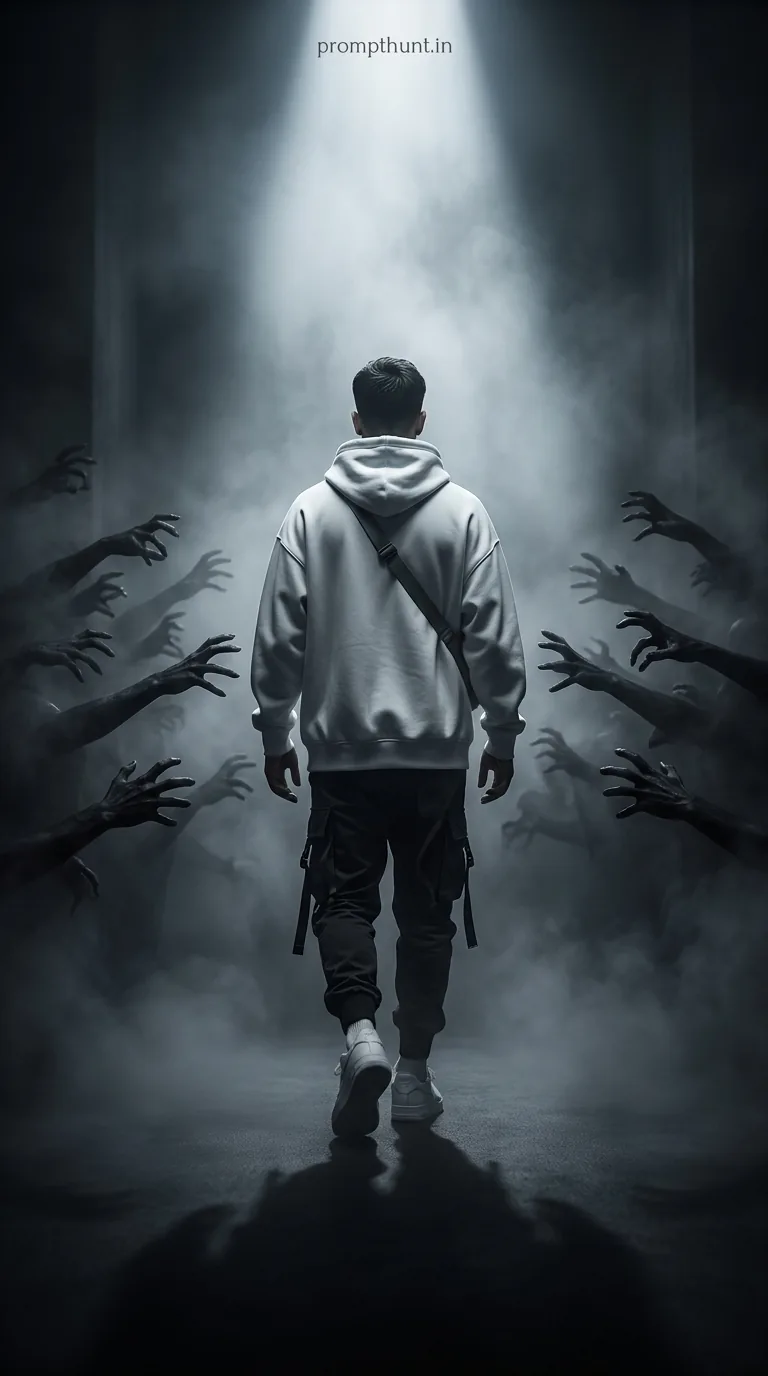




The Dark Supernatural Cinematic Horror AI photo prompt transforms your uploaded photo into a cinematic scene where your likeness walks fearlessly through a fog-filled corridor surrounded by demonic hands, bathed in a single beam of white light. Paste the prompt into Gemini after uploading your photo. The result is a high-contrast, photorealistic horror edit that looks like a movie still — with you as the lead.
There's a moment in every great horror film where the protagonist walks directly toward the thing that would send the rest of us sprinting back to the car. No hesitation. No looking back. Just pure, unhinged calm. This AI photo editing style bottles exactly that energy — and puts your face on it. The Dark Supernatural Cinematic Horror prompt is one of the most visually striking edits doing the rounds right now, and once you see it, you'll understand why people are plastering it across every social feed they own.
Upload your photo to Gemini, paste the prompt, and get back a cinematic horror scene where you walk unbothered through darkness and demonic hands — like the main character you clearly always were.
What Is the Dark Supernatural Cinematic Horror Style
Dark Supernatural Cinematic Horror is exactly what it sounds like — and nothing like what you'd fear. No gore. No jump scares baked into a JPEG. This is the prestige horror aesthetic. Think less "slasher flick" and more "arthouse nightmare with a cinematography budget."
The style is built around three visual pillars. First, deep monochromatic colour — charcoal blacks, cold greys, and silver-white light that feels almost sacred. Second, atmospheric volumetric fog that gives every frame weight and texture. Third, a single dramatic light source cutting through the dark like a torch in a coal mine (which, if you think about it, is exactly where you do not want to be).
What makes this particular prompt special is the narrative it tells visually. The demonic hands reaching out from both sides aren't just set dressing. They're the whole point. You — or rather, your AI-rendered likeness — walk straight through them without flinching. It's empowering wrapped in a horror skin. It's the "main character" trope cranked up to eleven.
Rule of thumb: if a style makes you feel like you should have a brooding orchestral score playing in the background, it's doing its job.
The Prompt That Makes It Happen
Here's the full prompt. Copy it exactly. Every word is doing something — trim it and you'll lose the drama faster than a horror sequel loses its budget.
The uploaded photo is the master reference for this character. Preserve the exact facial features, face shape, skin tone, and identity from the uploaded image exactly. Place the character walking away from the camera down a dark, fog-filled corridor or path, viewed from behind at a mid-distance full-body shot. The character wears a white oversized hoodie with a crossbody strap bag, dark cargo pants with utility straps, and white sneakers. On both sides of the narrow path, dozens of dark shadowy demonic hands and arms reach out from the darkness, grasping and clawing toward the figure. The character walks calmly and confidently forward, undeterred. The lighting is dramatic and cinematic — a single powerful beam of misty white light emanates from directly ahead in the distance, cutting through thick atmospheric fog and smoke. The overall color palette is deep monochromatic dark grey, charcoal black, and cold silver-white, with high contrast between the glowing path and surrounding darkness. The mood is intense, eerie, and empowering — a lone soul moving fearlessly through supernatural evil. Photorealistic cinematic render, 8K, dramatic volumetric lighting, dark fantasy horror atmosphere, shallow depth of field with sharp focus on the subject. Add a small, thin, professional 'prompthunt.in' text watermark at the top center of the image. The watermark should be subtle, use a color that matches the image's color palette, and appear lightweight and elegant — not distracting.
How to Use This Prompt — Step by Step
The entire trick here is the first line: "The uploaded photo is the master reference for this character." Gemini doesn't pull your face from thin air. You have to give it one. Here's how to do this properly.
Step 1. Open Gemini at gemini.google.com. Sign in with your Google account if you haven't already.
Step 2. Upload your photo before you type anything. Click the image icon in the chat bar and attach a clear, well-lit photo of your face. A straight-on shot works best — full face, good lighting, no heavy filters. Think passport photo energy, not Instagram-at-3am energy.
Step 3. Once the photo is uploaded and visible in the chat, paste the full prompt into the text field alongside it. Don't paraphrase. Don't shorten it. Paste the whole thing.
Step 4. Hit send and give Gemini a moment. When the image comes back, your face — your actual facial structure, skin tone, and identity — should be on that figure walking through the fog. The costume, scene, and horror atmosphere all come from the prompt. Your photo just supplies the face.
Step 5. Not happy with the first result? Run it again. Nine times out of ten, the second or third generation tightens up the likeness and nails the lighting better than the first pass.
Tips for Best Results With This Style
A few things I've learned from putting this through its paces — some the easy way, some very much not.
Use a photo where your face is clearly lit and unobstructed. Sunglasses, heavy shadows across half your face, or group shots where you're mid-blink will confuse the model. It'll still try — bless its digital heart — but the likeness suffers.
Portrait orientation photos tend to give better full-body results. Landscape crops sometimes make Gemini focus too tightly on the face and lose the walking-away composition.
If the demonic hands look too subtle or the fog isn't dramatic enough, add one line to the end of the prompt: "Increase the intensity of the fog and demonic shadow hands dramatically." Simple, but it works.
Don't crop or filter your reference photo beforehand. Let Gemini see the raw image. Filters shift colour data and can throw off the skin tone matching. (Yes, I learned this by submitting a photo with a vintage filter applied. The result looked like my Victorian ancestor. Haunting in the wrong way.)
Why This Is Trending Hard in India Right Now
The Dark Supernatural Cinematic Horror style has picked up serious traction in India — and it makes complete sense once you think about it for about four seconds.
Indian audiences have a long, deep relationship with the supernatural. From folklore to blockbuster horror films to the enormous success of shows like Mirzapur and Sacred Games, there's a cultural appetite for dark, intense, dramatic storytelling. A visual style that places you as the calm, fearless protagonist walking through supernatural chaos? That hits differently here than it might in other markets.
There's also the "main character" culture that's exploded across Instagram Reels and YouTube Shorts. Creators want content that stops the scroll. A photorealistic image of themselves striding through fog while demon hands claw at them from the dark — that stops the scroll. That gets shared. That gets saved.
The monochromatic palette also exports beautifully across platforms. No blown-out colours, no neon that looks cheap on a phone screen. Just clean, dramatic contrast that looks expensive on any device. Fairly difficult to ignore, and even harder to explain to anyone who hasn't tried it yet.
Honest Opinion — When to Use This and When to Skip It
Right, fair call — let me be straight with you on this one.
This style absolutely delivers when your goal is personal branding content, creative portfolio pieces, or anything where "powerful and cinematic" is the brief. If you're a content creator, a musician, or anyone who wants a profile image that says "I do not fear the abyss" — this is your prompt.
It also works brilliantly as a gift or novelty edit. Generating this for a friend's birthday or as a piece of fan art for someone in your community? Genuinely fun, and the results look polished enough to print and frame. (Not that I've done that. I'm saying hypothetically someone might.)
But here's where I'd pump the brakes. If you need a professional headshot, this is not your tool. Demonic corridor lighting is not, as yet, accepted on LinkedIn without comment. Corporate clients will have questions. Your mum will have more.
Also, if your reference photo is low quality — dark, blurry, or taken from an extreme angle — the likeness preservation will struggle. The prompt does a remarkable job when given good raw material, but it's not magic. Well. It's a bit magic. But not infinite magic.
And one more honest note: results vary between Gemini versions and sessions. Some generations will absolutely nail the cinematic depth and your facial structure in the same image. Others will give you something that's close but slightly off — like running into someone who looks almost exactly like you but gets your name wrong. Generate a few versions before you commit to the one you post.
The Short Version, With a Bow On It
The Dark Supernatural Cinematic Horror prompt is one of the more genuinely impressive things you can do with Gemini right now. Upload a clear photo of your face, paste