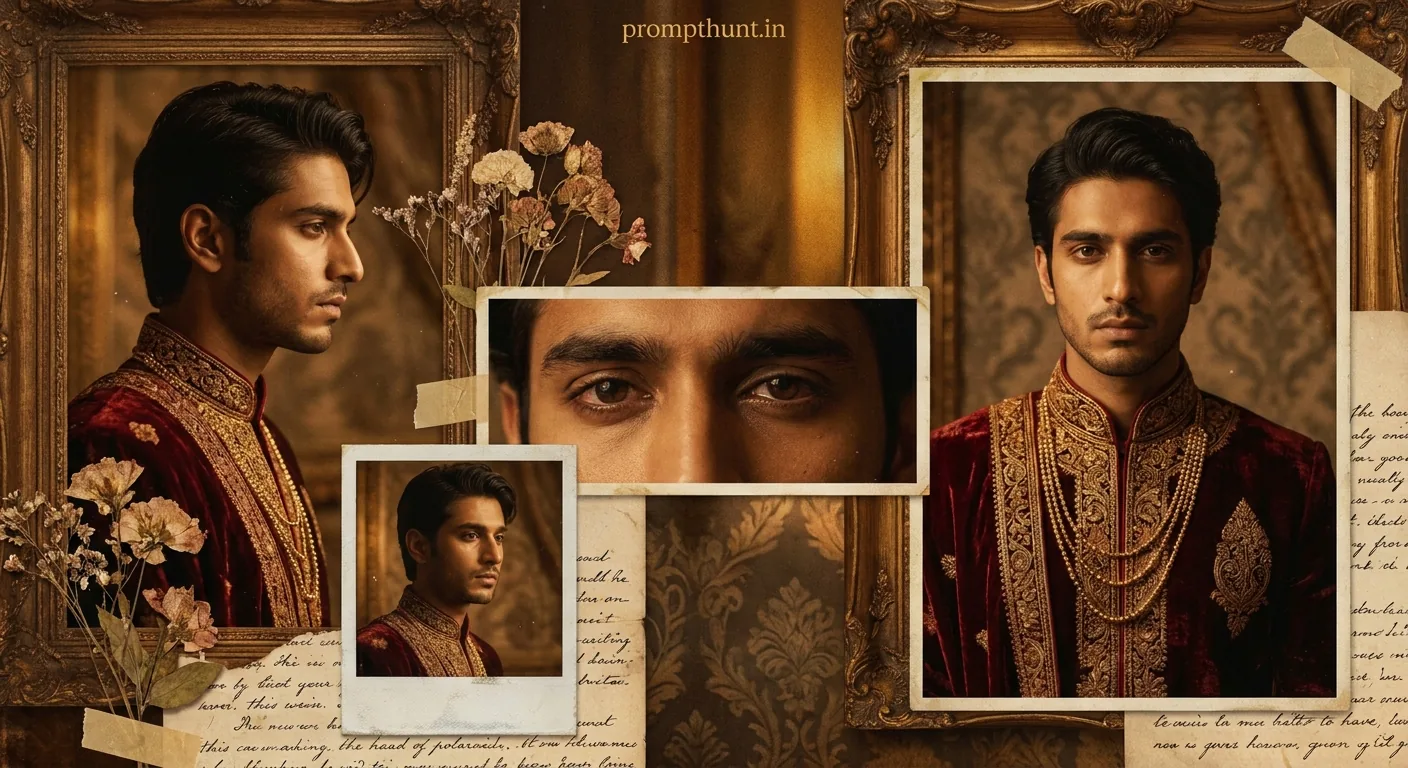




The Royal Mughal Nostalgia Collage AI photo editing style transforms your portrait into a layered, cinematic Mughal royal composition — multiple angles of your face arranged like aged Polaroids against sepia textures, gold embroidery, and dramatic amber lighting. Use the prompt in Gemini with your uploaded photo as the face reference. Results take about 30 seconds and look like a scene straight out of a period drama.
Someone looked at their selfie and thought: "What if I were a Mughal prince brooding over lost kingdoms?" And honestly, fair enough. The Royal Mughal Nostalgia Collage trend has taken over Indian Instagram with a mix of regal costuming, aged Polaroid layering, and the kind of melancholic lighting that makes everyone look like they've got important empire-related thoughts. It's cinematic, it's dramatic, and it's genuinely one of the most striking AI photo styles doing the rounds right now — no throne required.
Upload your photo to Gemini, paste the prompt below, and you'll get a layered Mughal royal portrait collage with your exact face, deep crimson sherwanis, sepia textures, and dramatic gold lighting in under a minute.
What Is the Royal Mughal Nostalgia Collage Style
Think of it as a historical mood board that someone left out in the sun for 200 years — in the best possible way.
The Royal Mughal Nostalgia Collage style pulls from three distinct visual traditions at once. First, there's the formal Mughal miniature portrait — structured, regal, richly costumed. Second, there's the layered collage aesthetic of overlapping Polaroids and vintage photographs. Third, there's the warm editorial language of South Asian period dramas like Bajirao Mastani or Jodhaa Akbar — that amber-gold light, the heavy fabrics, the gravitas.
The result is layered images of your face — profile, close-up eyes, full frontal — stacked like they were found in an old haveli chest. Dried florals, faded handwritten script, and ornate wooden frames fill the background. The colour palette runs deep: burgundy, burnt gold, warm amber, sepia brown, muted cream. Film grain throughout.
It looks expensive. It looks historical. It looks like you personally ruled something once and are now quietly regretting the succession wars.
The Royal Mughal Nostalgia Collage Prompt
This is the exact prompt driving the trend. Copy it in full — every word is doing a job.
The uploaded photo is the master reference for this character. Preserve the exact facial features, face shape, skin tone, and identity from the uploaded image exactly. Transform the subject into a richly styled Mughal royal portrait collage composition. Dress the subject in a deep crimson and burgundy velvet sherwani with intricate gold zari embroidery, mandarin collar, and layered gold chain necklace. The overall composition should be a layered, nostalgic collage of multiple angles of the same face — profile view, close-up eyes, full frontal portrait — arranged like aged Polaroid and vintage photographs overlapping each other. Background should feature warm sepia-toned antique textures, faded handwritten script, dried florals, and ornate wooden frames. Lighting is dramatic and warm — deep amber and golden tones with soft directional light casting gentle shadows across the face. The mood is melancholic, introspective, and regal — like a young prince lost in memory. Color palette: deep burgundy, burnt gold, warm amber, sepia brown, and muted cream. Film grain and aged photo texture should be applied throughout. The overall aesthetic should feel like a cinematic editorial from a historical South Asian period drama. Add a small, thin, professional 'prompthunt.in' text watermark at the top center of the image. The watermark should be subtle, use a color that matches the image's color palette, and appear lightweight and elegant — not distracting.
How to Use It: Step by Step
The key thing to understand before you start: this prompt is built around your uploaded photo. Gemini uses it as the face reference. The prompt handles everything else — costume, lighting, mood, composition. Your face stays yours. (Which is either reassuring or slightly alarming, depending on your relationship with your own face.)
Step 1. Open Gemini at gemini.google.com. Make sure you're using the full web version, not a third-party app.
Step 2. Upload your photo first, before you type anything. Click the image icon in the chat window and attach your photo. A clear, well-lit frontal shot works best — the AI needs a good look at your features to replicate them across multiple portrait angles.
Step 3. Once the photo is uploaded, paste the full prompt from the box above into the message field. Don't modify it yet — run it once as written.
Step 4. Hit send. Gemini will process both the image and the prompt together, using your face as the character reference and building the full Mughal collage around it.
Step 5. Download the result. If something looks off — the face drifted slightly, or the collage layering feels flat — upload the same photo again and run a second attempt. Gemini improves with a clean, high-contrast reference image.
Tips for Best Results With This Style
Rule of thumb: the better your source photo, the better the Mughal portrait. Blurry selfies produce blurry princes. Here's what actually moves the needle.
Use a photo with your face fully visible. Sunglasses, heavy shadows, or extreme angles confuse the face-preservation instruction. A plain, even-lit headshot — phone camera, decent daylight — is your best starting point.
Avoid busy backgrounds in your source photo. The AI sometimes picks up background elements and tries to incorporate them. A plain wall behind you gives Gemini less to work with and more focus on your actual face.
Run it twice if you're not happy first time. Nine times out of ten, the second attempt produces better collage layering. The multi-angle composition is complex and occasionally needs a second pass to nail the Polaroid overlap effect.
Don't crop your face before uploading. A full portrait — head and shoulders — gives the model enough data to construct the profile and close-up angles from a single reference. A tightly cropped face sometimes produces odd results when it tries to generate a side profile.
Natural skin tones photograph better here. Heavy filters on your source image can throw off the skin tone preservation instruction. The prompt explicitly asks Gemini to match your exact skin tone — don't make that job harder by uploading something already heavily edited.
Why the Royal Mughal Nostalgia Collage Is Trending in India Right Now
The timing makes sense. South Asian period dramas have never been more popular — on Netflix, Prime, everywhere. There's a genuine cultural appetite for Mughal and pre-colonial visual heritage, and AI tools are now good enough to place individual faces inside that world convincingly.
The collage format adds a second layer of appeal. It doesn't look like a single AI-generated image — it looks like a curated mood board, an editorial spread, something a creative director put together for a shoot. That perceived effort makes people more likely to share it.
It also hits a specific emotional note. The prompt asks for "melancholic, introspective, and regal" — which, if we're being honest, describes the vibe of roughly 60 percent of Instagram posts already. This just gives it a historical costume and better lighting.
My Honest Take: When to Use This, When to Skip It
The Royal Mughal Nostalgia Collage is genuinely one of the more impressive AI photo styles available right now. The layered collage composition is harder to produce than a single portrait swap, and when it lands, it really lands. The gold-and-burgundy palette photographs beautifully on screen and prints well too, which isn't true of every AI aesthetic.
That said, it's not the right tool for every situation. If you need a clean, single portrait — for a profile photo, a professional headshot, anything that needs to read clearly at small sizes — the collage format works against you. Multiple overlapping faces and aged textures are arresting at full size and confusing as a thumbnail. Don't use this for your LinkedIn. Your future employer does not need to see you as a brooding Mughal prince. (Or maybe they do. Depends on the industry.)
The melancholic mood is also fixed. The prompt is written for introspective and regal — there's no version of this that comes out looking playful or casual. If you want something warm and celebratory, a different style will serve you better. This one is specifically for when you want to look like you're contemplating the impermanence of empire.
For portraits, reels cover images, personal branding with a creative or cultural angle, or just a genuinely striking piece of AI art to keep for yourself — this style is hard to beat right now. The combination of face preservation, period costume, and collage composition puts it several steps above the basic background-swap prompts that most people are still running.
One honest caveat: Gemini handles face preservation better than most AI tools, but it's still not perfect. Occasionally the profile-view angle drifts slightly from your actual features. Running the prompt twice with the same photo usually fixes this. If it doesn't, try a photo taken in slightly brighter, more even lighting — that's the fix nine times out of ten.