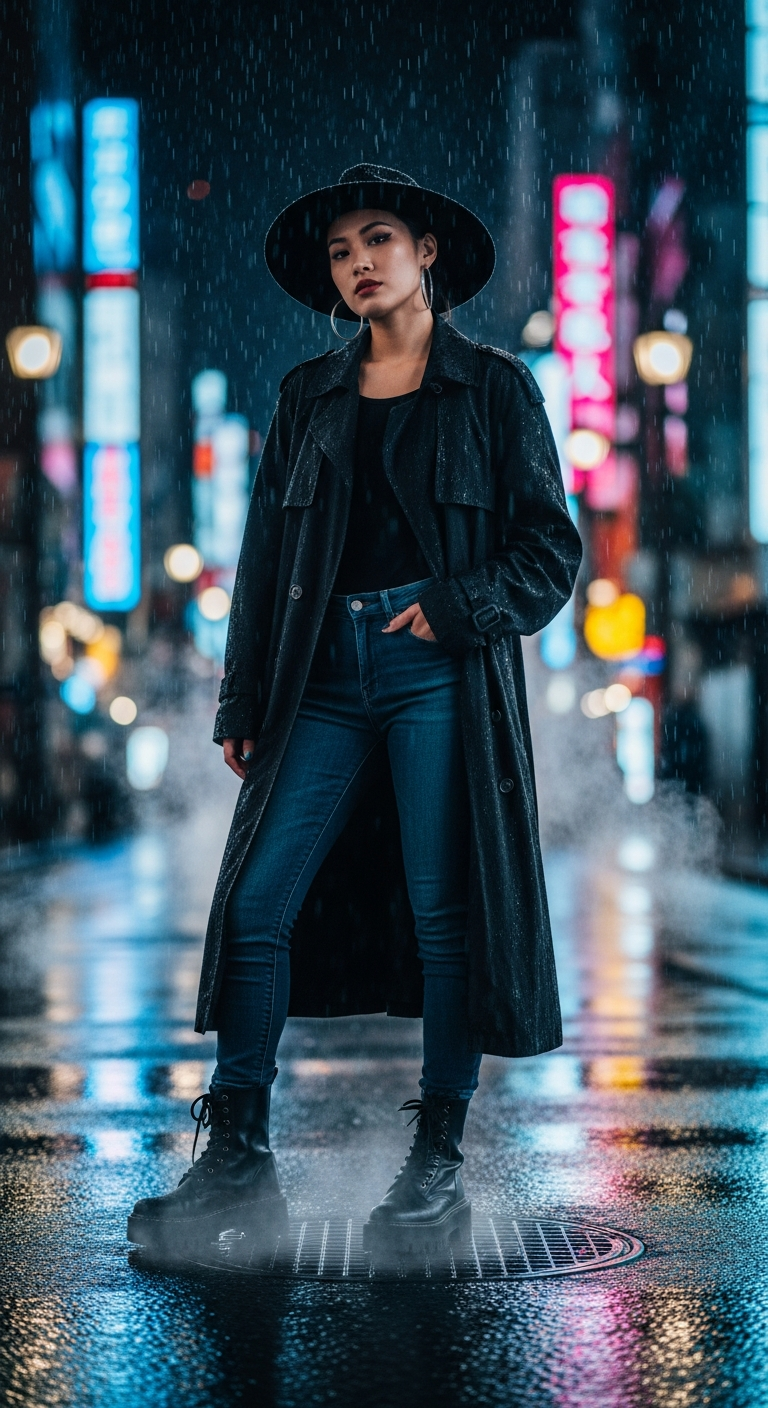
Tokyo Neon Rain Empress is a trending cinematic portrait photography style that uses AI to create ultra-realistic, moody portraits of stylish subjects on rain-soaked, neon-lit urban streets. It combines dramatic lighting, wet reflections, shallow depth of field, and cinematic color grading to produce jaw-dropping, film-quality images that dominate social feeds.
If your Instagram feed has been flooded lately with impossibly gorgeous portraits of stylish women glowing under Tokyo neon lights in the rain — you've already seen the Tokyo Neon Rain Empress style doing its thing. This cinematic portrait photography trend is everywhere right now, and for good reason: it looks like a big-budget movie still, it's emotionally magnetic, and AI can generate it in seconds. Let's break down exactly how it works and how you can recreate it.
What is Tokyo Neon Rain Empress Style?
Tokyo Neon Rain Empress is a cinematic portrait photography style that pulls from three powerful visual worlds: Japanese urban nightlife, high-fashion editorial photography, and Hollywood cinematography. Think Blade Runner meets Vogue Japan meets a moody indie film — all in one frame.
The core elements that define this style are the rain-slicked reflective streets, electric neon signage casting colored light across a subject, dramatic atmospheric fog or steam, and a fashion-forward subject who looks completely unbothered by the chaos around them. The confidence of the subject against the chaotic, beautiful city backdrop is what gives this style its emotional punch.
What makes it stand out from generic AI portraits is the layering of realism. We're talking realistic skin texture, authentic rain droplet physics on fabric, glistening wet pavement reflections, and that signature shallow depth of field that melts the neon background into creamy bokeh. It looks like a human photographer spent hours setting up the perfect rainy-night shoot — but it's entirely AI-generated.
The Viral Prompt
Tokyo Neon Rain Empress — Viral Prompt
A cinematic ultra-realistic portrait of a stylish young Asian woman standing on a rain-slicked, neon-lit Tokyo street at night. She is wearing an oversized black trench coat, dark wash skinny jeans, chunky black combat boots, and a wide-brimmed black fedora, with silver hoop earrings peeking out. She stands casually with one hand in her pocket, looking directly into the camera with a confident, slightly mysterious gaze. Dramatic cinematic rain falls around her, creating glistening drops on her coat and hat. The wet pavement beneath her reflects the vibrant blue, pink, and yellow neon signs from towering skyscrapers, forming dynamic streaks of light. Atmospheric steam rises from city grates, adding to the moody urban atmosphere. Low key lighting, high contrast, shallow depth of field, sharp focus on the subject, beautifully blurred city lights bokeh in the background, realistic skin texture, high detail, cinematic color grading, professional photography, DSLR quality, 85mm lens, ultra detailed, 8K
How to Use This Prompt Step by Step
Getting the most out of this cinematic portrait photography prompt is straightforward once you know the right tools and workflow. Here's how to do it from scratch:
Step 1 — Choose your AI platform. This prompt performs exceptionally well on Midjourney (v6 or newer), Leonardo AI, and Adobe Firefly. Midjourney is the top recommendation here because of how it handles cinematic lighting and skin texture realism. If you're using Stable Diffusion, pair it with a photorealistic checkpoint like RealVisXL.
Step 2 — Copy and paste the prompt as-is. Don't truncate it. Every descriptive layer in this prompt is load-bearing. The specific mention of "85mm lens," "shallow depth of field," "8K," and "DSLR quality" are technical signals that push the AI toward photorealism rather than illustration.
Step 3 — Adjust aspect ratio. For portrait photography, set your aspect ratio to 2:3 or 4:5. In Midjourney, add --ar 2:3 at the end of your prompt. This gives you a tall, editorial frame that looks natural for social sharing.
Step 4 — Upscale your favorite result. Generate a batch of four images and pick the strongest composition. Upscale it to maximum resolution. In Midjourney, use the "Upscale (Subtle)" option to preserve the cinematic grain without over-smoothing the skin.
Step 5 — Optional color grade post-generation. Import your image into Lightroom or VSCO and add a subtle teal-and-orange grade to deepen the cinematic contrast. Drop the highlights slightly, lift the shadows a touch, and boost the blues and pinks in the HSL panel to make those neon reflections sing.
Tips to Get the Best Results
Specify the rain intensity. Words like "dramatic cinematic rain" and "glistening drops" give the AI permission to go full atmosphere. If your results look too dry, try adding "heavy rainfall," "rain streaks visible mid-air," or "rain-blurred streetlights" to your prompt.
Control the neon palette intentionally. The blue, pink, and yellow neon palette in this prompt creates a specific emotional warmth within the cool nighttime setting. Want a different mood? Swap to red and green for something more intense, or go all-blue for an ultra-cold, noir aesthetic.
Anchor the subject with specific fashion details. Generic prompts produce generic results. The specificity of "oversized black trench coat," "chunky combat boots," and "wide-brimmed fedora" gives the AI a strong fashion editorial signal. If you want to remix the look, be equally specific — don't just say "nice outfit."
Use negative prompts wisely. If you're on a platform that supports negative prompts, add: blurry face, distorted hands, flat lighting, cartoon, anime, illustration, oversaturated. This keeps the realism locked in and prevents the AI from drifting into illustrated territory.
Seed consistency for series. If you want to create a series of images with the same character, use the seed feature (available in Midjourney and many other tools) to lock in the character's facial features across multiple generations. This is great for building a cohesive content aesthetic.
Why This Style Is Trending
The Tokyo Neon Rain Empress style is viral right now for reasons that go deeper than just looking cool. It sits at the intersection of several massive cultural moments happening simultaneously.
First, there's a global obsession with Japanese urban aesthetics. From anime culture to streetwear, Tokyo as a visual setting carries enormous aspirational energy. Rain only amplifies that — it adds drama, mystery, and a cinematic quality that dry streets simply can't match.
Second, this style speaks to a powerful archetype: the unbothered, confident woman who owns her space in a chaotic world. The subject isn't reacting to the rain or the city — she's commanding it. That energy is deeply relatable and aspirational, which is exactly why it performs so well as social content.
Third, the technical execution is genuinely impressive to casual viewers. Most people scrolling past these images do a double-take because they believe it might be a real photograph. That "wait, is this real?" moment is social media gold — it drives saves, shares, and comments.
Finally, cinematic portrait photography as a style has been growing steadily as AI image quality has improved. Tools can now render skin pores, rain drops on fabric, and reflective wet pavement with enough realism that the results are genuinely competitive with professional photography. We're at the tipping point where AI portraits don't just look good — they look iconic.
What AI tool is best for generating the Tokyo Neon Rain Empress style?
Midjourney v6 is the top choice for this style because of its exceptional handling of cinematic lighting, realistic skin texture, and atmospheric rain effects. Leonardo AI and Adobe Firefly are strong alternatives. For the most photorealistic results, try RealVisXL on Stable Diffusion with a cinematic LoRA applied.
Can I change the subject's ethnicity or style in this prompt?
Absolutely. The prompt is fully customizable. Simply swap "young Asian woman" for whatever descriptor fits your creative vision, and adjust the fashion details accordingly. The core neon rain atmosphere will carry the cinematic portrait photography style regardless of who your subject is.
What does "85mm lens" in the prompt actually do for AI generation?
Specifying an 85mm lens is a professional photography signal that tells the AI to simulate the compression and shallow depth of field characteristic of that focal length — widely used for portrait photography in real life. It results in a flattering perspective on the subject with beautifully blurred background bokeh.
How do I make the neon reflections in the pavement more dramatic?
Add phrases like "mirror-like wet pavement reflections," "neon light streaks in puddles," or "flooded street surface with vivid color reflections" to your prompt. You can also bump up the saturation of the blue and pink channels in post-processing to intensify those reflections after generation.
Is this style appropriate for commercial use?
It depends on the platform you use to generate the image. Midjourney's commercial use rights vary by subscription tier — Pro and higher plans grant commercial usage. Always check the terms of service for whichever AI tool you use before publishing AI-generated cinematic portrait photography commercially.
Why does my generated image sometimes look like an illustration instead of a photo?
This usually happens when key photorealism anchors are missing from your prompt. Make sure you include terms like "ultra-realistic," "DSLR quality," "realistic skin texture," "professional photography," and "8K." Adding negative prompts like "no illustration, no anime, no cartoon" will also help steer the AI toward photorealism.
Can I animate this image into a video clip?
Yes, and it looks stunning. Tools like Runway ML Gen-3, Kling AI, or Pika Labs can animate the rain, steam, and bokeh elements while keeping the subject relatively still — creating a cinemagraph effect that performs extremely well as Reels or TikTok content. It takes the viral factor of this style to another level entirely.
What aspect ratio should I use for Instagram versus TikTok?
For Instagram feed posts, use 4:5 (portrait) for maximum screen real estate. For Instagram Stories or TikTok, go with 9:16 (vertical full-screen). For a cinematic widescreen look that works great as a header or wallpaper, try 16:9 with the subject positioned using rule-of-thirds framing on the left side of the frame.
Now that you've got the full blueprint for creating Tokyo Neon Rain Empress images, the only thing left to do is fire up your favorite AI tool, drop that prompt in, and let the neon rain do its thing — your most-saved post might be one generation away.