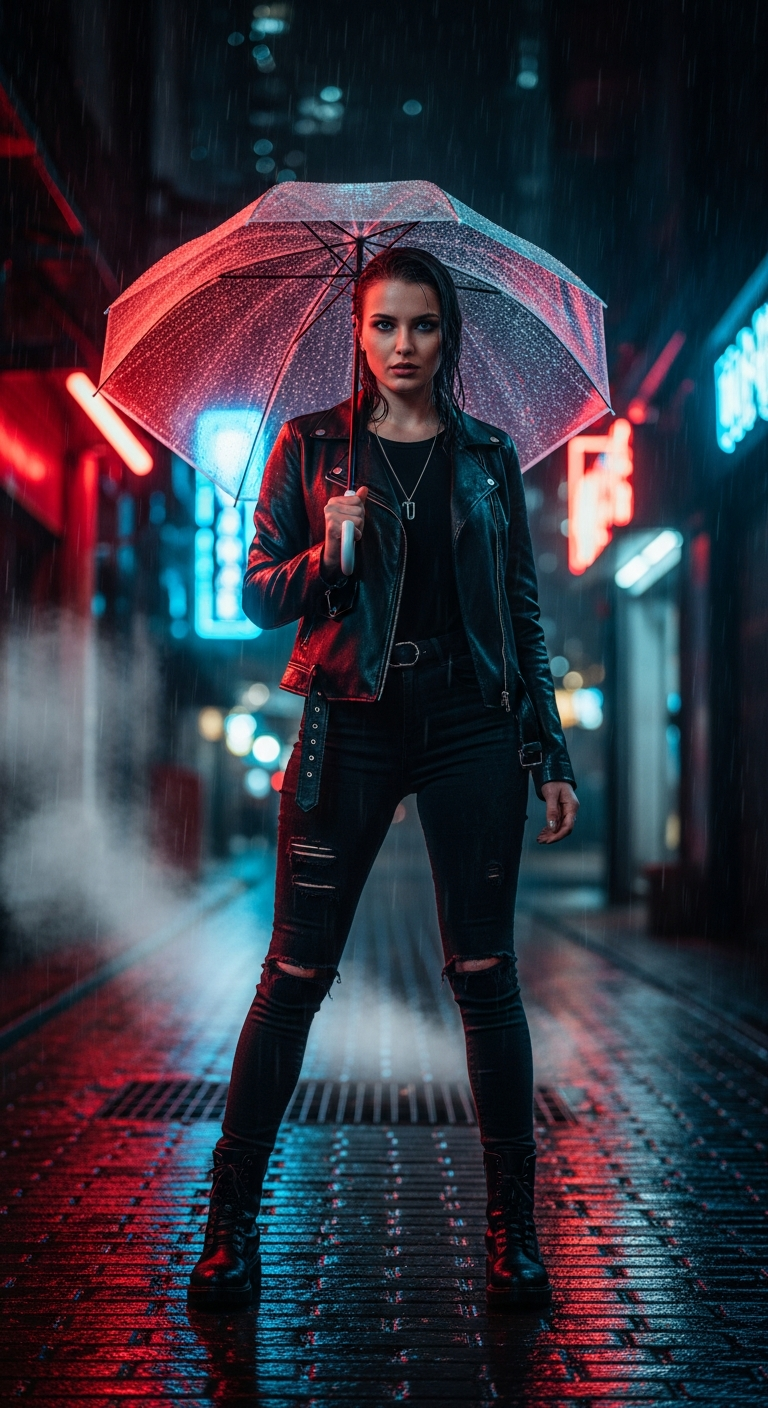
Neon Rain City Portrait is a cinematic portrait photography style that combines cyberpunk aesthetics, dramatic neon lighting, and rain-soaked urban environments to create moody, ultra-realistic AI-generated images. Using detailed prompts with specific lighting, lens, and atmosphere cues, you can generate stunning professional-grade portraits that look like high-budget film stills.
Imagine stepping into a scene straight out of Blade Runner — slick wet cobblestones, electric neon reflections bleeding into puddles, steam curling up from the ground, and a subject who looks like they absolutely own the night. That's exactly the energy behind the Neon Rain City Portrait style, and right now it's one of the most jaw-dropping trends in AI cinematic portrait photography. If you've been scrolling through AI art communities wondering how people are pulling off these insanely cinematic shots, you're in the right place.
What is Neon Rain City Portrait Style?
Neon Rain City Portrait is a subgenre of cinematic portrait photography that draws heavily from cyberpunk visual culture, noir film aesthetics, and high-end fashion photography. The core ingredients are simple but powerful: a compelling human subject, a rain-drenched urban nightscape, and an explosion of neon color lighting everything from below and behind.
What makes this style so visually arresting is the interplay of light and water. Rain transforms any urban environment into a canvas of reflection — every puddle becomes a mirror, every wet surface turns into an opportunity for color to multiply and dance. Add neon signs in bold reds, blues, and purples, and suddenly you have a scene with incredible depth and drama.
The style borrows liberally from iconic cinematic references — think the visual language of films like Blade Runner 2049, Ghost in the Shell, and Cyberpunk 2077's concept art. But unlike those futuristic worlds, Neon Rain City portraits feel grounded and wearable, blending real-world fashion with otherworldly atmosphere.
In AI-generated cinematic portrait photography, this style has exploded in popularity because modern models handle lighting simulation, wet textures, and bokeh with extraordinary realism. When prompted correctly, the results genuinely look like they came from a $50,000 fashion shoot.
The Viral Prompt
Prompt
A cinematic ultra-realistic portrait of a stylish young woman standing confidently in a dark, rain-soaked cyberpunk alleyway at night. The wet cobblestone ground reflects vibrant red, blue, and purple neon signs from surrounding futuristic buildings and shopfronts. Steam billows softly from nearby grates, adding to the atmosphere. She is wearing a sleek black leather jacket, dark ripped skinny jeans, and heavy-duty combat boots, with a single delicate silver chain necklace. Her left hand holds a transparent umbrella, which beautifully catches and refracts the multicolored neon lights. She looks directly into the camera with an intense, captivating gaze, her face slightly wet from the rain. Raindrops glisten on her hair and skin. Dramatic rim lighting from the neon signs highlights her silhouette, creating a powerful and mysterious mood. A soft bokeh blurs the distant city lights into shimmering orbs. Dark, moody atmosphere, shallow depth of field, stunning reflections, realistic skin texture, high detail, cinematic color grading, professional photography, DSLR quality, 85mm lens, ultra detailed, 8K
How to Use This Prompt Step by Step
Getting the most out of this cinematic portrait photography prompt is less about luck and more about understanding what each part is doing. Here's how to deploy it effectively.
Step 1 — Choose your AI platform. This prompt performs exceptionally well on Midjourney (v6 and above), Stable Diffusion XL with a cinematic LoRA applied, and Adobe Firefly. Each platform will give you a slightly different interpretation, so it's worth testing across a couple to find your preferred look.
Step 2 — Paste the full prompt as-is first. Before you start tweaking, run the original prompt and see what you get. The prompt is densely layered with detail — clothing, lighting, environment, camera specs, and mood cues all work together. Running it clean gives you a solid baseline to compare against your edits.
Step 3 — Adjust the subject description to match your vision. The original prompt features a young woman, but you can swap in any subject — a man in a long trench coat, an elderly woman with silver hair, even a non-human character. The environment and lighting details remain just as effective regardless of who's standing in the alley.
Step 4 — Experiment with neon color palettes. The default uses red, blue, and purple — a classic cyberpunk trio. Try swapping to gold and teal for a more elegant noir feel, or green and orange for a grittier, more dystopian vibe. Just update the color references in the neon signs and reflection descriptions.
Step 5 — Fine-tune with negative prompts. On platforms that support negative prompting, add: cartoon, anime, oversaturated, flat lighting, blurry face, low quality, distorted hands. This keeps your output firmly in the photorealistic cinematic portrait photography territory.
Tips to Get the Best Results
Lean into the lighting language. The most cinematic AI portraits succeed because of precise lighting descriptions. Rim lighting, neon color temperatures, and the direction of light all matter enormously. If your result feels flat, add phrases like "backlit by deep crimson neon" or "cool blue fill light from the left" to give the AI clearer direction.
The transparent umbrella is your secret weapon. Don't skip this detail. A transparent umbrella catching and refracting multicolored neon is one of those prompt elements that genuinely elevates the image — it creates a natural halo of color around the subject and adds a layer of visual complexity that screams high-end fashion photography.
Specify the lens and camera style every time. The "85mm lens, DSLR quality, shallow depth of field" trio in this prompt is doing heavy lifting. The 85mm focal length is the classic portrait lens — it creates that slightly compressed, flattering perspective. Always include a specific lens focal length in your cinematic portrait photography prompts.
Don't over-describe the background. The cyberpunk alley details are vivid but not exhaustive — there's room for the AI to make creative choices about signage, architecture, and ambient elements. Over-specifying the background can sometimes cause the AI to lose focus on the subject. Trust the atmosphere words: wet, neon, steamy, dark.
Upscale your output. Given the 8K and ultra-detailed cues in the prompt, always run your favorite result through an upscaler like Topaz Gigapixel or the platform's own upscale feature before using or sharing it. The detail in the rain droplets on skin and the neon reflections in wet cobblestones is where this style really shines at full resolution.
Why This Style Is Trending
Neon Rain City portraits are everywhere right now, and it's not hard to see why. We're living through a massive cultural moment for cyberpunk and neo-noir aesthetics — from blockbuster games like Cyberpunk 2077 to films, streetwear fashion, and music video visuals. The internet has a deep appetite for this dark, electric, rain-soaked visual language.
From a pure photography standpoint, this style ticks every box for shareable content. It's dramatic without being chaotic. It's dark but full of color. It features a relatable human subject in an extraordinary environment. These are exactly the visual qualities that drive engagement on Instagram, Pinterest, and AI art communities.
There's also something emotionally resonant about rain-soaked neon city portraits. Rain has always been a cinematic shorthand for introspection, tension, and beauty. Pair it with the warm-cold contrast of neon light on wet skin, and you've got imagery that triggers a genuinely powerful emotional response — one that people want to save, share, and use as wallpapers, profile photos, and inspiration boards.
For creators and photographers, this style also serves as incredible inspiration for real-world shoots. Many professional photographers are now using these AI-generated cinematic portrait references as mood boards to plan actual rain-night shoots in urban environments.
What AI tools work best for generating Neon Rain City portraits?
Midjourney v6 and Stable Diffusion XL with cinematic LoRA models consistently produce the most photorealistic results for this style. Adobe Firefly is also a strong choice if you need commercially safe outputs. Each handles neon lighting and wet textures slightly differently, so testing across platforms is worthwhile.
Can I use this prompt for male subjects or non-binary characters?
Absolutely. Simply replace the subject description — swap "stylish young woman" for whatever fits your creative vision. The environment, lighting, and technical specs in the prompt work equally well for any subject. You can also adjust clothing details to match your character's style.
Why does my output look flat instead of cinematic?
Flat results usually mean the lighting language isn't landing. Try adding more specific light source descriptions — "neon signage casting deep magenta rim light from the right" — or add "Rembrandt lighting, volumetric fog, cinematic grade" to your prompt. Also ensure you're not using a platform or model that defaults to illustration style.
How do I change the neon color palette while keeping the same mood?
Simply replace the color references in the neon signs and reflections descriptions. For a warmer, more golden noir feel try amber, gold, and deep red. For a cold tech-thriller vibe, go with icy blue, white, and electric green. The mood stays powerful as long as you keep the rain, the rim lighting, and the dark ambient environment.
What's the significance of specifying "85mm lens" in the prompt?
The 85mm focal length is widely known as the ideal portrait lens in professional photography. Specifying it tells the AI to generate an image with that characteristic slightly compressed, flattering perspective and natural subject separation from the background. It's a small detail that makes a big difference in how realistic and professional the portrait looks.
Can I use these generated portraits commercially?
It depends on the platform. Midjourney's commercial use terms vary by subscription tier. Adobe Firefly outputs are designed for commercial use. Always check the terms of service for the specific AI tool you're using before publishing or selling images generated with this or any other prompt.
How can I use this style as a reference for a real photography shoot?
These AI images make excellent mood boards. For a real-world version, scout urban locations with neon signage, shoot on a rainy night or use a hose and reflective surfaces to simulate rain, bring colored gels for your strobes to mimic neon lighting, and use a real 85mm lens at f/1.8 for that shallow depth of field. The AI output shows you exactly what to aim for.
Why do the rain and wet texture details matter so much in this style?
Water is a natural light multiplier — it reflects, refracts, and scatters colored light in ways that dramatically increase visual complexity and beauty. In this style, every raindrop on skin and every puddle reflection adds depth and realism. Modern AI models simulate wet surfaces and specular highlights on skin with impressive accuracy, which is a big part of why this style looks so cinematic at high resolution.
Now that you've got the full blueprint for creating stunning Neon Rain City portraits, go fire up your favorite AI tool, drop in this prompt, and get ready to produce cinematic portrait photography that stops the scroll every single time.