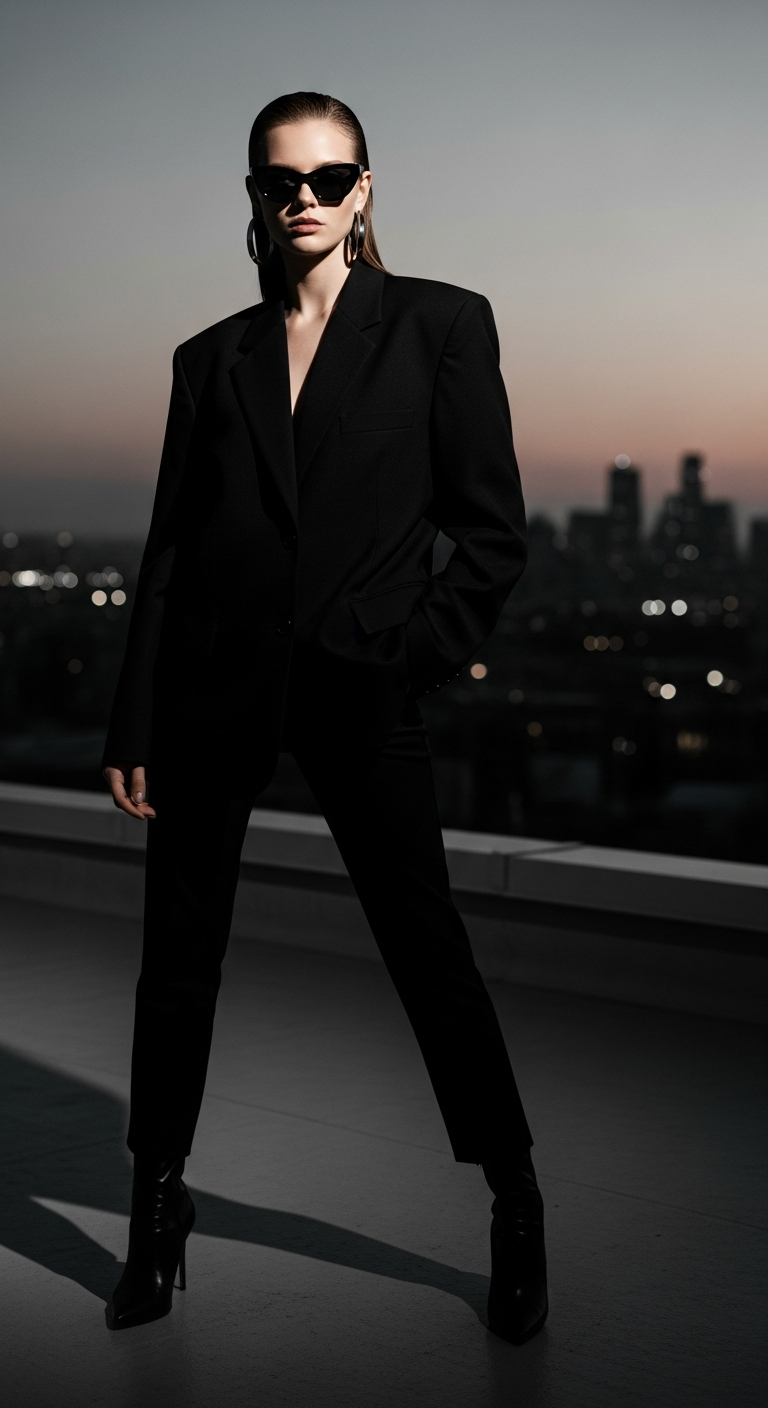
Monochrome Urban Muse is a high-contrast, black-and-white AI photo editing style inspired by Helmut Newton's iconic fashion photography. It combines dramatic chiaroscuro lighting, sharp shadows, and cinematic depth to create powerful, editorial-quality portraits. This style is perfect for anyone wanting to generate striking, magazine-worthy AI images with a sophisticated urban edge.
If you've ever scrolled through a fashion magazine and stopped cold at a black-and-white photograph — the kind where the light carves a face like sculpture and the shadows feel almost alive — you already understand the pull of this style. Now, thanks to AI image generation, you can recreate that exact feeling with a single well-crafted prompt. Welcome to the Monochrome Urban Muse, the cinematic portrait photography trend taking AI art communities by storm.
What is Monochrome Urban Muse?
Monochrome Urban Muse is a cinematic portrait photography style rooted in the visual language of legendary fashion photographer Helmut Newton. His work was defined by stark contrasts, bold silhouettes, powerful women, and a gritty yet glamorous urban atmosphere — and this AI style channels every bit of that energy.
At its core, this style is about tension. Light against dark. Softness against hard architecture. Vulnerability against power. The subject — typically a sharply dressed figure in an urban setting — commands the frame with an almost aggressive confidence, while the monochrome palette strips away distraction and forces you to focus on form, texture, and expression.
Unlike soft, pastel-toned AI portraits or golden-hour lifestyle shots, Monochrome Urban Muse is unapologetically dramatic. It uses hard, directional artificial lighting to create chiaroscuro effects, shallow depth of field to isolate the subject, and subtle film grain to add an authentic, analog quality. The result feels less like a digital render and more like a vintage print from a legendary photographer's archive.
For cinematic portrait photography enthusiasts, this style hits a sweet spot: it's technically demanding enough to look genuinely professional, yet with the right prompt, completely accessible to anyone using AI generation tools.
The Viral Prompt
Prompt
A cinematic ultra-realistic portrait of a stylish young woman standing on a sleek, minimalist urban rooftop at twilight, with the sprawling, softly blurred city skyline in the background, adorned with glittering distant lights. She is wearing a sharply tailored, oversized black blazer with strong shoulders, sleek black trousers, and high-heeled black ankle boots. Her accessories include a pair of bold, futuristic black cat-eye sunglasses and chunky silver hoop earrings. She stands with one hand confidently in her pocket, gazing directly into the camera with an intense, enigmatic expression, her posture exuding power and sophistication, reminiscent of a high-fashion editorial. The scene is rendered in a dramatic, high-contrast black and white, evoking the iconic style of Helmut Newton, with deep, sharply defined shadows and stark highlights across her face and silhouette, emphasizing texture and form. Hard, directional artificial light from unseen sources casts long, graphic shadows, creating a chiaroscuro effect. Gritty, sophisticated mood, shallow depth of field, subtle film grain texture. realistic skin texture, high detail, cinematic color grading, professional photography, DSLR quality, 85mm lens, ultra detailed, 8K
How to Use This Prompt Step by Step
Getting the most out of this cinematic portrait photography prompt is straightforward once you understand the workflow. Here's exactly how to put it to work.
Step 1: Choose your AI platform. This prompt is optimized for tools like Midjourney, DALL·E 3, Stable Diffusion, or Adobe Firefly. Midjourney tends to handle high-contrast black-and-white portraiture especially well, so if you have access, start there. For Midjourney, paste the prompt directly and add --ar 2:3 --style raw --v 6 to the end for a portrait-oriented, photorealistic output.
Step 2: Paste the prompt as-is for your first generation. Don't modify it yet. Run the base prompt and evaluate the results. You're looking for strong shadow definition, a clear silhouette, and that signature high-contrast monochrome feel. If the image comes out too soft or too gray, move on to refinement.
Step 3: Adjust for your platform's strengths. In Stable Diffusion, you can add negative prompts like color, soft lighting, low contrast, blurry, cartoon to push it further into the Helmut Newton territory. In DALL·E 3, try rephrasing the opening as "A professional fashion editorial photograph in the style of Helmut Newton..." to trigger stronger stylistic recognition.
Step 4: Upscale and refine. Once you have a result you like, upscale it using your platform's built-in tools or a third-party service like Topaz Gigapixel. The 8K detail instruction in the prompt should give you plenty to work with at high resolution.
Step 5: Final touches. Export your image and, if desired, run it through Lightroom or Photoshop to deepen the blacks, boost clarity, and add a very light vignette. This last step can push a great AI image into genuinely stunning territory.
Tips to Get the Best Results
Lean into the lighting language. The phrase "hard, directional artificial light from unseen sources" is doing a lot of heavy lifting in this prompt. If your results look flat, try adding "single key light, strong rim light, deep shadow fill" to reinforce the chiaroscuro instruction. Lighting specificity is everything in cinematic portrait photography.
Keep the wardrobe monochromatic in your prompt. One reason this prompt works so well is that every clothing element is black — blazer, trousers, boots. Introducing other colors (even in a black-and-white render) can confuse the AI's tonal mapping. Stick to high-contrast wardrobe choices: black, white, or deep charcoal.
Reference real photographers by name. "Helmut Newton" is a powerful stylistic anchor in this prompt. You can experiment with other names too — "Peter Lindbergh," "Richard Avedon," or "Paolo Roversi" — each will shift the mood subtly while keeping the editorial quality high.
Experiment with the background blur intensity. The bokeh city skyline adds depth without competing with the subject. If you want more environmental storytelling, try "slightly sharper background with visible architectural details" — but be careful not to pull focus away from your subject.
Film grain is your friend. The "subtle film grain texture" instruction is what separates this from looking like a sterile digital render. If your output looks too clean, explicitly add "analog film grain, 35mm grain texture, vintage photographic quality" to your prompt iteration.
Why This Style Is Trending
Monochrome Urban Muse is exploding right now for a few interconnected reasons, and understanding them helps you stay ahead of the curve.
First, there's a massive cultural wave of nostalgia for analog aesthetics. Film photography has been surging in popularity among Gen Z and millennials, and black-and-white imagery carries that same romantic weight. In a social media landscape dominated by oversaturated color grading, a striking monochrome image stops the scroll instantly.
Second, the fashion industry itself is in a high-contrast moment. Power dressing is back — big shoulders, sharp tailoring, bold accessories — and this AI style captures that energy perfectly. When your AI-generated image looks like it could have been pulled from a 1990s Versace campaign, it resonates on a deep cultural frequency.
Third, AI generation tools have reached a quality threshold where cinematic portrait photography prompts can produce genuinely photorealistic results. A year ago, getting consistent skin texture and accurate clothing drape from an AI was hit or miss. Now, with the right prompt engineering, the outputs are remarkable enough to share professionally.
Finally, Helmut Newton's aesthetic has been having a broader cultural revival — retrospectives, documentaries, and editorial homages have brought his work to a new generation of visual creators who are hungry to work in that idiom. AI makes that accessible to everyone, not just photographers with expensive studio setups and fashion budgets.
What AI tools work best for this cinematic portrait photography style?
Midjourney V6 delivers the most consistently photorealistic black-and-white portraiture, especially for high-contrast editorial looks. Stable Diffusion with a photorealistic checkpoint and DALL·E 3 are strong alternatives. Adobe Firefly is improving rapidly and integrates well with Lightroom for post-processing.
Can I use this prompt for male subjects or non-binary characters?
Absolutely. Simply replace the subject description — "stylish young woman" — with your preferred subject. The lighting setup, wardrobe direction, and atmospheric instructions all translate equally well. The Helmut Newton aesthetic works powerfully across all subject types.
Why does my output look gray instead of high-contrast black and white?
This usually means the AI is defaulting to a softer tonal interpretation. Try adding "pure black shadows, bright white highlights, no midtone gray, maximum contrast monochrome" to your prompt. In Midjourney, the --style raw parameter can also prevent over-softening.
What aspect ratio should I use for this style?
A 2:3 portrait ratio (roughly equivalent to a 35mm film frame) is ideal and most faithful to traditional fashion editorial photography. In Midjourney, add --ar 2:3. For Instagram, a 4:5 ratio works well without cropping too aggressively.
Is this style appropriate for professional portfolio work?
Yes, with some caveats. AI-generated images are increasingly accepted in creative and editorial contexts, but always disclose the AI origin when required. The quality of outputs from this prompt is high enough for concept presentations, mood boards, and personal creative projects.
How do I add more personality to the subject without losing the editorial feel?
Focus on small expressive details: a slight smirk, windswept hair, a turned-up collar. Add these as specific descriptors in the facial expression and styling sections of the prompt. Avoid over-describing emotions — subtle is always more powerful in this aesthetic.
Can I adapt this prompt for indoor settings instead of a rooftop?
Definitely. Swap the rooftop environment for descriptions like "a stark, white minimalist studio," "a dimly lit parking garage," or "an abandoned industrial warehouse." The lighting and wardrobe instructions remain the same — just anchor them to a new space with strong geometric or architectural character.
What post-processing should I do after generating the image?
In Lightroom or Photoshop, deepen the blacks using the Blacks and Shadows sliders, boost Clarity and Texture for skin and fabric detail, and add a subtle vignette to frame the subject. A very light grain overlay (if your AI output is too clean) can also enhance the analog feel dramatically.
Now that you have the prompt, the technique, and the context, there's only one thing left to do — generate your first Monochrome Urban Muse image and share it with the PromptHunt community to show the world what cinematic portrait photography powered by AI truly looks like.