




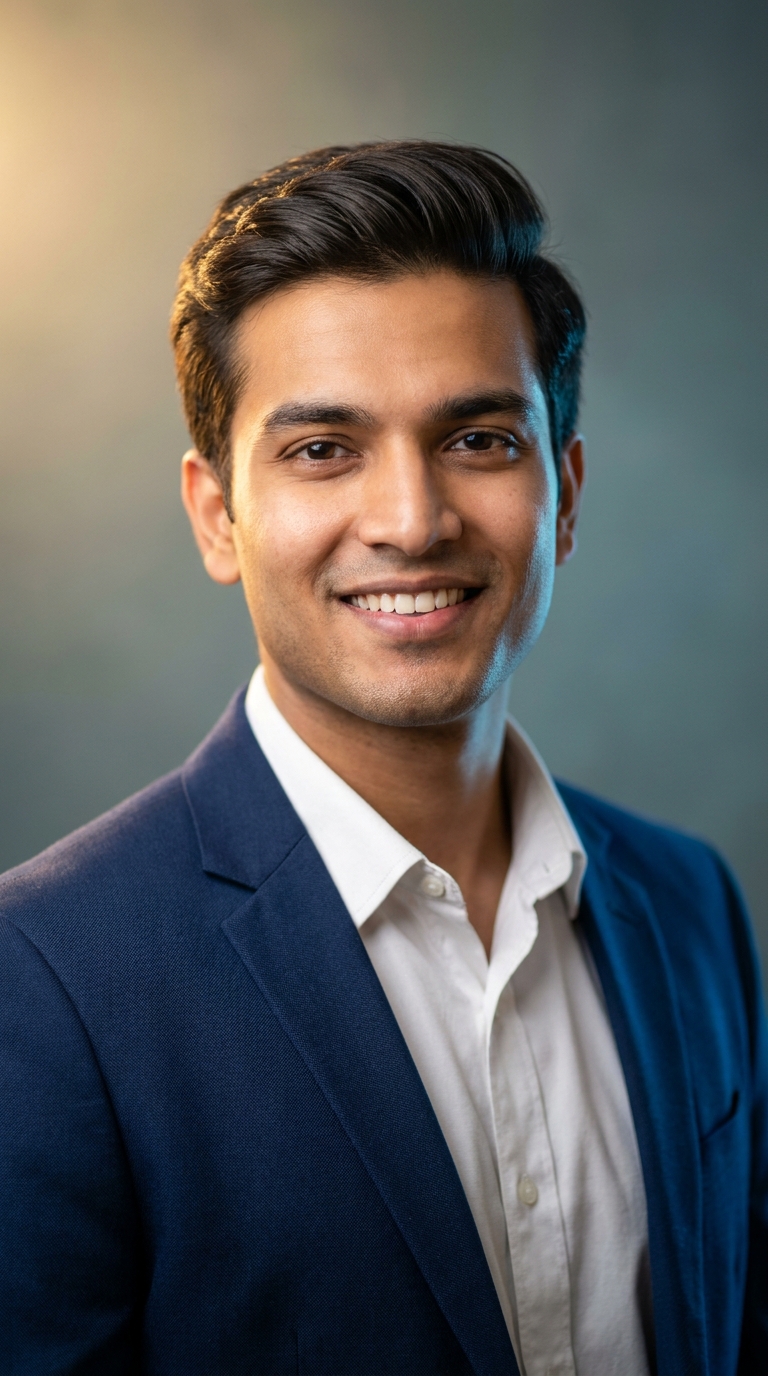
An AI professional headshot prompt generates a studio-quality LinkedIn profile photo using tools like Midjourney, Leonardo AI, or Stable Diffusion — no photographer required. This specific prompt produces a photorealistic Indian male professional portrait with warm studio lighting, shallow depth of field, and cinematic colour grading at magazine-cover quality.
A professional photographer in Mumbai charges anywhere from ₹5,000 to ₹25,000 for a headshot session. A decent AI prompt costs you exactly nothing and fifteen minutes of your Saturday. I'm not saying photographers are obsolete — I'm saying your LinkedIn profile shouldn't look like a passport photo taken in a government office fluorescent hellhole. The AI professional headshot trend is solving a real problem, and this particular prompt is doing it rather well.
What Is an AI Professional Headshot?
Simple concept. You feed a detailed text prompt into an AI image generator. The AI produces a photorealistic portrait that looks like it was shot in a proper studio. No camera. No backdrop. No photographer sighing at you to "look natural" while you stand there looking anything but.
The good ones — and this prompt qualifies — nail three things: lighting that sculpts the face properly, a background that doesn't fight for attention, and skin rendering that looks human rather than plastic-doll creepy. Nine times out of ten, the failure point is the skin. This prompt addresses that directly by specifying "natural texture preservation." Smart move.
The style here is corporate-warm. Not the stiff, fluorescent-lit headshot of 2009. Think magazine cover for a business publication. The kind of photo that makes recruiters pause their scroll.
The AI Professional Headshot Prompt That's Getting People Hired
A confident young Indian professional, male, mid-20s, wearing a crisp navy blue blazer over a white dress shirt, warm brown skin with natural texture, sharp defined jawline, neatly styled dark hair with a subtle side part, warm genuine smile showing teeth, direct eye contact with camera, shot in 9:16 vertical portrait orientation, studio-quality soft box lighting with warm golden key light from upper left and cool rim light from behind creating subtle shoulder glow, shallow depth of field with creamy bokeh background in muted teal-gray gradient, photorealistic ultra-sharp facial detail, magazine cover quality, 8K resolution, professional corporate headshot style, subtle skin retouching preserving natural texture, cinematic color grading with warm highlights and cool shadows, LinkedIn premium profile aesthetic
That's a well-built prompt. It's not asking the AI to guess — it's giving specific lighting direction, colour palette, lens behaviour, and mood. The dual-light setup (warm key from upper left, cool rim from behind) is borrowed directly from professional portrait photography. The AI responds to that specificity. Vague prompts get vague results. This is the opposite of vague. You might say it's... professionally developed. (I'll see myself out.)
How to Use It Step by Step
Step 1: Choose your tool. Midjourney produces the most cinematic results for this style. Leonardo AI is a strong second and has a free tier. Stable Diffusion with a portrait-tuned model works if you want full control. For beginners, Leonardo AI is the path of least resistance.
Step 2: Paste the prompt as-is. Don't paraphrase it. The specific phrases — "soft box lighting," "creamy bokeh," "cinematic color grading" — are trained vocabulary these models recognise. Changing them to plain English ("nice light," "blurry background") will cost you quality.
Step 3: Set your aspect ratio to 9:16. The prompt specifies this. In Midjourney, add --ar 9:16 at the end. In Leonardo AI, set this in the canvas settings before generating.
Step 4: Generate four variations. Most platforms give you a batch. Pick the one where the eyes have the sharpest detail. Eyes are everything in a headshot. If the eyes look slightly off, the whole image reads as AI.
Step 5: Run a face upscale. Use the platform's built-in upscaler or run the result through Magnific AI or Topaz Photo AI. This sharpens fine skin detail and makes the image genuinely print-quality.
Step 6: Crop for LinkedIn. LinkedIn profile photos display square. Crop to 400x400 pixels minimum, centred on the face. Done.
Tips for Best Results
Nail the lighting keywords. "Warm golden key light from upper left" is doing serious heavy lifting here. If you generate multiple versions, try swapping it to "Rembrandt lighting" or "butterfly lighting" for different moods. Same prompt, different light, different personality.
The background gradient matters. Teal-gray reads as polished and modern without being distracting. If you're in a creative field, try "muted sage green gradient." Finance or law? Keep the original teal-gray. It says "I am very serious about my spreadsheets."
Don't over-specify the face. Ironically, adding too many facial descriptors (square jaw, high cheekbones, specific eye shape) can cause AI models to produce uncanny results. The current prompt's balance is deliberate. Trust it.
Regenerate if teeth look odd. AI teeth are the industry's dirty little secret. Nine times out of ten, one generation in every four will have teeth that belong in a horror film. Regenerate without guilt. That's what the button is for.
Rule of thumb: If the image looks too perfect — skin like marble, lighting like a car advert — add "subtle natural skin imperfections" to the prompt. Paradoxically, slight realism makes it look more professional, not less.
Why This AI Professional Headshot Style Is Trending in India Right Now
Three reasons, none of them complicated.
First, LinkedIn adoption in India is growing fast. Over 101 million Indian users as of 2024, and the platform rewards profile completeness with algorithmic visibility. A quality headshot is the single fastest improvement most profiles can make.
Second, professional photography access is uneven. In Tier 1 cities it's expensive. In Tier 2 and Tier 3 cities, finding a photographer who does proper corporate headshots — not wedding portraits hastily repurposed — is genuinely difficult. AI fills that gap without requiring anyone to travel to Mumbai.
Third, the cultural specificity of this prompt matters. Most LinkedIn headshot prompts in circulation were built around Western features and Western lighting conventions. This one was built for warm brown skin, which requires different lighting ratios to render faithfully. That's not a small detail. It's why this prompt specifically is getting shared in Indian professional communities.
Honest Opinion — When NOT to Use This
Here's the part I actually enjoy writing. Let's be straight about the limits.
This prompt generates a fictional person. It does not generate you. If your goal is a profile photo that looks like you — your actual face, your actual smile — this prompt alone won't do that. You'd need a tool like Astria, Fooocus with IP-Adapter, or similar face-injection workflows that take your photos as reference. That's a different article, but it's the honest caveat.
What this prompt does brilliantly: it shows you the aesthetic you're aiming for. Run it, study the output, and then brief an actual photographer with "I want this look." You'll save yourself the frustration of a photographer producing something generic when you had a specific vision. The prompt becomes a mood board. That's genuinely useful, even if you never post the AI image itself.
Also — and I mean this — don't use a fully AI-generated face as your actual LinkedIn profile if you're in a field where authenticity matters (and most fields do). Recruiters are getting better at spotting AI portraits. The uncanny valley is real and HR professionals have been living in it long enough to recognise the postcode.
Use this to understand the style. Use it as a reference. Use it to generate internal company assets or illustrative content. Just be honest about what it is.
Which AI tool works best for this professional headshot prompt?
Midjourney V6 produces the most cinematic, magazine-quality results. Leonardo AI is the best free option. Stable Diffusion with a portrait-tu
How to use this ai professional headshot prompt
More prompts to explore



















AI Photo Editing Prompts