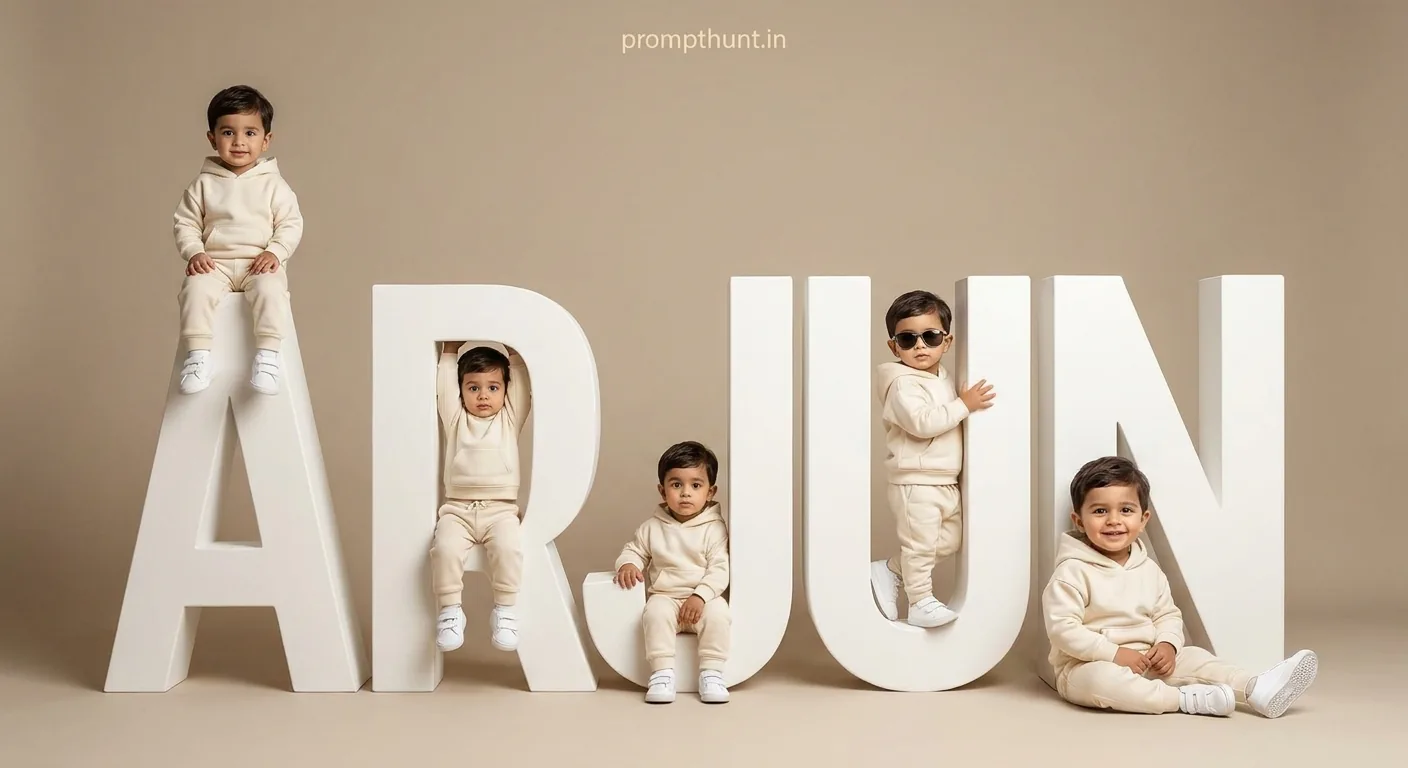




A Monochromatic Minimalist Baby Studio Portrait uses AI to place your toddler across multiple poses around large 3D white name-block letters, dressed in a cream tracksuit, in a single composite image. Upload your child's photo into Gemini, paste the prompt, and the AI handles the rest — same face, every panel, professional studio finish.
Your kid's first birthday is three weeks away. You want something special. Not "balloons from the supermarket" special — more "frame it above the fireplace for the next twenty years" special. The Monochromatic Minimalist Baby Studio Portrait trend is exactly that. One image. Multiple poses. Giant white block letters spelling out your child's name. The whole thing looks like it cost a professional photographer four hours and a studio booking fee. It cost you nothing but a decent photo and about ninety seconds of copy-pasting. Not bad for a Tuesday afternoon.
Upload your toddler's photo into Gemini, paste the prompt below with their name filled in, and get a composite studio portrait of your child in multiple poses around 3D white name-block letters — all in a cream monochromatic aesthetic that looks genuinely expensive.
What Exactly Is a Monochromatic Minimalist Baby Studio Portrait
Think of it as the "Old Money" aesthetic applied to baby photography. Every element — the clothing, the props, the background, the lighting — sits in the same narrow band of cream, ivory, off-white, and warm beige. Nothing competes for attention. The only star is the child.
The 3D white block letters are the centrepiece. They are large sculptural props, big enough for a toddler to sit on, hang from, or peek through. The name is spelled vertically, so the whole structure becomes a playground and a sign simultaneously. Multiple composite versions of the same child appear in the same frame — one sitting on top of the letters, one hanging from the side, one on the floor smiling, one wearing tiny sunglasses like a little CEO. (The sunglasses version is always the best one. Every time.)
The style borrows directly from high-end commercial baby photography studios. The kind with a waiting list and prices that make you quietly sit down. AI removes the waiting list and the sitting-down-in-shock part.
The Prompt
Copy this exactly. Replace the word "name" in the instruction with your child's actual name — the AI will spell it out in the 3D letters.
The uploaded photo is the master reference for this character. Preserve the exact facial features, face shape, skin tone, and identity from the uploaded image exactly. Create a composite studio portrait of a toddler boy posed in multiple positions around large 3D white block letters that spell out a name vertically. The child wears a matching cream/off-white hoodie tracksuit set with white sneakers throughout all poses. Style is clean monochromatic minimalist with an "Old Money Neutral" aesthetic. Color palette is entirely cream, ivory, off-white, and beige with a warm neutral studio background. The 3D letters are matte white sculptural props, large enough for the child to sit on top, hang from, sit inside, and lean against. Multiple composite versions of the same child appear simultaneously — sitting atop the letters, hanging from the sides, sitting inside letter gaps, wearing sunglasses in one panel, and standing confidently leaning against the structure in a hero full-body pose. One version sits casually on the floor in front of the letters smiling. Lighting is soft, diffused, even studio lighting with no harsh shadows, creating a bright airy feel. Mood is playful, celebratory, and luxurious. Shot in a professional white studio setting. Photorealistic quality, sharp details, commercial photography aesthetic. Add a small, thin, professional 'prompthunt.in' text watermark at the top center of the image. The watermark should be subtle, use a color that matches the image's color palette, and appear lightweight and elegant — not distracting.
How to Use It — Step by Step
This prompt is built around a reference image. Gemini needs to see your child's face before the prompt does anything useful. Skip that step and you get a generic stock-photo toddler. Follow the steps and you get your actual child, spelled out in letters across a studio backdrop.
Step 1. Open Google Gemini on your phone or browser. Make sure you are using Gemini 2.0 Flash or the most current model available — the image generation quality varies significantly by model.
Step 2. Upload a clear photo of your child as the reference image. Use the image attachment button before you type anything. The photo should show the face clearly — front-on, good lighting, no heavy filters. A recent birthday photo or a simple natural-light shot works perfectly. This uploaded photo becomes the face for every panel in the composite.
Step 3. Paste the full prompt into the text field. Before you hit send, mentally note where the name should go — the prompt says "spell out a name vertically." You can either add a sentence at the end of the prompt specifying the name, for example: "The name to spell is ARYAN." or type it as a follow-up message immediately after.
Step 4. Hit send. Gemini will generate the composite image using your child's uploaded photo as the master reference. The AI preserves the facial features, skin tone, and face shape across every pose.
Step 5. If the first result is not quite right — name misspelled, a pose looks off, the likeness drifted slightly — type a follow-up correction without uploading again. Something like "Regenerate with sharper likeness to the uploaded photo" usually tightens it up.
Tips for Best Results
The reference photo is doing most of the heavy lifting here. A good input photo means a good output. A blurry selfie from three metres away means Gemini is essentially guessing. Here is what actually helps.
Use a photo where the face takes up at least a third of the frame. Passport-style clarity is the goal. Not a passport-style expression though — a natural smile works far better for the playful mood of the final image.
Avoid photos with strong coloured lighting. A child photographed under red party lights or yellow fluorescent overheads will confuse the model's skin tone calibration. Natural window light or a simple flash photo from a phone is genuinely ideal.
If the name has more than five or six letters, the vertical stack of 3D letters gets tall. Gemini handles this fine, but the child-to-letter scale can look slightly off on longer names. A follow-up prompt asking it to "scale the letters proportionally to the child's height" tends to fix this cleanly.
For a girl version, add "toddler girl" to the prompt and change the tracksuit description to "cream/off-white matching set" — the hoodie tracksuit reads masculine by default. One small swap and the whole image shifts.
Rule of thumb: regenerate at least twice before deciding the result is not working. Gemini's image generation has genuine run-to-run variation. The second or third output is often noticeably better than the first. (It is basically the AI version of a child who refuses to smile for the first three attempts and then absolutely nails it on the fourth.)
Why This Is Everywhere in India Right Now
The Monochromatic Minimalist Baby Studio Portrait exploded across Indian Instagram and WhatsApp in early 2025 for a fairly simple reason: it maps perfectly onto existing cultural rituals. Naming ceremonies, first birthdays, annaprashan, half-birthdays — Indian families mark these moments with genuine enthusiasm and genuinely good photography. This style delivers the "professional studio" result without the professional studio cost or the logistical challenge of getting a tired toddler to cooperate in an actual studio for ninety minutes.
The name-block element hits especially hard. Seeing your child's name — ARYAN, KAVYA, MIHIR, ZARA — rendered in large sculptural white letters in a beautiful composite image is, frankly, extremely shareable. It went from niche AI trend to WhatsApp family group staple in about six weeks. That is genuinely fast, even by viral standards.
The cream and neutral palette also photographs well on phone screens, prints cleanly, and frames nicely. That is not an accident. It is why commercial photographers use it. The AI version simply made it accessible.
Honest Opinion — When Not to Use This
This style is brilliant for what it is. But it is not right for every situation, and I reckon it is worth being straight about that.
The monochromatic all-white palette is stunning in the image and slightly dull as a standalone print if you have a very colourful home. It works best as a digital keepsake, a framed nursery print, or a WhatsApp share. On a wall next to warm terracotta tiles and maximalist art, it can look a bit sterile.
The composite nature — multiple versions of the same child in one frame — can occasionally produce a slightly uncanny result if the likeness drifts between panels. Nine times out of ten it is fine. But on that tenth attempt, one version of the child will look subtly different from the others, and it will bother you more than it probably should. The fix is to regenerate, not to spend forty-five minutes staring at it trying to figure out which pose looks "off." (I say this from experience.)
Also, if your goal is a proper printed canvas above the mantelpiece, consider using this as a reference image to brief an actual photographer. Show them the AI output, tell them you want this aesthetic. You will get something genuinely archival. The AI version is wonderful. It is not a 60x90cm print-quality photograph