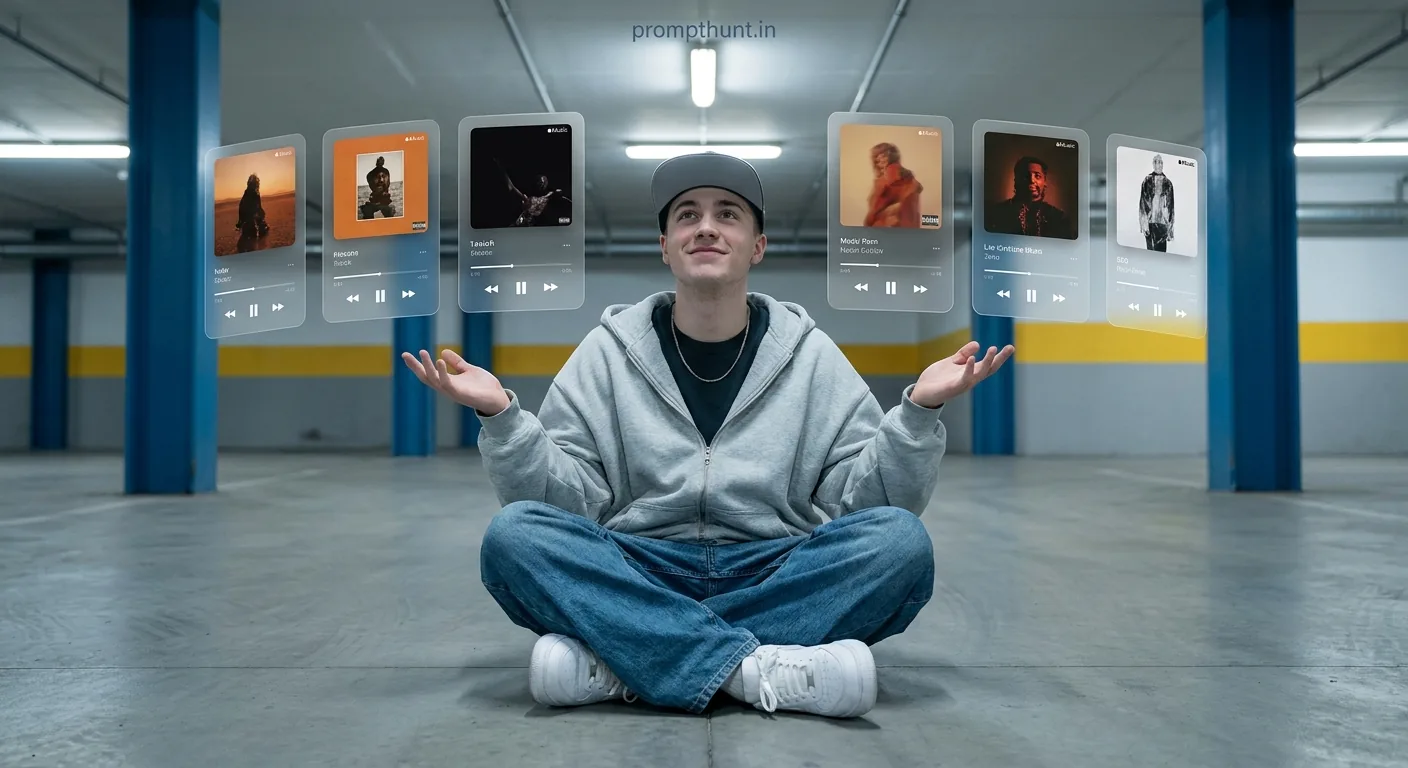




The Floating Music Player AR Visual Effect prompt places your face inside a cinematic urban scene surrounded by six glassmorphism Apple Music-style UI cards. Upload your photo into Gemini, paste the prompt, and the AI transforms you into a music-obsessed digital native with floating AR visuals — no design degree required.
You know that feeling when you have too many songs open at once and your brain just cannot pick one? This prompt turns that exact chaos into high-fashion editorial art. The Futuristic Music Lover / AR Floating UI Aesthetic is everywhere right now — moody parking garages, floating translucent UI cards, oversized fits, and a vibe that screams "I curate playlists the way other people curate personality." If you have ever wanted to look like you live inside an Apple Music feature film, this is your moment. And yes, before you ask — it works on your actual face.
Upload your photo to Gemini, paste this prompt, and you get a cinematic AR editorial image with floating music player cards surrounding your face in a moody urban parking garage — styled like a high-budget Apple Music campaign.
What the Futuristic Music Lover AR Floating UI Aesthetic Actually Is
It is a composite editorial style. Think high-end fashion photography crossed with the UI of a music streaming app crossed with a sci-fi film about someone who loves Spotify way too much.
The look has three ingredients working together. First, the urban backdrop — a concrete parking garage or subway station with blue steel columns and fluorescent lighting. Cold, industrial, quietly cinematic. Second, the outfit — baggy grey hoodie, wide-leg denim, chunky white sneakers, flat-brim cap. Classic streetwear done well. Third, and this is the bit that makes people stop scrolling — the floating glassmorphism music player cards.
Six of them. Translucent. Frosted. Hovering at different angles around the subject like a personal DJ booth made of light. Each one shows song artwork, artist names, progress bars, and playback controls. Styled exactly like Apple Music now-playing screens. The whole composite feels like a screenshot from a world where AR interfaces are just part of daily life. That world is not here yet. But your photo can live there right now.
The color palette does the heavy lifting. Muted grey-blue base, warm accent tones bleeding in from the album art on each floating card. It should not work — cold and warm, digital and human — but it absolutely does. Nine times out of ten, the contrast is exactly what makes the image stop people mid-scroll.
The Prompt — Copy It Exactly
The uploaded photo is the master reference for this character. Preserve the exact facial features, face shape, skin tone, and identity from the uploaded image exactly. Place the character sitting cross-legged on the ground of an urban parking garage or subway station floor, wearing an oversized light grey zip-up hoodie, wide-leg baggy denim jeans, and clean white chunky sneakers, with a flat-brim grey fitted cap and a thin chain necklace. The character has both hands raised slightly with open palms in a "look at all this" gesture. Surrounding the character are 6 floating translucent glassmorphism-style music player UI cards, each displaying different song artwork, artist names, progress bars, and playback controls — styled like Apple Music now-playing screens. The cards float at various angles and distances around the subject in a cinematic arc. Background is a realistic urban parking structure with blue steel columns, yellow striped walls, and concrete floors under cool fluorescent lighting. The overall color palette is muted grey-blue with warm accent tones from the album art. Mood is effortlessly cool, music-obsessed, digital-native. Lighting is soft, even, slightly cool-toned overhead fluorescent. The composite should feel like a high-quality editorial photo with seamlessly integrated AR UI elements. Add a small, thin, professional 'prompthunt.in' text watermark at the top center of the image. The watermark should be subtle, use a color that matches the image's color palette, and appear lightweight and elegant — not distracting.
How to Use This Prompt — Three Steps, No Surprises
This prompt is built around a reference photo system. The AI needs your face first. Without it, you just get a generic character. With it, the result looks like you — same face, same features, completely different universe.
Step 1: Open Gemini and upload your photo. Go to gemini.google.com. Before you type anything, upload a clear photo of your face as the reference image. A well-lit front-facing photo works best. Sunglasses are a bad idea here. Hats too. Give the AI a clean look at you — it is doing a lot of work to preserve your likeness and it deserves decent source material.
Step 2: Paste the full prompt into the chat. Copy the entire prompt from the box above. Do not trim it. Every detail in there — the gestures, the UI card styling, the palette — is doing specific work. Paste it in and send.
Step 3: Review and regenerate if needed. Gemini is good but it is not a mind reader. If the first output is slightly off — the floating cards look too flat, or the face likeness slipped — hit regenerate. You can also add a short follow-up like "make the floating cards more translucent" and it will adjust. Most people nail it within two or three attempts.
Tips for Best Results With the AR Floating UI Aesthetic
A few things separate a decent result from one people actually save and share.
Use a high-resolution source photo. The AI preserves what it can see clearly. A blurry or dark selfie gives it less to work with, and the face likeness suffers. Bright, natural light, straight-on angle, no filters. Boring to take, brilliant to use.
Do not crop your face too tight. Upload a photo that shows at least head and shoulders. The prompt positions your character sitting cross-legged — the AI needs some context about your build to make the full-body composite look proportional.
The glassmorphism cards can vary between runs. Sometimes they look perfect — genuinely translucent, frosted, with crisp UI elements. Other times they look like frosted rectangles with vague shapes on them. If you want sharper UI detail, add this to the end of your prompt: "ensure each floating music card displays clear legible song title text, artist name, and a visible progress bar." That small addition makes a measurable difference.
Rule of thumb — if the background looks great but the face looks slightly off, try a higher resolution upload. If the face looks great but the AR cards look flat, the regenerate button is your friend. These two issues are almost always fixable separately.
Why This Style Is Trending in India Right Now
India has a serious streetwear-meets-digital-art moment happening. The aesthetic started in K-pop fandom edits, jumped into sneaker culture, and landed squarely in the AI photo editing space. The combination of a recognisable music streaming interface with cinematic photography hits a specific cultural nerve — streaming is personal, music is identity, and looking like you live inside your own playlist is the kind of flex that photographs very, very well.
The parking garage setting matters more than it seems. It is an aspirational space — not a fancy studio, not a luxury hotel. It is gritty, real, urban. It feels accessible. "This could be somewhere near me" is a thought that makes people share content. Add the floating AR elements and suddenly the ordinary becomes science fiction. That tension is exactly what drives saves and reposts.
Apple Music's design language is also doing heavy lifting here. Even people who use Spotify recognise the now-playing card layout. The glassmorphism UI is culturally legible in a way that, say, a completely fictional interface would not be. It reads as "near future" rather than "alternate universe." That distinction is subtle but it matters for virality.
Honest Take — When to Use This and When to Skip It
This prompt earns its hype, but it is not for everyone and it is not for every occasion. Let me be straight with you about where it works and where it falls flat.
It works brilliantly as a profile photo for music-adjacent creators — DJs, playlist curators, music bloggers, anyone building a personal brand around sound and culture. It also works as a shareable piece of content on Instagram or LinkedIn if your audience skews young and digitally-native. The visual language is immediately legible. People know what Apple Music looks like, they know what AR UI feels like from gaming and tech culture, and they get the reference instantly.
Where it does not work: professional corporate profiles. Recruiters and hiring managers are not ready for this. If you are updating your LinkedIn headshot, bookmark this page for later and use a different prompt today. Fair call.
It also struggles if your source photo is very formal — sharp blazer, stiff posture. The prompt's energy is loose and effortless. If the reference image is fighting that mood, the composite looks inconsistent. Casual photos produce better results. A hoodie in real life helps the AI commit to a hoodie in the output.
One genuine limitation: Gemini handles face likeness well but not perfectly. If you have a very specific or distinctive feature — a strong beard shape, a very particular hairstyle — it may simplify it slightly. It is not a conspiracy, it is just the nature of generative compositing. The closer your source photo is to the intended aesthetic, the better the AI can preserve what makes you, you. (Yes, I am recommending that you dress like you are already in the prompt. I did warn you I have bad advice sometimes.)
The Bottom Line
The Floating Music Player AR Visual Effect prompt