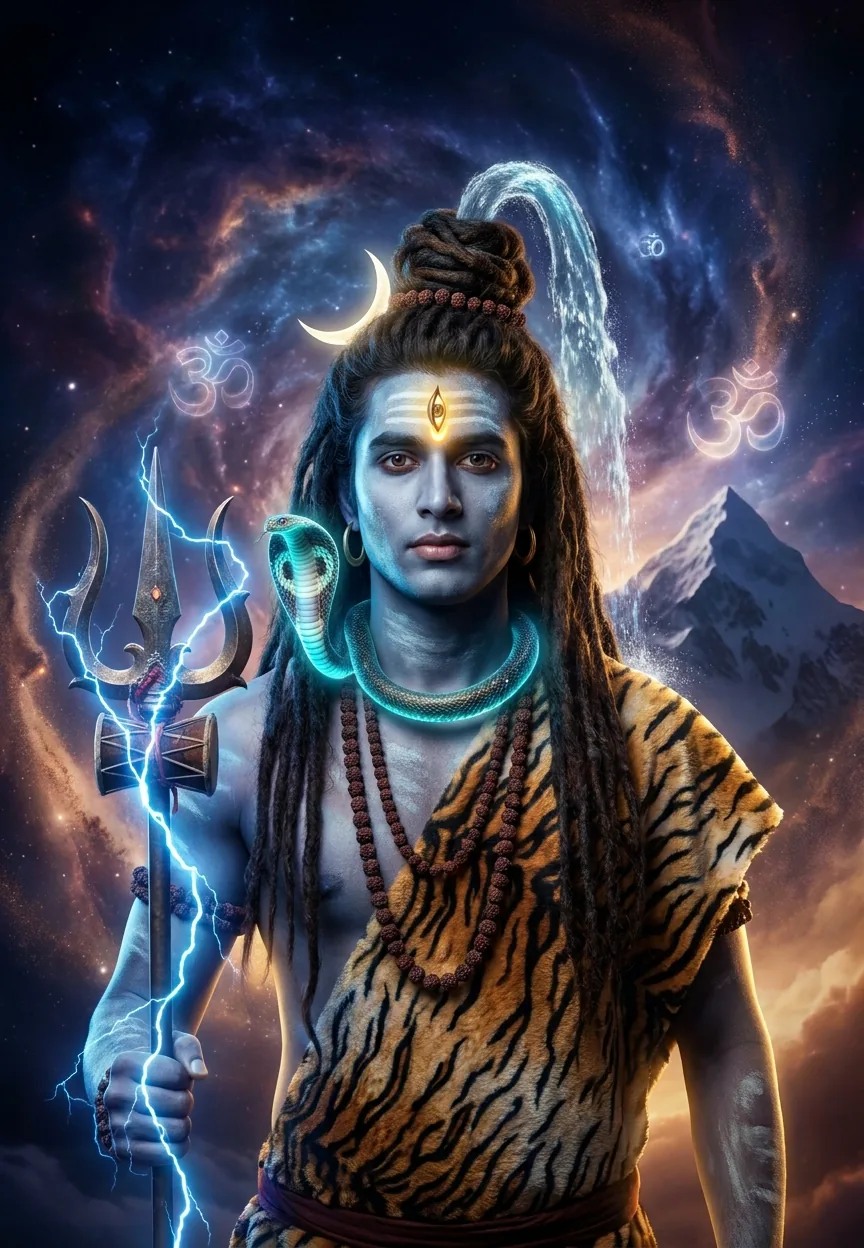



The Lord Shiva Cosmic Warrior prompt transforms your photo into a hyper-realistic divine portrait using Gemini AI. It layers ash-smeared skin, a blazing third eye, sacred Mount Kailash, swirling nebula clouds, and cinematic god rays into a single 9:13 vertical image that looks like a mythological epic and a Hollywood blockbuster had a very spiritual baby.
Lord Shiva Cosmic Warrior Transformation: The Gemini AI Prompt That Hits Different
Nine times out of ten, when someone asks me about mythological AI photo prompts, they want something that looks impressive on a phone screen. This one does that. But the Lord Shiva Cosmic Warrior transformation prompt goes further — it produces images so detailed, so cinematically lit, and so genuinely dramatic that people are sharing them across WhatsApp, Instagram Reels, and YouTube Shorts faster than you can say "Har Har Mahadev." The Mythological and Heroic style is having a serious moment right now, and this prompt is the reason why.
Paste this prompt into Gemini AI with your photo, and it turns you into a hyper-realistic divine warrior version of Lord Shiva — third eye, Trishul, cosmic backdrop, the lot — in about thirty seconds.
What the Mythological and Heroic Style Actually Is
Mythological and Heroic is an AI photo editing style that merges realistic portraiture with the visual language of ancient epics. Think less "fantasy game character" and more "this person genuinely descended from the cosmos to sort things out."
The style borrows from classical Indian miniature painting, Bollywood poster art, and modern cinematic VFX. It is big on dramatic lighting. It loves volumetric god rays. It has strong opinions about rim lighting in electric blue.
What separates it from generic fantasy edits is specificity. Every element in this style carries cultural and spiritual weight — the crescent moon on Shiva's hair, the Ganga flowing from his matted locks, the serpent Vasuki coiled at his neck. None of it is decoration. All of it is iconography. The AI treats these details seriously, and the results look it.
It is, frankly, the most dramatic thing you can do to a photograph without actually starring in a film. (Some people reckon it is more dramatic than most films, and honestly, fair enough.)
The Prompt — Copy This Exactly
A hyper-realistic vertical portrait (9:13 ratio) of a young Indian man transformed into a divine manifestation of Lord Shiva, standing tall against a cosmic backdrop of swirling galaxies and sacred Mount Kailash. The subject has striking ash-smeared skin with a luminous blue-grey divine glow, matted dreadlocked hair adorned with the crescent moon and flowing sacred Ganga river cascading down. A third eye blazes with golden fire on his forehead. He wears a tiger skin draped across his broad shoulders, adorned with a Rudraksha mala, serpent Vasuki coiled around his neck glowing with mystical energy. His trident (Trishul) radiates electric lightning bolts. The background features an epic celestial storm with deep indigo and violet nebula clouds, glowing orange embers, and sacred Om symbols dissolving into stardust. Dramatic cinematic lighting with rim light in electric blue and warm amber tones, ultra-detailed 8K resolution, photorealistic textures, dramatic upward camera angle emphasizing power and divinity, deep shadows with volumetric god rays piercing through cosmic clouds. Epic mythological fantasy art style meets hyperrealism.
How to Use This Prompt — Three Steps, No Surprises
Step one: get your source photo right. Use a clear, well-lit portrait shot from below chin height if you can manage it. An upward angle on the subject works best because the prompt already calls for a dramatic upward camera perspective. You want your AI and your photo pulling in the same direction. Think of it like a team effort — except one team member is a large language model and the other is you on a Tuesday afternoon.
Step two: open Gemini AI and upload your portrait. Paste the full prompt above into the text field alongside your image. Do not paraphrase it. Do not trim it. The specificity of this prompt is what makes it work. Every clause — the indigo nebula clouds, the glowing Vasuki, the sacred Om symbols dissolving into stardust — instructs the AI on texture, colour, and depth. Cut any of it and you lose fidelity.
Step three: generate and refine. If the first output is not quite right, add a short follow-up instruction. Something like "increase the intensity of the third eye golden glow" or "make the background nebula darker indigo" works well. Gemini responds to conversational refinement. You are having a creative dialogue, not just placing an order.
Rule of thumb: the better your source photo's lighting, the more photorealistic your final output. A flat selfie taken in bathroom light will produce a flat result. A portrait near a window, or taken outdoors in natural light, gives the AI something real to work with.
Tips That Actually Make a Difference
Shoot or select a photo where your face fills at least forty percent of the frame. The third eye detail, the ash-smeared skin texture, the blue-grey glow — all of these land harder when there is enough facial real estate for the AI to work on.
Match the aspect ratio. This prompt specifies 9:13, which is a tall vertical format built for mobile screens. If your source image is a landscape crop or a square, you are working against yourself before you start.
Do not wear busy patterns in your source photo. A plain dark shirt or a simple kurta gives the AI room to drape the tiger skin and Rudraksha mala without visual conflict. Plaid is the enemy of mythology. (I will not be taking questions on this.)
If you want a more intense cosmic background, add the phrase "more dramatic nebula intensity, deeper violet and indigo tones" to a follow-up prompt. The default output is already strong, but Gemini will push it further if you ask.
Save at the highest resolution Gemini offers before downloading. The prompt asks for 8K ultra-detail, and you want to preserve that when printing or posting.
Why This Style Is Trending — and Not Just in India
The short answer is cultural pride meeting accessible technology. For a long time, seeing yourself rendered in the visual language of Indian mythology required a professional artist, a significant budget, and considerable patience. Now it takes thirty seconds and a decent internet connection.
India has one of the highest rates of Gemini AI adoption globally, and the appetite for Mythological and Heroic content on Instagram and YouTube Shorts has been growing since early 2024. Videos showing the before-and-after transformation process regularly hit two to three million views on Reels. The comment sections are full of people tagging their brothers, cousins, and fathers to get one made.
But this is not a purely regional trend. The aesthetic — epic cinematic lighting, cosmic scale, hyper-detailed cultural iconography — travels well. It reads as visually spectacular to anyone, regardless of familiarity with the mythology. The Mythological and Heroic style is, at its core, a power fantasy executed with genuine artistry. That has universal appeal.
There is also a devotional dimension that is easy to underestimate. Many users treat this as a form of creative reverence — a way of personally connecting with a deity they grew up worshipping. The transformation is not just cosmetic. For a lot of people, it means something. Fair call to take that seriously.
Honest Opinion — Including When Not to Use This
This prompt is genuinely one of the best Mythological and Heroic prompts I have come across. The level of iconographic detail is unusual. Most AI portrait prompts in this category produce something that looks like a video game loading screen. This one, when the source photo is right, looks like a studio production still.
That said, I want to be straight with you about three situations where this prompt will disappoint.
First: if your source photo has poor lighting or a cluttered background, Gemini will struggle to separate you cleanly from your environment. The cosmic backdrop will look pasted-on rather than integrated. Garbage in, mythology out — but the wrong kind of mythology.
Second: if you are hoping for a subtle result, walk away now. This prompt is not subtle. It is volumetric god rays and electric blue rim lighting and serpents glowing with mystical energy. It is designed to be maximum. If you want something tasteful and understated, this is not your prompt. (Nothing wrong with tasteful. It is just a different conversation.)
Third: some users have reported Gemini occasionally interpreting "blue-grey divine glow" too literally, producing a result where the skin tones look more like a science fiction alien than a divine figure. If that happens, follow up with "warm the skin tones slightly while retaining the sacred blue-grey luminescence." That refinement usually fixes it in one generation.
Used correctly — good source photo, matched aspect ratio, full prompt intact — this delivers at a level that will make you want to print it and frame it. I reckon most people who try it will do exactly that.
The Short Version
The Lord Shiva Cosmic Warrior prompt is one of the best Mythological and Heroic AI edits available right now. It is specific, culturally grounded, and cinematic in a way that most portrait prompts simply are not. Get your source photo right, paste the prompt in full, and let Gemini do the heavy lifting. The results speak for themselves — and they speak at approximately the volume of a divine cosmic thunderclap ech



















