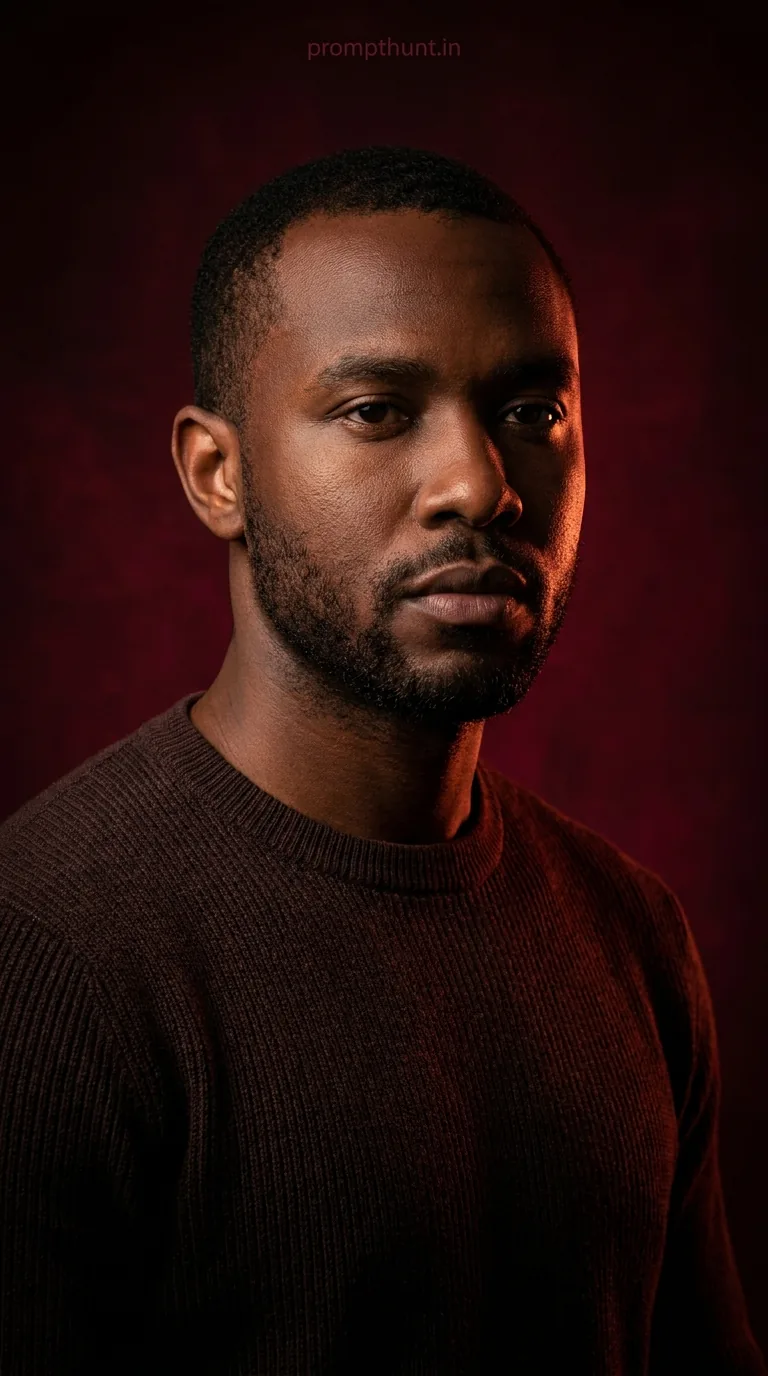




A Cinematic Dark Moody Portrait uses dramatic rim lighting, deep crimson backgrounds, and heavy shadow contrast to make any portrait look like a film character reveal. Upload your photo into Gemini, paste this prompt, and the AI rebuilds you in that brooding, high-fashion editorial style — same face, completely transformed atmosphere.
There's a specific kind of portrait that stops your thumb mid-scroll. No colour pop, no bright smile, no cheerful backdrop. Just shadow, a single slash of warm amber light cutting across a jaw, and an expression that says "I have seen things." That's the Cinematic Dark Moody Portrait — and right now, it's the most requested AI photo style on the internet. The good news is you don't need a Hollywood lighting rig or a film director on speed dial. You need Gemini, one decent selfie, and this prompt.
Upload your photo to Gemini first, then paste this prompt — it rebuilds your face in a dramatic, dark cinematic style with crimson lighting and deep shadow contrast, like a scene from a serious film.
What Exactly Is a Cinematic Dark Moody Portrait?
Think of every film poster where the protagonist looks like they've got a complicated backstory and excellent cheekbones. That's the aesthetic.
Technically, it's a portrait style built on three pillars. First, low-key lighting — most of the frame is dark, with light used surgically rather than generously. Second, a restricted colour palette — deep reds, maroons, near-blacks, and selective warm highlights only. Third, rim lighting — a thin, glowing edge of light tracing the silhouette, separating the subject from the background like a knife through velvet.
The style borrows from high-fashion editorial photography and cinematic cinematography. It's what you'd get if a Vogue shoot and a Christopher Nolan film had a very intense, well-lit child.
The 85mm lens aesthetic referenced in the prompt matters too. That focal length flatters faces — it compresses features slightly, reduces distortion, and produces that clean, professional "this person has a publicist" look. AI replicates it beautifully.
The Cinematic Dark Moody Portrait Prompt
This is the full prompt. Copy every word. Don't paraphrase it — AI is oddly literal and trimming even one instruction tends to cost you quality.
The uploaded photo is the master reference for this character. Preserve the exact facial features, face shape, skin tone, and identity from the uploaded image exactly. Place the subject in a cinematic dark moody portrait style with a deep crimson and near-black background gradient. Apply dramatic rim lighting with a warm amber-red glow tracing the right side of the face, jawline, and shoulders, creating a strong contrast against the dark background. The left side of the face should fall into deep shadow with soft, controlled falloff. The subject wears a dark brown ribbed crew-neck sweater with minimal styling. The overall colour palette is dominated by deep reds, maroons, and blacks with selective warm highlights. The mood is intense, brooding, and cinematic — like a high-fashion editorial or a film character reveal. The background is a textured, dark burgundy studio backdrop with subtle vignetting at the edges. The composition is a close-up portrait shot slightly below eye level, with the subject gazing slightly off-camera with a serious, contemplative expression. Studio portrait lighting setup, 85mm lens aesthetic, ultra-realistic cinematic quality. Vertical 9:13 composition. Add a small, thin, professional 'prompthunt.in' text watermark at the top center of the image. The watermark should be subtle, use a color that matches the image's color palette, and appear lightweight and elegant — not distracting.
How to Use This Prompt — Step by Step
This is where most people go wrong. They paste the prompt first, wonder why they got a random stranger looking brooding, and blame the AI. The prompt is face-dependent. Your photo has to go in first.
Step 1. Open Gemini (gemini.google.com) on your phone or browser. Make sure you're signed into your Google account.
Step 2. Upload your photo. Tap the image icon in the chat and select a clear, well-lit photo of your face — front-facing, good resolution, minimal filters. This is your master reference. Gemini reads it as "this is who we're working with." Everything else in the prompt changes the style, not the identity.
Step 3. Paste the full prompt above into the text box alongside your uploaded photo. Don't modify it yet — run the original first and see what you get.
Step 4. Generate and review. The AI will transform your photo into the cinematic style while preserving your face, skin tone, and features. If the likeness is slightly off, try a clearer reference photo — ideally one with your face fully visible, even lighting, and no heavy filters doing the AI's job for it.
Step 5. Regenerate if needed. Gemini gives you options. Run it two or three times and pick the strongest result. The rim lighting position and shadow depth vary slightly between generations, so give it a few shots. (Pun absolutely intended.)
Tips for Best Results With This Style
Nine times out of ten, output quality comes down to input photo quality. Here's what actually moves the needle.
Use a neutral-background photo as your reference. Complex backgrounds confuse the AI about where your face ends and the environment begins. Plain walls, soft lighting — boring photo, brilliant result.
Avoid heavily filtered selfies. If your reference photo already has a dramatic filter on it, the AI is trying to interpret two styles at once. Give it your actual face. Let the prompt do the drama.
Front-facing or slight angle works best. Extreme profile shots lose facial detail. A 3/4 angle is the sweet spot — it gives the AI enough information to reconstruct your features while keeping the cinematic composition natural.
Good resolution matters. A blurry or low-light photo gives the AI less to work with. The more detail it can read from your reference, the more accurate the identity preservation.
Don't trim the prompt. The specificity is load-bearing. "Rim lighting with a warm amber-red glow tracing the right side of the face, jawline, and shoulders" isn't decoration — it's an instruction set. Leave it intact.
Why This Style Is Everywhere Right Now in India
The dark moody portrait trend has been building globally, but it's hit particularly hard in India — and there are a few solid reasons for that.
Indian skin tones interact beautifully with warm amber-red rim lighting. The contrast between deep shadow and that glowing warm edge is especially dramatic and photogenic against warmer complexions. The results look genuinely cinematic in a way that feels native to the style, not forced.
There's also the Bollywood connection. High-drama lighting, intense expressions, and brooding character energy are basically a genre staple. The aesthetic resonates. People see the output and immediately read it as "film star" energy — because their visual vocabulary is already primed for exactly that look.
And practically speaking, Gemini is widely used and accessible in India, the style works in a single generation without complex editing skills, and the results are shareable enough to travel fast on Instagram and WhatsApp. That combination is basically a viral formula.
Honest Take — When Not to Use This Style
I reckon this is one of the strongest AI portrait prompts available right now. The output quality is high, the style is distinct, and when it lands, it really lands. But it's not for every situation — and pretending otherwise would make me no better than a brochure.
This style is intense. That's the point. But if you're generating a photo for a professional profile, a LinkedIn headshot, or anything that needs to communicate "approachable and friendly," this is not your prompt. You will look like you've just discovered a conspiracy and are about to deliver a monologue about it.
The dark, moody aesthetic also flattens detail in the shadow areas by design. If the left side of your face has a feature you particularly want preserved — a scar, a distinctive mark — it may disappear into the shadow. That's not a flaw, it's the style doing exactly what it's supposed to do. Just know it going in.
The sweater specification in the prompt is fixed. You'll come out in a dark brown ribbed crew-neck regardless of what you were wearing in your reference photo. For most people this is fine — it's a clean, minimal look that serves the mood. But if you had a specific wardrobe in mind, you'd need to modify that line of the prompt. Fair enough.
One more thing: don't use this for photos of children. The brooding intensity reads fine on adults. On kids it's just strange and slightly unsettling, like casting a toddler in a noir film. Nobody needs that.
For creative portraits, social media content, profile pictures, or just the satisfaction of seeing yourself rendered in dramatic cinematic light — this prompt is genuinely excellent. Use it for what it's good at.
The Verdict
The Cinematic Dark Moody Portrait prompt is one of those rare cases where the output actually matches the hype. Upload a clean reference photo, paste the prompt into Gemini, and in one generation you've got a portrait that looks like it belongs on a film poster or a magazine cover. The rim lighting, the deep shadow falloff, the crimson backdrop — it