Ceiling Fan Transition AI Prompt: Make the Outfit Change
By the PromptHunt team · Published · Updated · 7 copy-paste prompts
The ceiling fan transition is an AI video trend where a camera on the ceiling looks down at you lying under a spinning fan, and every time a blade sweeps past the lens your outfit changes. To make it, create one overhead photo with an image prompt, then animate it with a video prompt that lists each outfit in order.
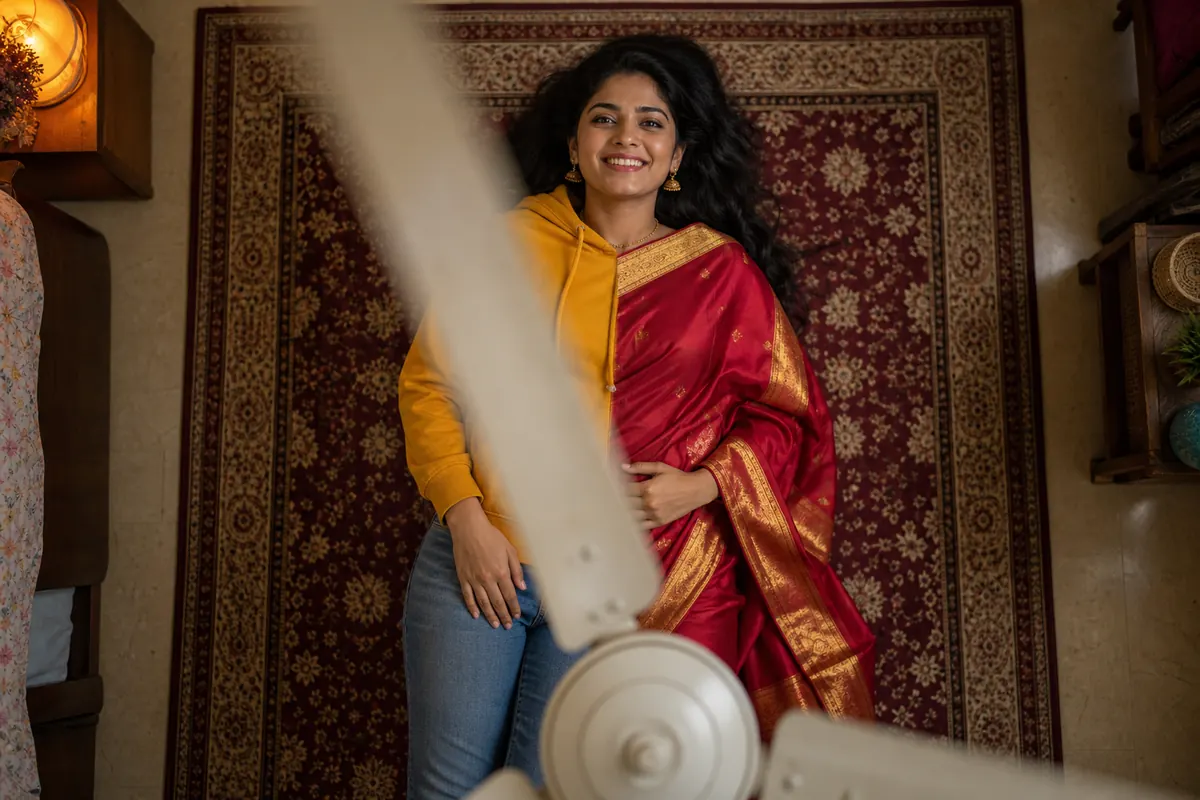
The whole trick in one frame: the blade covers the lens, and the outfit on the other side is already different.
Below you get the start-photo prompt, six ready video prompts written for Indian outfits, the prompt formula if you want to write your own, and a fixes table for when the blade timing goes sideways. It does, regularly. This trend has more spin than a cricket commentator.
The format took off on TikTok and Instagram Reels in September 2026. The camera sits flat on the ceiling, looking straight down. You lie on a rug. Someone switches the fan on, and each blade that crosses the lens acts as a wipe: when it clears, you are wearing something new.
It works because the blade hides the cut. Hindi film songs have been changing the heroine’s outfit every verse for decades; the fan does the same job in under a second and without a costume department. Most people do not film it for real. They make it with AI from a single selfie, which is the version this guide covers.
Please do not tape your phone to an actual ceiling fan. That is not a transition, that is a warranty claim.
What you need before you start
One clear photo of your face: front-facing, even light, no sunglasses. A plain selfie is fine (yes, even the one taken lying in bed; nobody needs to know).
An AI image editor for the start frame: ChatGPT or Gemini both accept a photo plus a prompt.
An image-to-video app that takes a start photo: Google Flow, Grok Imagine, Kling, Pixverse or Dreamina all do. Free limits change often, so check the app.
Three or four outfits in mind, ideally in colours that contrast with each other and with the rug.
Step 1: the start-photo prompt
Video models do far better when the first frame already has the overhead angle, the rug and the fan. So make that frame first. Upload your selfie to ChatGPT or Gemini and paste this:
Overhead start photo (works for anyone)
Change the grey T-shirt line if you want a different first outfit. Keep it simple; the glow-up comes later.
Use my uploaded photo as the face and identity reference. Create a photorealistic vertical 9:16 photo taken from a camera fixed on the ceiling, looking straight down. I am lying on my back on a patterned rug in a bedroom, arms relaxed, looking up at the camera with a soft smile. A plain white three-blade ceiling fan is in the foreground at the top of the frame, blades still. I am wearing a plain grey T-shirt and black track pants. Soft warm room light, natural skin texture, sharp focus on the face. Keep my face, hair, skin tone and body build exactly as in my photo. No text or watermark.
Check the face before moving on. If it does not look like you here, it will not look like you in the video either, so regenerate now while it is cheap.
Step 2: ceiling fan transition AI prompts for the outfit change
Upload the start photo to your video app, paste one of these, and set the clip to around 10 seconds in 9:16. Every prompt follows the same rules: the scene once, a fixed camera, the number of changes, one change per full blade pass, outfits named exactly, and a line that keeps your face.
1. Saree glow-up (for girls)
Hoodie to Banarasi silk to lehenga. The red-and-gold change reads well on a dark rug.
Animate this photo as a vertical 9:16 video, about 10 seconds long. One fixed camera on the ceiling looks straight down; it never moves, zooms or tilts. A plain white three-blade ceiling fan between the camera and the floor switches on and speeds up. The outfit changes 3 times. Each change happens only at the moment a fan blade fully covers the lens, one new look per blade pass, in this order: Look 1 (start): a mustard-yellow hoodie and blue jeans; Look 2: a white cotton kurti with an indigo block-print dupatta; Look 3: a red Banarasi silk saree with a wide gold border and gold jhumkas; Look 4: an emerald-green lehenga with mirror work and a maang tikka. The person stays in the same spot between changes, moving naturally and smiling at the camera. On the last look the fan slows down and she laughs in surprise. Keep the face, hair, skin tone and body build exactly the same in every look; only the clothes change. The fan, rug and room stay the same. No text, captions or watermark.
2. Men’s fit check
Lounge wear to a three-piece suit. Each look changes the colour of the whole torso, so every blade pass is obvious.
Animate this photo as a vertical 9:16 video, about 10 seconds long. One fixed camera on the ceiling looks straight down; it never moves, zooms or tilts. A plain white three-blade ceiling fan between the camera and the floor switches on and speeds up. The outfit changes 3 times. Each change happens only at the moment a fan blade fully covers the lens, one new look per blade pass, in this order: Look 1 (start): a plain white T-shirt and grey track pants; Look 2: a black leather biker jacket over the white T-shirt with dark blue jeans; Look 3: a black kurta with a maroon Nehru jacket; Look 4: a navy blue three-piece suit with a white shirt and no tie. The person stays in the same spot between changes, moving naturally and smiling at the camera. On the last look the fan slows down and he straightens his cuffs and raises one eyebrow at the camera. Keep the face, hair, skin tone and body build exactly the same in every look; only the clothes change. The fan, rug and room stay the same. No text, captions or watermark.
The men’s fit check, one frame per blade pass. Same pose, same face, only the clothes move.
3. Shaadi season, all five functions
One clip for the whole wedding: haldi, mehendi, sangeet and reception. Five looks need the full 10 seconds.
Animate this photo as a vertical 9:16 video, about 10 seconds long. One fixed camera on the ceiling looks straight down; it never moves, zooms or tilts. A plain white three-blade ceiling fan between the camera and the floor switches on and speeds up. The outfit changes 4 times. Each change happens only at the moment a fan blade fully covers the lens, one new look per blade pass, in this order: Look 1 (start): an oversized grey sweatshirt and pyjamas; Look 2: a bright haldi-yellow sharara set with gota trim; Look 3: a parrot-green anarkali with a pink dupatta for mehendi; Look 4: a silver sequinned saree for the sangeet; Look 5: a deep maroon velvet lehenga with heavy zari work for the reception. The person stays in the same spot between changes, moving naturally and smiling at the camera. After the last look the fan slows and she throws a small wave at the camera. Keep the face, hair, skin tone and body build exactly the same in every look; only the clothes change. The fan, rug and room stay the same. No text, captions or watermark.
4. Groom mode (for boys)
From hostel hoodie to ivory sherwani and a pink safa. The turban arriving on a blade pass is the bit people replay.
Animate this photo as a vertical 9:16 video, about 10 seconds long. One fixed camera on the ceiling looks straight down; it never moves, zooms or tilts. A plain white three-blade ceiling fan between the camera and the floor switches on and speeds up. The outfit changes 3 times. Each change happens only at the moment a fan blade fully covers the lens, one new look per blade pass, in this order: Look 1 (start): a faded black hoodie and grey joggers; Look 2: a haldi-yellow cotton kurta pyjama; Look 3: a black bandhgala with brass buttons; Look 4: an ivory sherwani with gold embroidery, a pink safa turban and a pearl necklace. The person stays in the same spot between changes, moving naturally and smiling at the camera. On the last look the fan slows and he gives a proud, slightly embarrassed grin. Keep the face, hair, skin tone and body build exactly the same in every look; only the clothes change. The fan, rug and room stay the same. No text, captions or watermark.
5. Diwali couple
Two people side by side, matching at every change. Upload a photo with both of you in it for the start frame.
Animate this photo as a vertical 9:16 video, about 10 seconds long. One fixed camera on the ceiling looks straight down; it never moves, zooms or tilts. Two people lie side by side on a cream rug with marigold petals and small lit diyas around its edges. A plain white three-blade ceiling fan between the camera and the floor switches on and speeds up. The outfit changes 3 times. Each change happens only at the moment a fan blade fully covers the lens, one new look per blade pass, in this order: Look 1 (start): both in matching grey cotton pyjama sets; Look 2: he in a white chikankari kurta, she in a yellow anarkali; Look 3: he in a maroon bandhgala, she in a maroon silk saree with a gold border; Look 4: he in an ivory sherwani with a gold stole, she in a gold-and-emerald lehenga. Both people stay in the same spot between changes, moving naturally and smiling at the camera. On the last look the fan slows, the diyas flicker, and they turn to laugh at each other. Keep both faces, hair, skin tones and body builds exactly the same in every look; only the clothes change. The fan, rug and room stay the same. No text, captions or watermark.
The final look of the Diwali couple prompt. Diyas around the rug give every frame a warm edge.
6. Retro Bollywood decades
A time-travel version: today, the 1970s, the 1980s and the 1990s. Works for boys and girls.
Animate this photo as a vertical 9:16 video, about 10 seconds long. One fixed camera on the ceiling looks straight down; it never moves, zooms or tilts. A plain white three-blade ceiling fan between the camera and the floor switches on and speeds up. The outfit changes 3 times. Each change happens only at the moment a fan blade fully covers the lens, one new look per blade pass, in this order: Look 1 (start): an oversized black T-shirt and cargo pants; Look 2: 1970s bell-bottom trousers and a wide-collar printed shirt; Look 3: a 1980s neon pink-and-blue tracksuit with a sweatband; Look 4: a 1990s oversized denim jacket, white vest and a red bandana. The person stays in the same spot between changes, moving naturally and smiling at the camera. On the last look the fan slows and they strike a dramatic hero pose with one hand on the chest. Keep the face, hair, skin tone and body build exactly the same in every look; only the clothes change. The fan, rug and room stay the same. No text, captions or watermark.
The fan transition prompt formula (write your own)
Rule of thumb: describe the room once, then spend your words on the clothes. Fill these slots in this order and most video apps will behave.
Slot
What to write
Format
Vertical 9:16, about 10 seconds.
Camera
One fixed camera on the ceiling looking straight down; never moves, zooms or tilts.
Scene
Who is lying where, on what rug. One sentence.
Trigger
A plain white three-blade fan switches on and speeds up.
Timing
The number of changes, and that each happens only when a blade fully covers the lens.
Looks
Look 1 (start), Look 2, Look 3… each with colour, fabric and garment.
Ending
What happens on the last look: fan slows, a laugh, a pose.
Lock
Keep the face, hair, skin tone and body build the same; only clothes change. No text.
Why your ceiling fan outfit change looks wrong (and the fix)
Nine times out of ten the problem is timing or contrast, not the app. Here is what usually breaks:
Problem
Fix
The outfit changes before the blade covers the lens
Keep “only at the moment a fan blade fully covers the lens” in the prompt, cut down to three or four looks, and regenerate. Timing is different on every run.
The face looks like someone else
Remake the start photo from a sharper, front-facing selfie. Side profiles, sunglasses and heavy filters give the model less to hold on to.
You can barely see the change
Contrast matters more than fashion. A cream sweater on a cream rug looks like no change at all; put dark outfits on a light rug and the other way round.
Wrong garment (a gown instead of a suit)
Name the actual clothes: colour, fabric, cut. “A navy three-piece suit with a white shirt” works; “a classy look” is a coin toss.
The camera drifts or zooms
Put the fixed-camera sentence first, as in the prompts above. If the app has a static or locked camera setting, switch it on.
The fan changes shape or wobbles
Describe one fan and keep it boring: “a plain white three-blade ceiling fan”. Fancy fans with lights grow extra blades.
Before you post it
Add the music in the app. Instagram, YouTube and TikTok all let you pick trending audio when posting, which beats baking a song into the file.
Switch on the AI label. Instagram, YouTube and TikTok ask creators to label realistic AI-made video. It costs nothing and keeps the post safe.
Only use faces that said yes. Your own, or a friend who agreed. Making someone change clothes on camera without asking is not a trend, it is a problem.
It is a short AI video, popular on Reels, TikTok and Shorts since September 2026, filmed from a camera looking straight down from the ceiling. A person lies on a rug under a spinning fan, and each time a blade sweeps past the lens their outfit changes.
Which app is best for the ceiling fan transition?
Any image-to-video tool that accepts a start photo and a text prompt can do it, such as Google Flow, Grok Imagine, Kling, Pixverse or Dreamina. Results differ from run to run, so try the same prompt in two apps and keep the one that holds your face best.
Can I make the ceiling fan outfit change from a normal selfie?
Yes. Step 1 turns an ordinary front-facing photo into the overhead start frame, so you never have to lie under a real fan. A clear, evenly lit photo without sunglasses gives the most accurate face.
How many outfit changes should I add?
Three or four changes fit comfortably in an 8 to 10 second clip. Five is the limit before blade passes start to blur together, and more than that usually means changes happen between blades.
Can I do the fan transition in ChatGPT or Gemini?
ChatGPT and Gemini can make the start photo in Step 1. The moving part needs a video model; Gemini can make short videos with Veo depending on your plan, otherwise use a separate image-to-video app.
Why does my outfit change before the blade passes?
Video models do not count blades precisely, so timing varies between runs. Keep the line saying each change happens only when a blade fully covers the lens, use no more than four changes, and regenerate.
That is the whole thing. One selfie, two prompts, and a ceiling fan that has finally earned its electricity bill.