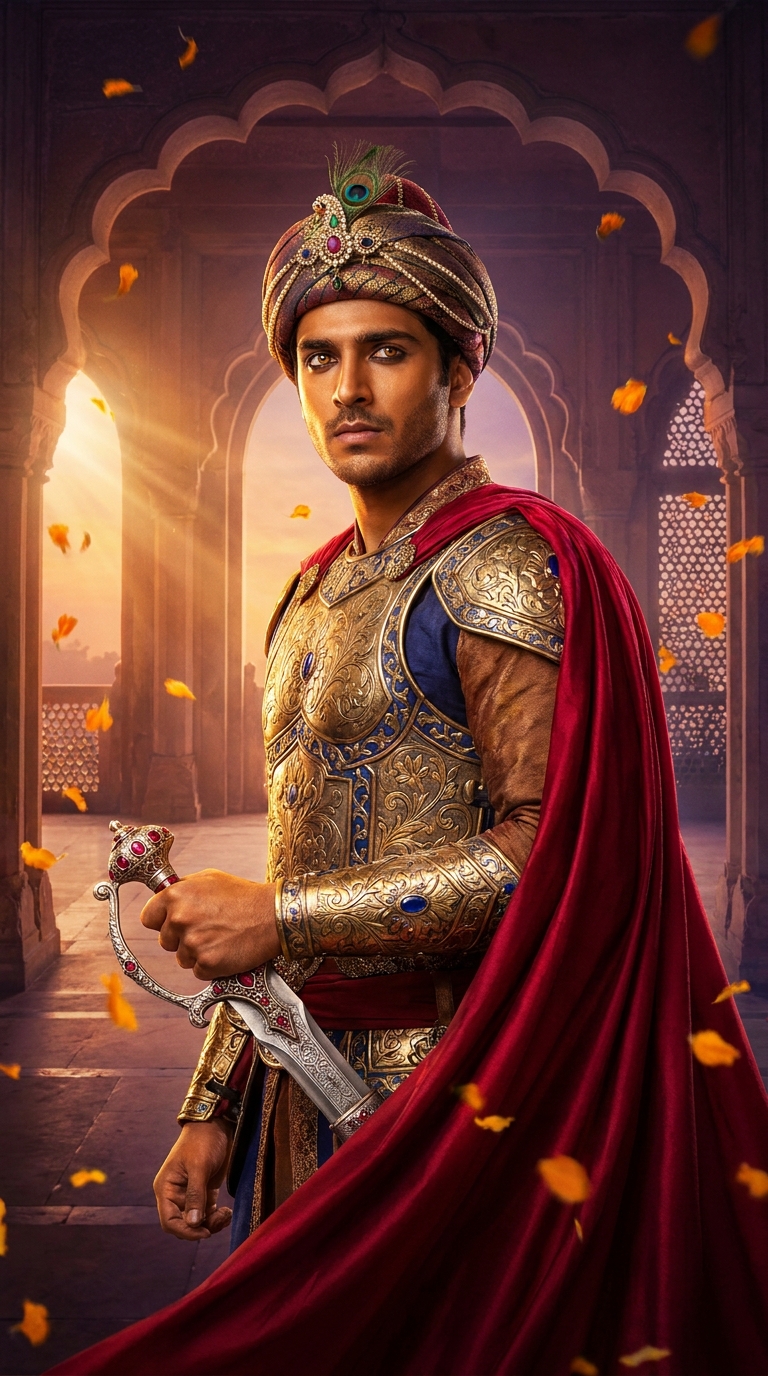
A Cinematic Fantasy Portrait prompt transforms an ordinary photo into a hyper-detailed, dramatically lit royal scene — think Mughal emperor meets IMAX blockbuster. This specific prompt places a young Indian man in hammered gold armor, jeweled turban, and a crimson cape against a golden-hour palace backdrop, using Gemini AI to generate 8K-quality fantasy portraiture in under two minutes.
Someone forwarded me this image last Tuesday and I genuinely thought it was a film still from a Rs. 400-crore Bollywood production. It was not. It was a bloke from Pune, a selfie from his bathroom, and a very well-written prompt fed into Gemini. That's the thing about a good Cinematic Fantasy Portrait — it doesn't just edit a photo. It rewrites the whole story of who you are. And apparently, in this story, you're a Mughal warrior prince with better cheekbones than anyone has a right to.
Paste this prompt into Gemini with a clear front-facing photo and it produces a hyper-realistic Mughal warrior portrait with cinematic lighting, gold armor, and the kind of dramatic energy that makes your LinkedIn headshot look like a cry for help.
What a Cinematic Fantasy Portrait Actually Is
A Cinematic Fantasy Portrait is exactly what it sounds like — a portrait styled like a frame from an epic film, not a snapshot from real life.
The key ingredients are dramatic lighting, a richly detailed costume or setting, and enough depth-of-field trickery to make the background look like a painting. When you add a specific historical or cultural aesthetic — in this case, Mughal royalty — you get something that feels genuinely cinematic rather than just "filtered."
The Mughal angle matters here. Mughal art was obsessive about detail. Hand-engraved metalwork, gemstone inlay, intricate jali lattice patterns — these weren't decorative choices, they were statements of power. This prompt borrows that visual language and runs it through an IMAX lens. The result sits somewhere between a history museum and a Marvel origin story. Which, honestly, is a fine place to be.
The Prompt That Started This
A strikingly handsome young Indian man in his mid-20s, transformed into a cinematic fantasy Mughal warrior prince, wearing an ornate royal armor made of hammered gold and deep sapphire blue gemstones, intricate hand-engraved breastplate with floral Mughal motifs, a rich crimson silk cape flowing dramatically behind him, a jeweled turban adorned with an emerald peacock feather brooch, kohl-lined intense dark eyes reflecting firelight, strong defined jawline, warm golden-brown skin glowing with cinematic rim lighting, holding an elaborately decorated silver sword with ruby-encrusted hilt, standing before a grand palace archway at golden hour dusk, soft bokeh of marigold petals floating in the air, warm amber and deep violet atmospheric haze, dramatic volumetric God rays piercing through ornate jali lattice windows, hyper-realistic skin texture, 8K ultra-detailed photography, cinematic color grading with deep shadows and luminous highlights, shot on IMAX lens, epic movie poster composition, 9:16 vertical aspect ratio
How to Use This Prompt — Three Steps, No Surprises
Step one: get your source photo right. Use a clear, well-lit front-facing image. Natural daylight works best. Avoid heavy shadows across the face, glasses, or anything that gives the AI an excuse to get confused. Nine times out of ten, a bad output traces back to a bad input photo — not the prompt.
Step two: open Gemini (the Google one, not the star sign) and upload your photo. Paste the full prompt in alongside it. Don't trim it. Every phrase in that prompt is doing a job — the "God rays," the "jali lattice windows," the "bokeh of marigold petals." Pull one thread and the whole tapestry gets a bit sad.
Step three: run it. If the first result isn't quite there, try regenerating before you start tweaking the prompt. Gemini sometimes needs a second attempt to nail the lighting balance between those deep shadows and luminous highlights. Two or three generations is normal. Twenty is a sign something is structurally wrong with your source image.
Tips for Getting the Best Result
Keep the face visible in your source photo. The AI needs your actual features to work with. A profile shot will produce a warrior, just not necessarily you — which is either a bug or a feature depending on your feelings about your side profile.
The 9:16 aspect ratio is specified in the prompt for a reason. It's portrait-native, built for phone screens, and it forces the composition to stack vertically — cape at the top, sword at the bottom, face dead centre. If your platform needs a square crop, generate at 9:16 first and crop afterwards. Don't change the ratio in the prompt itself or the palace archway composition falls apart.
Rule of thumb: if your skin tone is darker or lighter than the "warm golden-brown" described, add a small clarification line at the end of the prompt. Something like "subject has deep brown skin tones" or "subject has fair skin." Gemini is reasonably good at adapting, but giving it the explicit instruction saves you a generation or two.
The marigold bokeh detail is a small touch that does outsized work. Those floating petals ground the fantasy in a recognisably South Asian visual context. If you want to lean into a different cultural aesthetic — say, Rajput rather than Mughal — swap "floral Mughal motifs" for "geometric Rajput patterns" and "jeweled turban" for "saffron Rajput pagri." The rest of the prompt holds up fine.
Why This Is Everywhere in India Right Now
The Mughal warrior portrait took off in India specifically because it hits several things at once. There's a deep cultural pride angle — seeing yourself rendered as a figure from one of India's most visually opulent historical periods is genuinely moving for a lot of people. There's also the Bollywood connection. Films like Jodhaa Akbar and Padmaavat burned this aesthetic into the national visual memory. When the AI portrait echoes those production designs, it feels familiar and epic at the same time.
The 9:16 format is not a coincidence either. Instagram Reels and WhatsApp Stories run at 9:16. This style was built for social sharing, and it shows. The image lands in your feed looking like a film poster, which means people stop scrolling. That's the game.
There's also something to be said about timing. AI portrait tools have existed for a while, but the quality jump in the last twelve months — particularly in skin texture rendering and lighting physics — means results that once looked like a video game cutscene now look genuinely photographic. People are noticing the difference.
Honest Opinion — Including When Not to Use This
This prompt is excellent. I'll say that plainly. The combination of specific material textures (hammered gold, silk, ruby-encrusted hilt), precise lighting language (volumetric God rays, cinematic rim lighting), and a clear compositional instruction (epic movie poster composition) gives Gemini enough to work with that even a mediocre source photo produces something impressive.
But let me be straight about the limitations.
First, hands and swords. AI still struggles with the physics of someone holding an elaborate object naturally. The sword hilt often looks slightly off — fingers at odd angles, grip too loose or too rigid. It's rarely bad enough to ruin the image, but you'll notice it once I've said it. Sorry about that.
Second, this is a fantasy portrait. It is not a historical document. The "Mughal" aesthetic here is Hollywood-adjacent — more influenced by Bollywood costume design and Western fantasy art than by actual Mughal miniature painting. If you care deeply about historical accuracy, you will find details to object to. If you care about a stunning image that makes your mates text you asking what film you're in, you'll be delighted.
Third — and I say this with full awareness that it's rich coming from someone writing about AI photo editing — there's a version of this trend where everyone starts looking the same. The same armor, same lighting, same cape. When a prompt goes genuinely viral, AI outputs converge. The tip about swapping Mughal motifs for Rajput patterns isn't just a customisation trick. It's how you stay an individual rather than one of ten thousand warrior princes on Instagram who all look like they went to the same fictional royal academy.
Use this prompt as a starting point, not a final answer. The best results come from people who treat the prompt as a recipe — solid base, personal touches added to taste. The worst come from people who treat it as a vending machine. Put prompt in, get identity out. That's not how it works, and frankly, you deserve better than a vending machine version of yourself.
The Bottom Line
This is one of the best-constructed Cinematic Fantasy Portrait prompts floating around right now. The lighting language is precise, the cultural detail is rich, and the format is built for how people actually share images. Get a decent source photo, paste the full prompt, give it two or three generations, and you'll have something genuinely worth showing off. Adjust for your own skin tone, swap historical references if you want something more personal, and resist the urge to post the sword hand close-up.
You're a Mughal warrior prince now. Carry yourself accordingly — and maybe put the bathroom selfie in a frame for contrast.