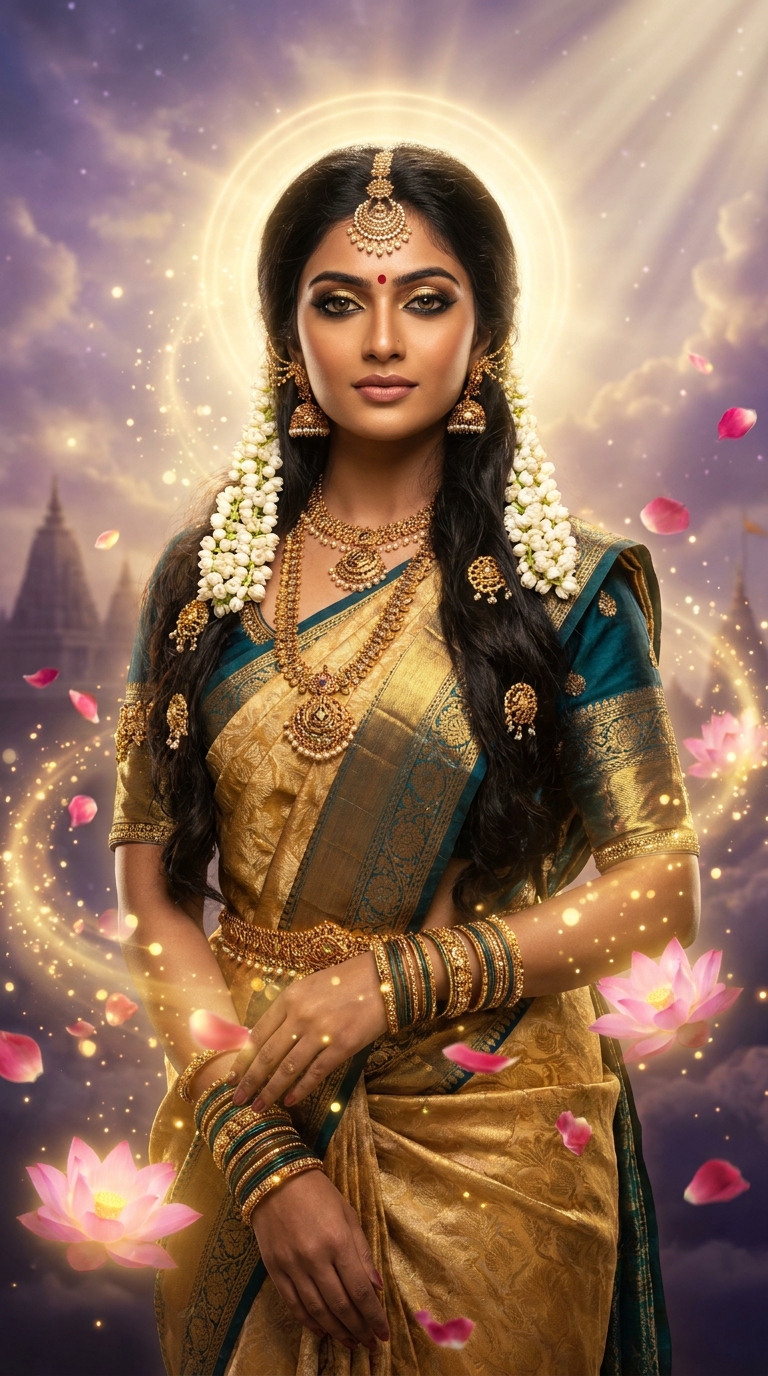
The Divine Indian Goddess Ethereal Glow prompt transforms a portrait photo into a hyper-realistic, celestially lit goddess image using Gemini AI. It combines traditional Indian bridal aesthetics — silk sarees, temple jewellery, jasmine flowers — with divine golden light, floating lotus blooms, and cinematic god rays for a mythological fantasy portrait that looks like it cost a film studio serious money.
There's a photo style doing serious numbers on Instagram right now, and it's not another moody black-and-white street shot. It's full-blown divine goddess energy — think Deepika Padukone meets the Mahabharata, but rendered in 4K with god rays that would make even Zeus a little jealous. The Ethereal Fantasy genre has always had a foothold in AI editing, but this particular take — rooted in Indian mythology, temple jewellery, and luminous golden light — has cracked something genuinely special. It's specific, it's cultural, and nine times out of ten, the results are jaw-dropping.
Drop this prompt into Gemini AI with a clean front-facing portrait, and you'll get a mythological goddess edit with traditional jewellery, divine golden lighting, and cinematic depth that looks like a Bollywood poster crossed with a Renaissance painting.
What the Ethereal Fantasy Goddess Style Actually Is
Ethereal Fantasy as a genre sits at the crossroads of portrait photography and digital mythology. It takes a real person and renders them as something slightly beyond human — luminous, divine, surrounded by elements that don't exist in your living room.
This specific Indian Goddess variant adds layers of cultural specificity that make it stand out from generic "glowy portrait" edits. The prompt pulls from classical iconography — the lotus, the maang tikka, the temple silhouette, the warm golden aura. These aren't random aesthetic choices. They're visual shorthand for divinity that anyone familiar with Indian art history will recognise immediately.
The result isn't a costume. It's closer to a devotional painting updated for the Instagram era. Hyper-realistic textures sit alongside genuinely magical elements. The jasmine flowers are botanically accurate. The god rays are cinematic. The kajal is sharp enough to cut glass. It's an edit that respects the source material while pushing it somewhere new.
And yes, "god rays" is the technical term. I didn't just make that up to sound dramatic. (I did make up being humble about it, though.)
The Prompt Itself — Copy It, Don't Paraphrase It
The wording here matters. Gemini AI responds to specificity. Vague prompts get vague results. This one is built to leave nothing to chance.
A breathtakingly beautiful young Indian woman transformed into an ethereal goddess deity, standing in a 9:16 vertical portrait, wearing an ornate gold and deep teal silk saree with intricate zari embroidery, adorned with heavy traditional temple jewelry including maang tikka, jhumka earrings, layered necklaces and bangles, her dark flowing hair decorated with fresh jasmine flowers and golden hair pins, surrounded by swirling divine golden light particles and glowing lotus flowers floating in the air, soft luminescent skin with a warm golden inner glow, eyes dramatically enhanced with deep kajal and shimmering golden eyeshadow with a bindi on forehead, background featuring a mystical celestial sky with soft purple and gold clouds, floating rose petals, and subtle temple architecture silhouette, god rays streaming from above, hyper-realistic photography style, cinematic lighting, ultra-detailed textures, 4K professional quality, magical atmosphere, divine aura radiating around the subject, shallow depth of field, shot on Sony A7R V with 85mm portrait lens
How to Use This Prompt — Three Steps, No Surprises
Getting the most out of this requires a bit of setup. Dump a blurry selfie in and expect a blurry goddess — rubbish in, rubbish out, as the saying goes.
Step one: pick the right source photo. You want a clean, well-lit front-facing portrait. Natural light is ideal. Neutral background helps the AI focus on the subject rather than trying to interpret a cluttered bedroom. The face should be clearly visible — no heavy filters, no extreme angles. Think passport photo quality, not artistic ambiguity.
Step two: open Gemini AI and upload your image. Paste the full prompt exactly as written. Don't paraphrase. Don't trim it. Every detail in that prompt is pulling weight — the Sony A7R V reference alone signals to the model that you want professional-grade photographic realism, not a painting or illustration.
Step three: review and regenerate if needed. First results are often excellent. But if the jewellery looks generic or the lighting feels flat, regenerate. Gemini handles variation well. The third or fourth output is usually the one worth saving.
Total time from upload to finished image: roughly four minutes. Faster than finding a parking spot at a wedding venue.
Tips for Best Results — Where Most People Go Wrong
Nine times out of ten, the edits that disappoint come down to three fixable mistakes.
Don't use group shots. The prompt is calibrated for a single subject. Multiple people confuse the AI's jewellery and lighting placement. One person, centred, fills the 9:16 frame beautifully.
Match the skin tone direction. The prompt specifies a "warm golden inner glow." This works across a wide range of skin tones, but if you want to adjust the colour temperature, add "cooler moonlit glow" or "deeper amber warmth" to the end of the prompt. Small additions steer the output without breaking the core composition.
The 85mm lens reference matters more than you'd think. Keeping that in the prompt tells Gemini to use shallow depth of field with subject compression — the background stays dreamy and soft while the subject stays sharp. Remove it and you risk a flatter, less cinematic result.
Rule of thumb: if the first output has the face right but the jewellery looks plastic, add "ultra-detailed hand-carved temple jewellery with deep metallic reflections" to the prompt on the next run. That usually sorts it.
Also — and I cannot stress this enough — save the prompt. You'll want it again next Diwali.
Why This Ethereal Fantasy Style Is Everywhere Right Now
The timing is not accidental. AI portrait editing has reached a quality threshold where the outputs are genuinely shareable — not "impressive for AI" shareable, but "did you hire a photographer" shareable. That tipping point changed behaviour fast.
In India specifically, this style lands because it bridges something that already has massive cultural resonance — the goddess aesthetic in fashion, bridal photography, and religious art — with the accessibility of a free AI tool. A professional shoot with this level of styling would run to tens of thousands of rupees. The prompt costs nothing but the time to find a decent source photo.
Navratri, Dussehra, Diwali, and wedding season create a recurring demand for exactly this kind of imagery. Creators who post during those windows are riding a cultural current, not just an algorithmic one. The hashtag ecosystem around this style — connecting Ethereal Fantasy, AI art, and Indian bridal aesthetics — is genuinely cross-platform. It's performing on Instagram Reels, Pinterest boards, and YouTube thumbnails simultaneously.
It's also, frankly, beautiful. And beautiful things get shared. Revolutionary insight, I know.
Honest Opinion — When Not to Use This
Right, here's where I earn my keep. This prompt is excellent. It's also not for every situation, and anyone telling you otherwise is selling something.
If you're using this for commercial purposes — brand campaigns, product placements, anything client-facing — check your platform's AI disclosure policies first. Several major social platforms now require labelling on AI-generated imagery. The edit is stunning; a hidden-ball legal issue is considerably less so.
The style is maximalist by design. Heavy jewellery, swirling particles, god rays, floating petals — it's a lot happening at once. For someone who prefers minimal, clean aesthetics, this will feel overwhelming regardless of how well the AI executes it. Know your audience before you post. Your minimalist architecture-loving followers might not share the goddess vision.
There's also a conversation worth having about cultural representation. This prompt draws on specific iconographic traditions — temple jewellery, the bindi, the lotus symbolism. When used by someone connected to that culture, it's celebratory. When used without that connection, it can drift into territory that feels extractive rather than appreciative. That's not a reason to avoid the style — it's a reason to use it thoughtfully.
And finally: the hyper-realistic approach means this prompt can occasionally produce results that look slightly too perfect — skin that's luminous to the point of looking airbrushed into a different species. If that happens, add "natural skin texture, subtle pores, realistic skin detail" to dial it back toward believable. Divinity is the goal. Plastic surgery billboard is not.
The prompt is a starting point, not a straitjacket. Treat it like a recipe — follow it closely the first time, then adjust once you understand why each ingredient is there.
The Verdict
The Divine Indian Goddess Ethereal Glow prompt is one of the better-constructed AI photo editing prompts in the Ethereal Fantasy category — specific enough to produce consistent results, flexible enough to adapt, and culturally