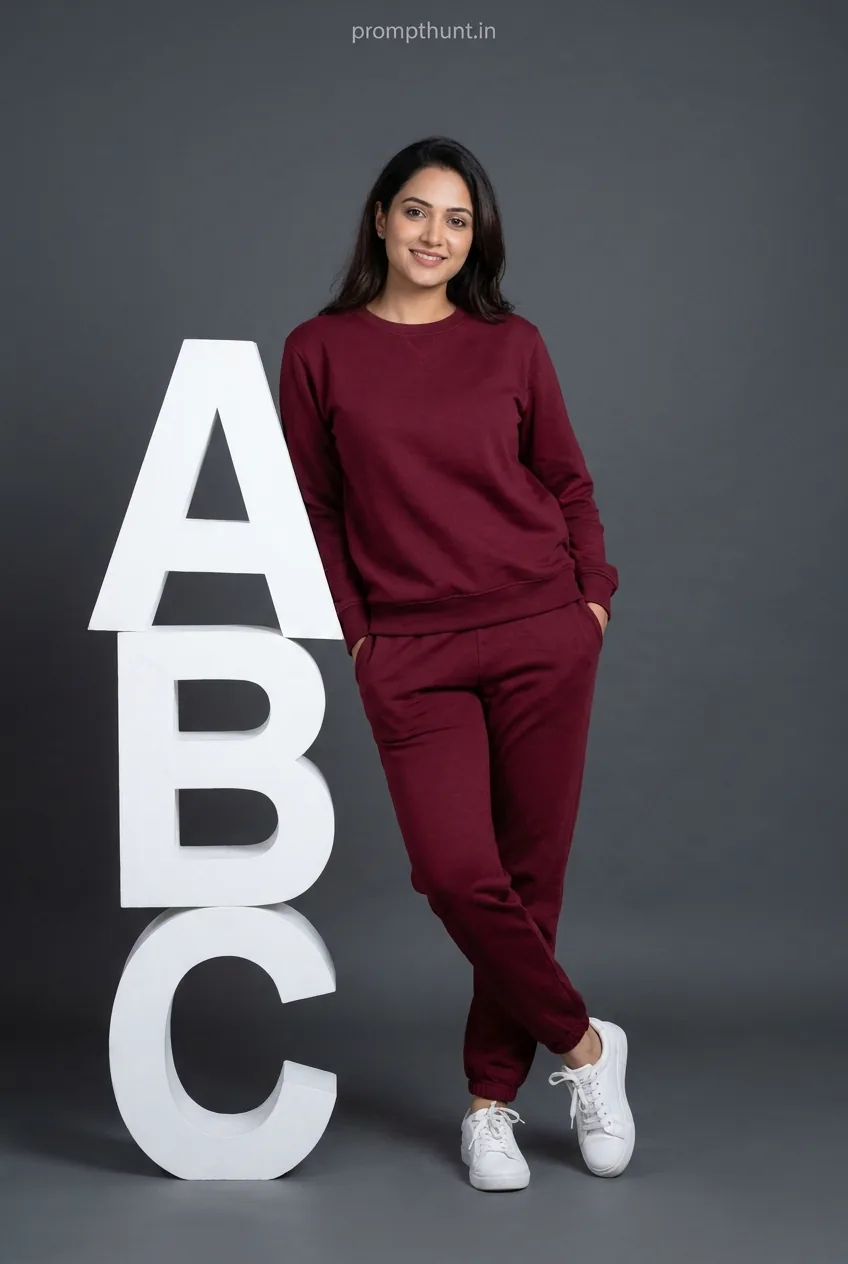




A Minimalist Athleisure Brand Campaign AI photo editing prompt transforms your uploaded photo into a clean, commercial-style fashion shoot — deep burgundy tracksuit, white sneakers, charcoal grey backdrop, soft studio lighting. Paste the prompt into Gemini after uploading your photo. The AI keeps your face and builds the entire campaign aesthetic around it.
You know that feeling when you scroll past a Zara or H&M lookbook and think, "I could be in that"? Well, now you actually can be — and you don't need a stylist, a DSLR, or a studio that smells faintly of cigarettes and ambition. The Minimalist Athleisure Brand Campaign style is one of those AI photo editing prompts that looks expensive and takes about forty-five seconds. That's a better ratio than most things in life.
Upload your photo to Gemini, paste the Minimalist Athleisure Brand Campaign prompt, and get back a full-body fashion campaign image with your exact face — deep maroon tracksuit, white sneakers, 3D block letters, the works.
What Exactly Is the Minimalist Athleisure Brand Campaign Style
Athleisure is the fashion world's admission that comfort won. We all knew it would.
The Minimalist Athleisure Brand Campaign aesthetic takes that comfort-first wardrobe — matching tracksuits, clean sneakers, relaxed silhouettes — and shoots it like a global brand has a budget riding on it. Think neutral studio backdrops, soft diffused lighting with no drama, one strong colour story, and a model who looks like they accidentally wandered in from a Sunday morning run but somehow ended up looking incredible.
This prompt nails all of it. Deep burgundy-wine tracksuit against a flat charcoal grey seamless backdrop. White lace-up sneakers for contrast. Big 3D white stacked letters to lean against casually — because nothing says "I'm a brand" like leaning on giant letters of your own brand. The composition is full-body, vertical, slightly left of centre. It is, in a word, clean.
It's the kind of image that costs real brands somewhere between sixty thousand and two lakh rupees to shoot. You're doing it for free in under a minute. (Don't tell the photographers. I mean — some of my best friends are photographers.)
The Prompt Itself
The uploaded photo is the master reference for this character. Preserve the exact facial features, face shape, skin tone, and identity from the uploaded image exactly. Place the character in a minimalist brand campaign photoshoot style. The subject wears a matching deep maroon/burgundy tracksuit set consisting of a relaxed crew-neck sweatshirt with long sleeves and matching jogger pants with a visible drawstring waistband. Complete the look with clean white lace-up sneakers. The character leans casually against large 3D white stacked block letters arranged vertically, with hands resting in pockets and one leg slightly crossed in front of the other in a relaxed pose. The background is a smooth, flat medium-tone charcoal grey seamless studio backdrop. Lighting is soft, even, and diffused studio lighting with no harsh shadows, creating a clean commercial photography aesthetic. The overall mood is confident, approachable, and modern. Color palette is dominated by deep burgundy/wine tones against neutral grey, with white accents from the shoes and 3D letters. Composition is a full-body vertical portrait shot with the subject centered slightly left of frame. The style is clean, professional, and e-commerce/fashion brand campaign ready. Add a small, thin, professional 'prompthunt.in' text watermark at the top center of the image. The watermark should be subtle, use a color that matches the image's color palette, and appear lightweight and elegant — not distracting.
How to Use This Prompt — Step by Step
This one has a rule. A non-negotiable, very important rule. The prompt starts with "The uploaded photo is the master reference." That means Gemini needs your photo first. Without it, you'll get a random generated person. With it, you'll get yourself in a brand campaign. Big difference.
Step 1. Open Google Gemini. Go to gemini.google.com — make sure you're signed into your Google account.
Step 2. Upload your photo. Click the image upload icon in the chat box and attach a clear, well-lit photo of yourself. Front-facing works best. The AI reads your face from this — treat it like the casting brief.
Step 3. Copy the full prompt above. Every word. Don't trim it, don't paraphrase it, don't get creative with it. The specificity is doing real work.
Step 4. Paste the prompt into the same message as your uploaded photo. Send it.
Step 5. Wait about fifteen to thirty seconds. Gemini will generate the image. If the first result is slightly off — maybe the face drifted or the lighting is a bit flat — try once more. Nine times out of ten, the second attempt lands better than the first.
Tips for Getting the Best Results
A rule of thumb: the better your input photo, the better your output image. Grainy, backlit selfies produce grainy, confused results. A clean, well-lit front-facing photo gives Gemini everything it needs to lock in your face properly.
A few things that genuinely help:
Use a photo where your full face is visible. No sunglasses, no partial profile, no hand blocking half your face. The AI needs the whole picture to preserve identity accurately.
Neutral expressions perform better than big grins. This is a campaign shoot, not a birthday photo. The prompt calls for "confident and approachable" — and that reads better from a relaxed, neutral face than from a wide smile.
Good lighting in your reference photo matters. Natural window light works great. Harsh overhead lighting or low indoor light makes the AI's job harder than it needs to be.
If the face drifts, regenerate once. Gemini sometimes wanders slightly on first pass. Don't rebuild the prompt — just hit generate again with the same inputs.
Vertical photos as reference images work best for this prompt since the output is a full-body vertical portrait. Portrait orientation in, portrait orientation out.
Why This Style Is Trending Hard in India Right Now
Two things happened at once. India's athleisure market exploded — everyone from homegrown startups to international brands is fighting for shelf space in the activewear category. And AI image generation got good enough that you can fake a forty-thousand-rupee studio shoot in a chat window.
Small clothing brands and solo creators noticed immediately. Why pay for a model, a photographer, a studio, and a post-production editor when Gemini can produce campaign-quality images in seconds? That's not cynicism — that's just maths.
On top of that, the burgundy-and-grey colour story this prompt uses is having a massive moment. It's showing up everywhere from Myntra campaigns to Instagram explore pages. It reads as premium without being loud about it. Very much the vibe people are chasing right now.
For personal use — LinkedIn, Instagram, digital resumes — this prompt produces images that look like you hired a proper photographer. Which is either inspiring or slightly terrifying, depending on which side of the camera you're usually on.
Honest Opinion — When This Works and When It Doesn't
Let's be straight about this.
This prompt is genuinely excellent for what it does. The colour palette is specific enough that the output is consistent. The scene description — 3D block letters, charcoal backdrop, diffused lighting — is detailed enough that Gemini has very little room to improvise badly. That specificity is why it works so reliably.
But there are real limits. AI face preservation is better than it was a year ago — significantly better. It is not, however, perfect. If your reference photo has tricky lighting, unusual angles, or heavy makeup that changes your features, the output face may drift. You'll still get a great image. It might just look like a confident cousin rather than you specifically.
For professional or commercial use — an actual brand campaign going on a billboard or a product page — I'd still recommend this as a concept proof or mood board, not a final deliverable. The resolution and fine-detail work that comes out of a proper studio shoot is still different. Not always better in every way, but different in ways that matter at large print sizes.
Also: don't use this to misrepresent yourself. That should go without saying, but here we are. Using your own face in a creative way is the whole point. Using someone else's face without their knowledge is a very different thing, and not what this tool is for.
For content creation, personal branding, Instagram posts, brand concept pitches, and general "I want to look like I hired a fashion photographer" energy? It's brilliant. Use it freely. It's one of the more satisfying prompts in this category because the output genuinely looks like something a real brand would post — not like someone asked a computer to draw a human and got back a nightmare.
The only thing it can't do is make you taller. We're working on it.
The Bottom Line
The Minimalist Athleisure Brand Campaign prompt is clean, specific, and produces results that look like they belong in an actual fashion lookbook — not like they were generated by something that still struggles with hands. Upload a good photo