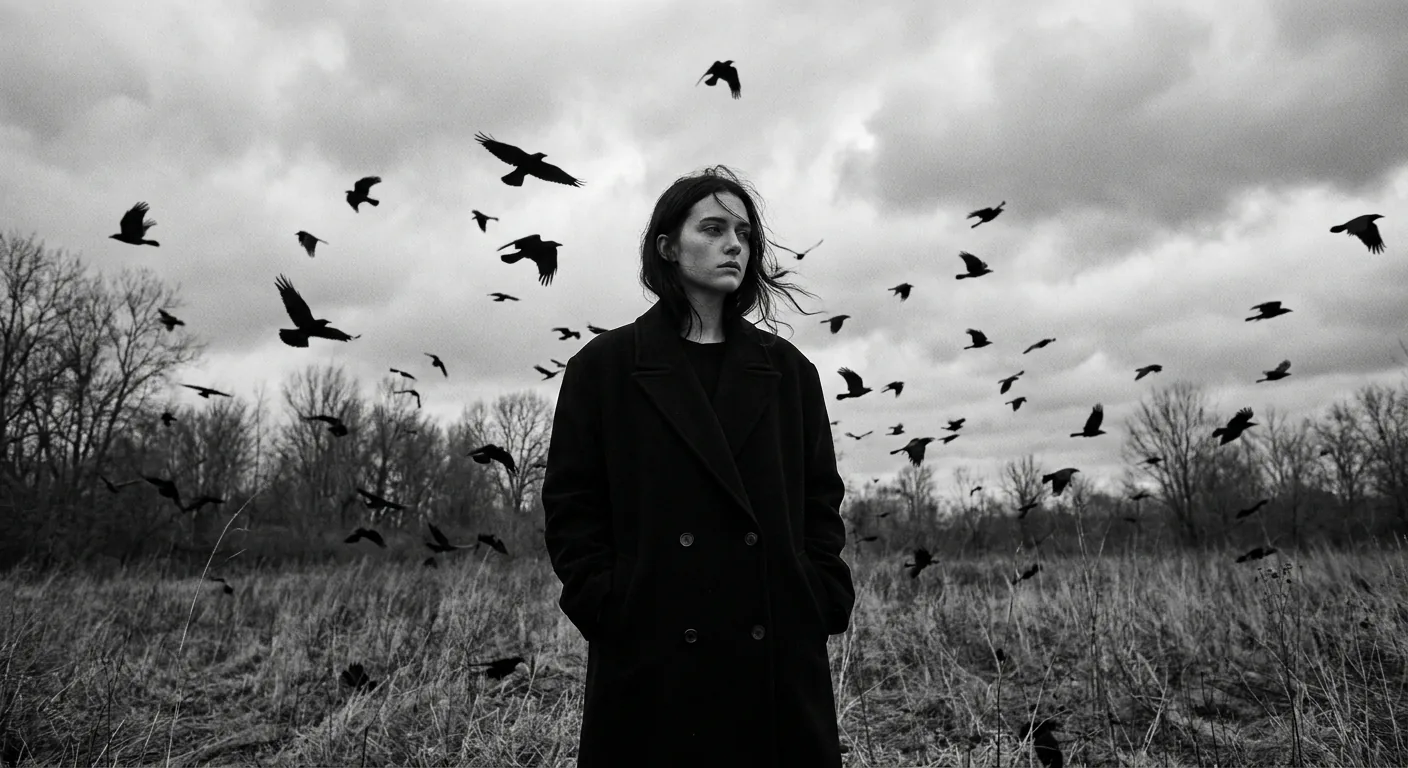




The Dark Gothic Crow Field AI photo prompt transforms your uploaded selfie into a cinematic black-and-white editorial portrait — you standing alone in a dead field, surrounded by swirling crows, draped in a long black overcoat, looking brooding and magnificent. Paste the prompt into Gemini after uploading your photo. The AI keeps your face exact and rewrites everything else.
Some people want AI photos that make them look like they're at a beach in Santorini. Fair enough. But some people — the good ones — want to look like they've seen things. Like they've walked through a storm, made a deal with a raven, and emerged on the other side with great cheekbones and existential dread. That's what this prompt delivers. Dark Gothic Romanticism as a Moody Editorial Portrait style, and it's currently doing numbers on Instagram and Pinterest feeds across the country.
Upload your photo to Gemini, paste this prompt, and get a cinematic black-and-white gothic portrait with crows, a dead field, and the kind of brooding energy that makes people ask "are you okay?" in the best possible way.
What Exactly Is Dark Gothic Romanticism as a Moody Editorial Portrait Style
Dark Gothic Romanticism isn't just "making things look dark." It's a specific visual language. Think nineteenth-century poetry if it had a camera. Isolation, nature in decay, the human figure as something both fragile and defiant against a brooding sky.
The Moody Editorial Portrait layer is what makes this feel magazine-worthy rather than just gloomy. Editorial photography has rules — strong composition, deliberate lighting, intentional wardrobe. This prompt combines both. You get the emotional weight of gothic imagery with the technical polish of a fashion shoot.
The crows are doing a lot of the heavy lifting here, visually speaking. Dozens of them, mid-flight, swirling dramatically. It's not subtle. It was never supposed to be subtle. Think less "casual Tuesday" and more "main character of a Tim Burton film who also studied philosophy." (I reckon that's the highest compliment I can give anyone.)
The black-and-white treatment with deep contrast and soft grey tones pulls everything together. Colour would ruin it. Colour would make it a Halloween photo. Monochrome makes it art.
The Dark Gothic Crow Field Prompt
The uploaded photo is the master reference for this character. Preserve the exact facial features, face shape, skin tone, and identity from the uploaded image exactly. Render the subject standing alone in an open field with dead grass and bare trees in the far background, surrounded by dozens of black crows in mid-flight swirling dramatically around them. The subject wears a long, oversized black wool overcoat reaching mid-calf, hands tucked into pockets, dark clothing underneath. Hair is dark, slightly windswept and loose. The subject gazes pensively to one side with a melancholic, introspective expression. The entire image is desaturated black and white with deep contrast, rich dark shadows, and soft diffused grey tones. The sky is filled with heavy overcast clouds, dramatic and brooding. Lighting is flat, natural, overcast daylight with no harsh shadows — cinematic and editorial in feel. Composition is a low-angle shot looking slightly upward, placing the subject as a commanding figure against the dramatic sky. The mood is gothic, melancholic, solitary, and poetic — evoking themes of isolation, mystery, and dark romanticism. Photorealistic, high-resolution editorial photography style, 35mm film aesthetic.
How to Use This Dark Gothic Romanticism Prompt in Gemini
This prompt only works when you upload your photo first. That opening line — "The uploaded photo is the master reference for this character" — is doing the critical work. Gemini reads your face from the image you upload and uses it as the anchor. The prompt changes the world around your face. Your face stays exactly as it is.
Here's how to do it, step by step. No surprises.
Step 1. Open Gemini at gemini.google.com. Make sure you're signed into your Google account.
Step 2. Upload your photo using the image attachment button. Use a clear, well-lit photo of your face — straight-on or slight angle works best. Avoid heavy filters on the source image. Gemini needs to see the real you, not the Valencia-filtered version of you.
Step 3. Copy the full prompt from the box above. Paste it into the message field alongside your uploaded image.
Step 4. Hit send and wait about 20–40 seconds. Gemini will generate the image with your face preserved and the entire gothic crow field scene built around you.
Step 5. If the first result isn't quite right, try regenerating once or twice. Gemini sometimes varies the crow placement and sky intensity between attempts. The second or third generation is often the strongest.
That's genuinely it. Five steps to looking like you're the protagonist of a very prestigious sad novel.
Tips for Getting the Best Results with This Moody Editorial Portrait Prompt
Nine times out of ten, results suffer because of the source photo, not the prompt. Here's what actually matters.
Use a photo with a clear face and visible shoulders. The AI needs to understand your head-to-shoulder proportion to place you convincingly in a standing full-length scene. A cropped face selfie works but a three-quarter body shot works better.
Neutral background in your source photo helps. A plain wall, a simple outdoor setting — anything that doesn't confuse Gemini about where your face ends and the background begins.
Don't wear heavy patterns in your source photo. The prompt replaces your outfit with the black overcoat anyway, but busy patterns in the source image can sometimes bleed into the final render in odd ways.
If your hair is light or blonde, add one line to the prompt. After "Hair is dark, slightly windswept and loose," add: "adapt subject's natural hair colour to suit the monochrome aesthetic." This helps Gemini handle the desaturation more gracefully instead of just forcing dark hair onto a face where it looks wrong.
Rule of thumb: if the face looks slightly off in the first result, regenerate before tweaking the prompt. Most face-preservation issues in Gemini resolve themselves on the second attempt.
Why This Dark Gothic Romanticism Aesthetic Is Trending Hard Right Now
India's AI photo editing community has always leaned toward bold, dramatic aesthetics. Royal portraits, warrior edits, mythological transformations — there's a long tradition of wanting images that feel larger than everyday life. Dark Gothic Romanticism fits neatly into that appetite, with a specifically global, editorial feel that crosses well onto international feeds.
The crow imagery specifically has strong cultural resonance. Crows in South Asian tradition carry weight — memory, ancestors, something between this world and whatever comes next. The prompt taps into that subconsciously without being overtly referential. It feels familiar and cinematic at the same time.
There's also the pure contrast value. India's most-shared AI portraits tend to be maximalist — lots of detail, lots of drama. This prompt delivers both in a single image. The swirling crows, the overcast sky, the commanding low-angle composition. It photographs beautifully as a screenshot and holds up at thumbnail size, which matters enormously for virality.
(Also, frankly, people are tired of looking happy in photos. There's a real market for "magnificent and complicated.")
Honest Opinion: When This Style Works and When It Really Doesn't
I'm not going to pretend this prompt is for everyone. It isn't.
If you're creating content for a brand that requires warmth, approachability, or colour — step away from the crows. Dark Gothic Romanticism as a Moody Editorial Portrait is a statement look. It says something specific about the subject's inner world, or at least implies they have one. That's brilliant for personal branding in creative fields — photography, writing, music, fashion, film. It works for artists who want their profile image to carry weight.
It is considerably less useful if you're a dentist trying to look friendly, or creating content for a children's education platform, or genuinely just want a nice photo for your mum's WhatsApp display picture. Your mum deserves colour.
The 35mm film aesthetic and flat overcast lighting also mean this prompt is intentionally low on surface glamour. There's no golden hour glow. No sparkle. The image earns its impact through mood and composition, not prettiness. Some people love that. Some people will look at their result and ask where the shimmer went. If you want shimmer, this isn't your prompt. If you want to look like you're contemplating something vast and unknowable in a field full of birds, you've come to the right place.
One more honest note: Gemini's face preservation is genuinely good but not always perfect on the first attempt. Skin tone, particularly for deeper complexions, sometimes needs a regeneration or two before the rendering honours the original faithfully. Don't panic. Try again before you change anything in the prompt.
You and Several Dozen Crows, Looking Magnificent
This prompt is one of the most dramatic things you can do with a selfie and a free AI tool. Dark Gothic Romanticism as a