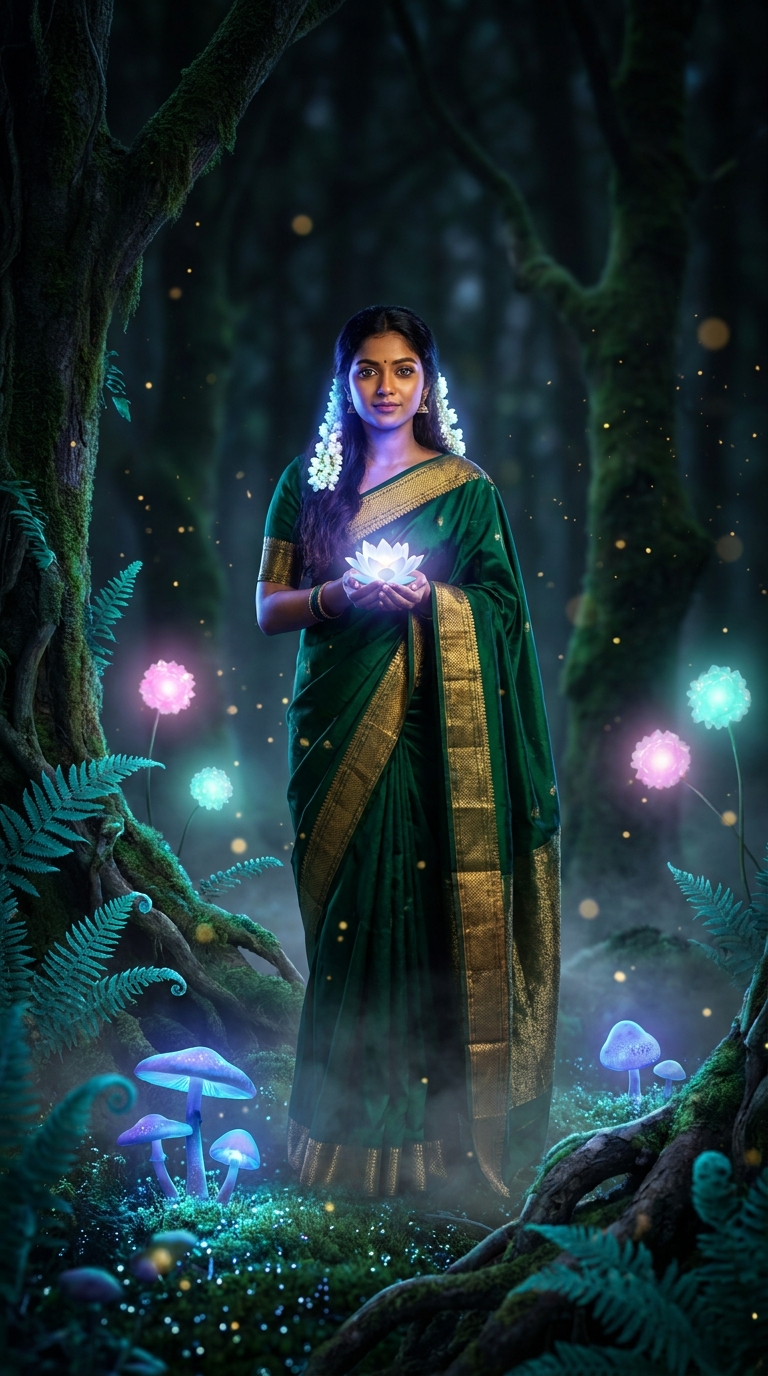
Bio-luminescent flora AI photo editing uses glowing plant life — mushrooms, ferns, flowers — to create a magical, otherworldly portrait effect. This Gemini AI prompt places a subject inside an enchanted midnight forest lit entirely by soft blue, violet, and teal bioluminescent light. The result looks like a cinematic film still crossed with a fantasy novel cover.
Glowing Bio-Luminescent Garden Beauty: The Gemini AI Photo Editing Prompt Everyone's Using
There's a photo trend sweeping Instagram reels, Pinterest boards, and WhatsApp forwards right now, and it involves glowing mushrooms, floating lotus flowers, and more ethereal blue light than a hospital waiting room. Bio-luminescent flora portrait editing has officially arrived — and if you haven't tried it yet, you're missing out on one of the most genuinely beautiful AI photo styles of the year. Stick around. This one's actually worth your time.
Paste this Gemini AI prompt with your portrait photo to generate a stunning bioluminescent forest scene with glowing flora, dramatic cool lighting, and cinematic 8K-quality results.
What Is Bio-Luminescent Flora Style, Exactly?
Bioluminescence is a real natural phenomenon. Certain deep-sea creatures, fungi, and rare plants produce their own cold light through chemical reactions. Nature does it. AI just turns the dial up to eleven.
In AI photo editing, bio-luminescent flora style recreates that effect across an entire forest environment. Every plant glows. Mushrooms pulse blue and violet. Ferns radiate teal. Flowers float and shimmer. The light source isn't the sun or a studio strobe — it's the plants themselves, wrapping your subject in a cool, fantastical glow that you genuinely cannot achieve with conventional photography.
The style sits somewhere between Avatar, a Bollywood fantasy sequence, and a perfume advertisement shot on another planet. High praise. Very accurate.
Gemini AI handles this style particularly well because it understands layered atmospheric lighting — the way cool bioluminescent blue bounces off warm skin tones, the contrast between deep dark forest backgrounds and radiant foreground detail. Nine times out of ten, it nails the skin illumination on the first try.
The Bio-Luminescent Flora Prompt
Here it is. Use this exactly as written for best results. Swap the subject description if needed — more on that below.
A stunning young Indian woman wearing a rich emerald green silk saree with intricate golden zari border, standing gracefully in a magical enchanted forest at midnight, surrounded by breathtaking bio-luminescent flora — glowing blue and violet mushrooms at her feet, luminous teal ferns curling around ancient tree roots, softly pulsing pink and aqua flowers floating in the air, shimmering golden pollen particles drifting like stardust. Her dark flowing hair is adorned with glowing white jasmine flowers that emit a soft ethereal light. Her skin has a warm golden-brown tone beautifully illuminated by the cool blue-violet bioluminescent glow reflecting from the surrounding plants. Her eyes are bright and expressive, wearing subtle kajal with a bindi on her forehead. She holds a delicate glowing lotus flower in her cupped hands radiating soft white-blue light. The forest floor is carpeted with luminous moss and tiny sparkling dewdrops. Mist floats at ankle level. Deep dark forest background with towering ancient trees. Cinematic photography style, ultra-realistic, 8K resolution, dramatic atmospheric lighting, bokeh background, 9:16 vertical portrait orientation, magazine cover quality.
How to Use This Prompt — Three Steps, No Surprises
Step one: Open Gemini. Head to gemini.google.com and make sure you're using Gemini Advanced or the image generation mode. Standard Gemini may not render the visual complexity this prompt demands. If your output looks like a crayon drawing, upgrade the tier. (We've all been there.)
Step two: Paste the prompt. Drop it in as-is first. See what comes back before you start tweaking. Gemini works best when you give it the full context upfront rather than building slowly. The specificity here — emerald green saree, golden zari border, teal ferns, ankle-level mist — is doing real work. Don't gut it.
Step three: Iterate on one element at a time. If the skin tone illumination feels off, ask Gemini to adjust "the bioluminescent light reflecting on her skin — warmer, less blue." If the forest background feels too sparse, add "denser ancient trees with glowing bark." Change one variable per generation. Changing five things at once is a recipe for chaos (and occasionally nightmare fuel).
Rule of thumb: the more specific your colour descriptions, the better the output. "Blue light" gets you something generic. "Cool blue-violet bioluminescent glow with soft aqua undertones" gets you a magazine cover.
Tips That Actually Make a Difference
Anchor the light sources. This prompt works because it tells Gemini exactly where the light comes from — the plants, the lotus, the jasmine. If you adapt this for a different scene, always specify your light sources. AI loves a clear brief. It's basically a very talented intern that way.
The 9:16 ratio matters. This prompt is built for vertical portrait format — Instagram stories, phone wallpapers, reel thumbnails. If you need a square or landscape version, add "1:1 ratio, centred composition" or "16:9 landscape, wide forest vista" at the end. Don't just crop the vertical output. The composition will suffer.
Contrast the warm and cool. The magic here is golden-brown warm skin tone against cool blue-violet bioluminescent light. That temperature contrast is why this looks so striking. If you're adapting the prompt for a different subject, keep that warm-cool tension. It's doing most of the visual heavy lifting.
Mist is your friend. The ankle-level mist detail sounds small. It isn't. That low ground fog adds depth, separates the subject from the forest floor, and makes the whole image feel cinematic rather than like a photo stuck in front of a background. Keep it in every version you make.
Bokeh in the background, detail in the foreground. This prompt requests bokeh — that soft blur behind the subject. It keeps the eye on the person, not the trees. If Gemini gives you too much sharp detail in the background, add "deep bokeh, f/1.4 aperture effect, subject in sharp focus."
Why This Trend Is Everywhere in India Right Now
Bio-luminescent flora portraits are having a serious moment across Indian social media — and the reasons make complete sense once you look at them.
First, the saree. The emerald green silk saree with golden zari border isn't just beautiful clothing — it's a visual anchor that grounds the fantasy in something culturally specific and genuinely elegant. The AI doesn't just generate "a woman in a forest." It generates a distinctly Indian scene, which resonates hard with the audience actually sharing these images.
Second, the colour palette works brilliantly with warm South Asian skin tones. Cool bioluminescent blue bouncing off golden-brown skin creates a contrast that looks genuinely cinematic. This isn't an accident. The prompt is engineered for it.
Third — and fair enough to say this plainly — it photographs like a film still. India has a deep relationship with cinematic visual language through Bollywood. A portrait that looks like it belongs in a fantasy film trailer lands differently here than it would elsewhere. It hits an existing cultural sweet spot with remarkable precision.
Creators are using it for everything: Diwali portraits, wedding photography inspiration, Instagram theme content, Kanjivaram saree showcases. The style is versatile enough to serve all of them.
Honest Opinion — and When Not to Use This
Right. Time for the straight talk portion of the evening.
This is one of the most visually impressive AI portrait styles I've seen this year. The layered lighting, the cultural specificity, the cinematic atmosphere — it genuinely works. The prompt is well-constructed, and Gemini handles it better than most tools would. If you want a striking social media image or a creative portrait concept, this absolutely delivers.
But here's when I'd tell you to skip it.
If you're using this for commercial work — product photography, brand campaigns, client portraits — the fantasy aesthetic may work against you. Bioluminescent forests are spectacular, but they don't say "trustworthy local business" or "professional headshot." Know your context.
Also, if everyone at the same wedding is using the exact same prompt, the results start to look identical. The prompt is public. That's the point of sharing it. But if you want something that feels personal, swap out the saree colour, change the flora palette, shift from blue-violet to amber-gold bioluminescence. Customise it or accept that your output will look like everyone else's. That's not a criticism — it's just the nature of shared prompts.
One more thing worth saying plainly: AI-generated portraits raise real questions about representation and consent. This prompt generates an image of a person — a realistic one. If you're using outputs commercially, be clear about the AI origin. Audiences increasingly notice and care. Transparency costs nothing and protects your credibility.
The style itself? Outstanding. Use it with your eyes open.
Final Thought
Bio-luminescent flora AI portraits are the real deal — culturally resonant, vis