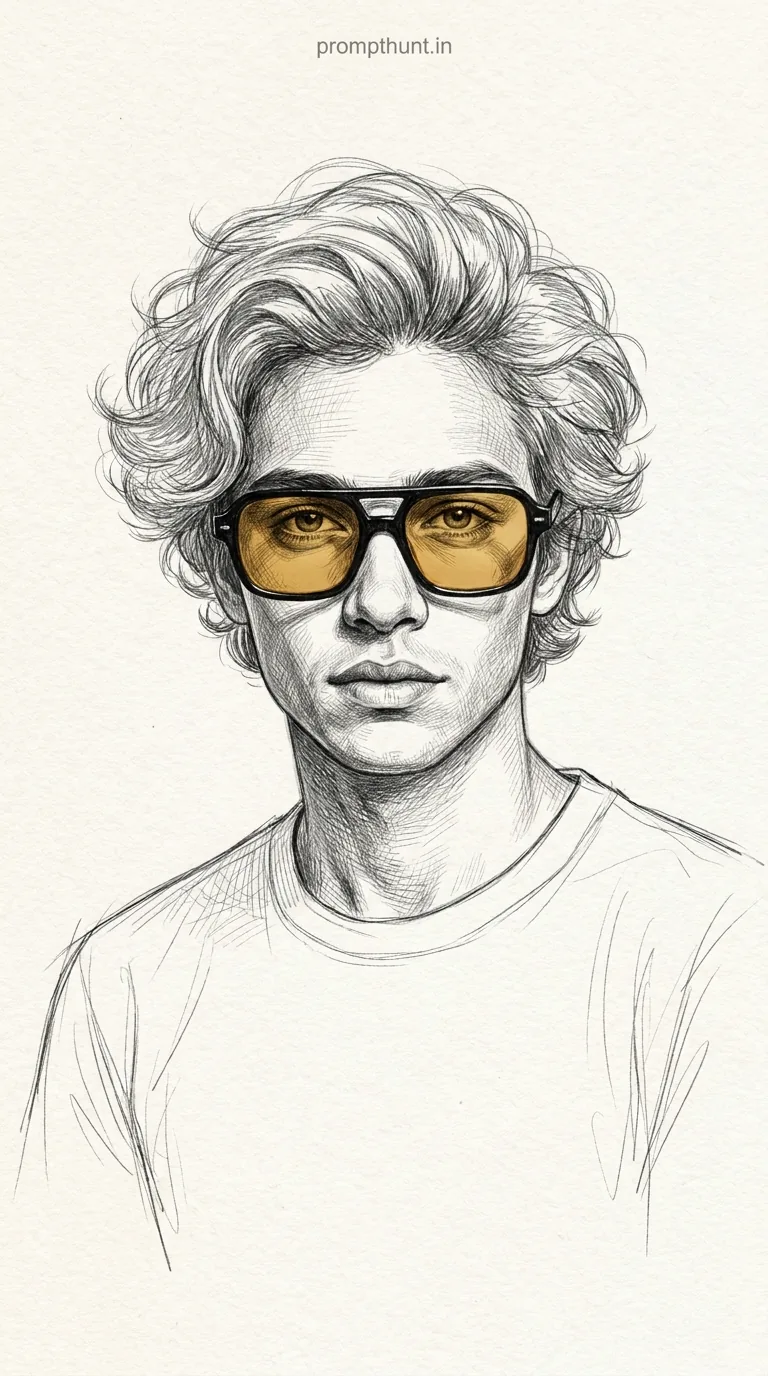




A Pencil Sketch Portrait with Selective Color Pop transforms your photo into a detailed graphite illustration — all grey tones and hatching — except for one bold element rendered in full colour. In this version, that element is a pair of amber-lensed retro sunglasses. Upload your photo to Gemini, paste the prompt, and the AI handles the rest.
There's a specific kind of cool that comes from a pencil sketch portrait. It looks like effort. Like someone sat down with a 2B and actually cared. Now imagine that same sketch — all grey and textured and fine-lined — and then one thing pops in full colour. A pair of bold, warm-lensed sunglasses sitting right on your face like they own the place. That's the Pencil Sketch Portrait with Selective Color Pop, and it's the kind of AI photo edit that makes people stop mid-scroll and ask, "Wait, how did you do that."
Upload your photo to Gemini, paste the prompt below, and you'll get a graphite sketch portrait of yourself where everything is black and white except a pair of amber-yellow tinted sunglasses — sharp, editorial, and genuinely impressive.
What Is a Pencil Sketch Portrait with Selective Color Pop
Selective colour is an old photography trick. Drain everything to greyscale, then bring one element back in full colour. It creates an immediate focal point. Your eye goes straight to it.
This prompt takes that idea and adds a whole layer of craft. The portrait isn't just desaturated — it's rebuilt as a pencil illustration. Fine hatching on the cheeks. Cross-hatching in the shadows. Loose gestural lines on the clothing that fade toward the edges, like the artist got bored halfway through (in a cool way, not a lazy way).
The single colour element here is a pair of retro square sunglasses with amber-yellow lenses. Black frames, warm golden tint, eyes visible through them. In a sketch full of graphite grey, those lenses hit like a spotlight. That's the whole trick. One colour. Maximum drama.
Rule of thumb: selective colour works best when the coloured element has a strong shape. Sunglasses are perfect — geometric, familiar, bold.
The Pencil Sketch Portrait with Selective Color Pop Prompt
This is the exact prompt. Copy it in full. Don't paraphrase it or try to simplify it — every line is doing a job.
The uploaded photo is the master reference for this character. Preserve the exact facial features, face shape, skin tone, and identity from the uploaded image exactly. Transform the portrait into a highly detailed pencil sketch illustration rendered in graphite on a clean off-white paper background. The entire image should be in black, white, and grey tones using fine hatching and cross-hatching techniques to create depth, shadow, and texture across the face, hair, neck, and clothing. The hair should have natural volume with loose pencil strokes suggesting movement. The clothing is a simple crew-neck t-shirt rendered loosely with gestural sketch lines that fade toward the edges, giving an unfinished artistic feel. The only element rendered in full color is a pair of bold black-framed retro square sunglasses with warm amber/golden-yellow tinted lenses — this selective color pop creates a striking focal point. The eyes should be visible and detailed through the tinted lenses. The overall mood is cool, artistic, and editorial — like a high-end fashion illustration meets fine art portrait sketch. Lighting is soft and even with subtle shadow depth. Background is minimal and clean white/cream paper texture. Vertical 9:13 composition. Add a small, thin, professional 'prompthunt.in' text watermark at the top center of the image. The watermark should be subtle, use a color that matches the image's color palette, and appear lightweight and elegant — not distracting.
How to Use This Prompt — Step by Step
This prompt works with Google Gemini. The first step is non-negotiable — the photo upload. Gemini uses your uploaded image as the face reference. Skip that step and you'll get a random face that looks nothing like you. Nobody wants that.
Step 1: Open Gemini and upload your photo. Go to gemini.google.com. Start a new chat. Click the image icon and upload a clear, well-lit photo of your face. Front-facing works best. The prompt literally begins with "The uploaded photo is the master reference" — that's not decoration, that's instruction.
Step 2: Paste the full prompt. Copy the entire prompt from the box above. Paste it into the same message as your photo. Don't split them across two messages.
Step 3: Send and wait. Gemini will process both the image and the prompt together. Give it a moment. It's doing a lot. (More than you do on most Monday mornings, fair enough.)
Step 4: Save and share. Download the result. Crop to taste if needed. Post it. Watch the comments come in.
Tips That Actually Make a Difference
Nine times out of ten, the results are better when the input photo is clean. Here's what actually helps.
Use a plain background in your source photo. Busy backgrounds confuse the sketch conversion. A wall, a plain door, anything simple.
Good lighting on your face is everything. Even, natural light. No harsh shadows. No backlight that makes you a silhouette. The sketch hatching builds on the tonal information in your face — give it something to work with.
Front-facing or slight three-quarter angle. Full profile shots work, but the sunglasses pop harder when you're facing forward. That's just geometry.
If the identity drifts, try again. Gemini isn't perfect every run. Sometimes it'll nail your likeness first try. Sometimes it needs a second attempt. Try re-uploading a different photo — slightly closer crop, better light — and run it again.
Don't resize or compress your photo before uploading. Full resolution gives the AI more facial detail to reference. Think of it like giving a portrait artist a good reference print versus a thumbnail. One of those ends well.
Why This Style Is Trending in India Right Now
India has a long tradition of hand-drawn portrait art — the kind you'd commission at a fair or find in illustrated magazines from the 1970s and 80s. There's cultural memory attached to pencil sketches. They feel like heirlooms.
This prompt taps into that nostalgia and then modernises it with the colour pop. The result looks like a fashion editorial from a premium magazine — the kind that costs too much at an airport. It reads as aspirational without being inaccessible.
On Instagram and Threads, the contrast between the greyscale sketch and those amber lenses creates a thumbnail that stops the scroll. The vertical 9:13 format is optimised for mobile — it fills a phone screen. That's not a coincidence.
There's also something specific about sunglasses as a cultural signifier. They carry attitude. In a sketch portrait, where everything else is understated and artistic, the glasses become the whole personality. One pair of amber frames and suddenly the portrait says: I know what I'm doing.
Honest Opinion — When to Use It and When to Skip It
This style is genuinely one of the stronger prompts doing the rounds right now. The pencil sketch conversion is detailed enough to be impressive, and the selective colour mechanic gives it a clear visual identity. It's not just "make my photo look like a drawing." It has a point of view.
That said — it's not for every use case. If you're using AI portraits for professional headshots, this isn't it. It's artistic, editorial, and deliberately sketch-like. The clothing is rendered as a loose, gestural t-shirt. That's great for a profile picture or a creative post. It's less great if you need to look like you work in a bank.
The selective colour trick also lives and dies by the sunglasses. If you don't like the retro square frames aesthetic, the whole concept falls flat for you personally. The prompt is written specifically around that one accessory — the amber lenses are the whole point. You can't really remove them and get the same effect. That's either perfect or a deal-breaker depending on your taste, and either answer is fair.
I'd also say: don't overpost this style. The reason it lands hard is because it's unexpected. Use it once for a standout post. If your entire feed becomes pencil sketches with yellow glasses, the effect dilutes quickly. Scarcity is part of the impact. Once you've used it, let it breathe.
One more honest note — Gemini's face preservation is good, not perfect. It handles most faces well, but occasionally the likeness drifts slightly on second or third generations. Use the result that looks most like you. Don't keep regenerating hoping for a better version that never comes. The first or second generation is usually the strongest.
One Pair of Glasses, Zero Grey Areas
The Pencil Sketch Portrait with Selective Color Pop is one of those prompts that looks complicated and runs simple. Upload your photo. Paste the prompt. Get a graphite portrait with amber sunglasses that looks like it belongs in a gallery, or at least on a very good Instagram grid. The whole thing takes under two minutes. The sketch took someone at art school three weeks. Don't tell them.